Question
In: Computer Science
Part 2: Approximating the Value of Pi Mathematical constant pi it most often to find the circumference...
Part 2: Approximating the Value of Pi
Mathematical constant pi it most often to find the circumference or the area of a circle. For simplicity, the value that is commonly used for pi is 3.14. However, pi is actually an irrational number, meaning that that it has an infinite, nonrepeating number of decimal digits. The value is
3.1415926535897932384626433832795028841971693993751058209749445923078164062…
In this lab, we will approximate the value of pi using a technique known as Monte Carlo Simulation. This means that we will use random numbers to simulate a “game of chance”. The result of this game will be an approximation for pi.
Setup
The game that we will use for this simulation is “darts”. We will “randomly” throw a number of darts at a specially configured dartboard. The set up for our board is shown below. In the figure, you can see that we have a round dartboard mounted on a square piece of wood. The dartboard has a radius of one unit. The piece of wood is exactly two units square so that the round board fits perfectly inside the square.
But how will this help us to approximate pi? Consider the area of the circular dartboard. It has a radius of one so its area is pi. The area of the square piece of wood is 4 (2 x 2). The ratio of the area of the circle to the area of the square is pi/4. If we throw a whole bunch of darts and let them randomly land on the square piece of wood, some will also land on the dartboard. The number of darts that land on the dartboard, divided by the number that we throw total, will be in the ratio described above (pi/4). Multiply by 4 and we have pi.
Throwing Darts
Now that we have our dartboard setup, we can throw darts. We will assume that we are good enough at throwing darts that we always hit the wood. However, sometimes the darts will hit the dartboard and sometimes they will miss.
In order to simulate throwing the darts, we can generate two random numbers between zero and one. The first will be the “x coordinate” of the dart and the second will be the “y coordinate”. However, we have a problem. The coordinates for the dartboard go from -1 to 1.
How can we turn a random number between 0 to 1 into a random number between -1 and 1? We know that random.random() will return a number between 0 and 1. We may obtain a number between -1 and 1by calculating random.random() *2 -1.
Activity 4: The program has been started for you. You need to fill in the part that will “throw the dart”. Once you know the x,y coordinate, have the turtle move to that location and make a dot. by using the dot() function of turtle. Note that the tail is already up so it will not leave a line.
import turtle
import math
import random
wn = turtle.Screen()
wn.setworldcoordinates(-1,-1,1,1)
fred = turtle.Turtle()
fred.up()
numdarts = 50
for i in range(numdarts):
randx = random.random()
randy = random.random()
x =
y =
wn.exitonclick()
Counting Darts
We already know the total number of darts being thrown. The variable numdarts keeps this for us. What we need to figure out is how many darts land in the circle? Since the circle is centered at (0,0) and it has a radius of 1, the question is really simply a matter of checking to see whether the dart has landed within 1 unit of the center. Luckily, there is a turtle method called distance that will return the distance from the turtle to any other position. It needs the x,y for the other position.
For example, fred.distance(0,0) would return the distance from fred’s current position to position (0,0), the center of the circle.
Now we simply need to use this method in a conditional to ask whether fred is within 1 unit from the center. If so, color the dart red, otherwise, color it blue. Also, if we find that it is in the circle, count it. Create an accumulator variable, call it insideCount, initialize it to zero, and then increment it when necessary. Remember that the increment is a form of the accumulator pattern using reassignment.
The Value of Pi
After the loop has completed and visualization has been drawn, we still need to actually compute pi and print it. Use the relationship insideCount/numdarts *4, why?
Run your program with larger values of numdarts to see if the approximation gets better. If you want to speed things up for large values of numdarts, like 1000, set the tracer to be 100 using wn.tracer(100).
NB: The language is Python.
Solutions
Expert Solution
Here is the completed code for this problem. Comments are included, go through it, learn how things work and let me know if you have any doubts or if you need anything to change. If you are satisfied with the solution, please rate the answer. Thanks
Note: Please maintain proper code spacing (indentation), just copy the code part and paste it in your compiler/IDE directly, no modifications required.
#code
import turtle
import math

import random

wn = turtle.Screen()
wn.tracer(100)

wn.setworldcoordinates(-1,-1,1,1)

fred = turtle.Turtle()
fred.up()
fred.speed(0)
fred.goto(0,0)


numdarts = 1000
insideCount=0 #number of dots inside

for i in range(numdarts):
    randx = random.random()
    randy = random.random()
    #adjusting randx and randy to be within -1,1 range
    x =randx*2 -1
    y =randy*2-1
    #moving turtle to above coordinates
    fred.goto(x, y)
    #finding distance from center coordinate
    dist_from_center=fred.distance(0,0)
    #if this distance is less than or equal to 1, it means that the dot is
    #inside circle,else not
    if dist_from_center<=1:
        #updating insideCount
        insideCount+=1
        #using red color
        fred.pencolor('red')
    else:
        #using blue color
        fred.pencolor('blue')
    #drawing the dot
    fred.dot()

#finding the value of pi by dividing insideCount by numDarts and multiplying by 4
pi=(insideCount/numdarts) * 4
#displaying this value to the console.
print('Estimated value for PI is',pi)
wn.exitonclick()
#output when numdarts=1000
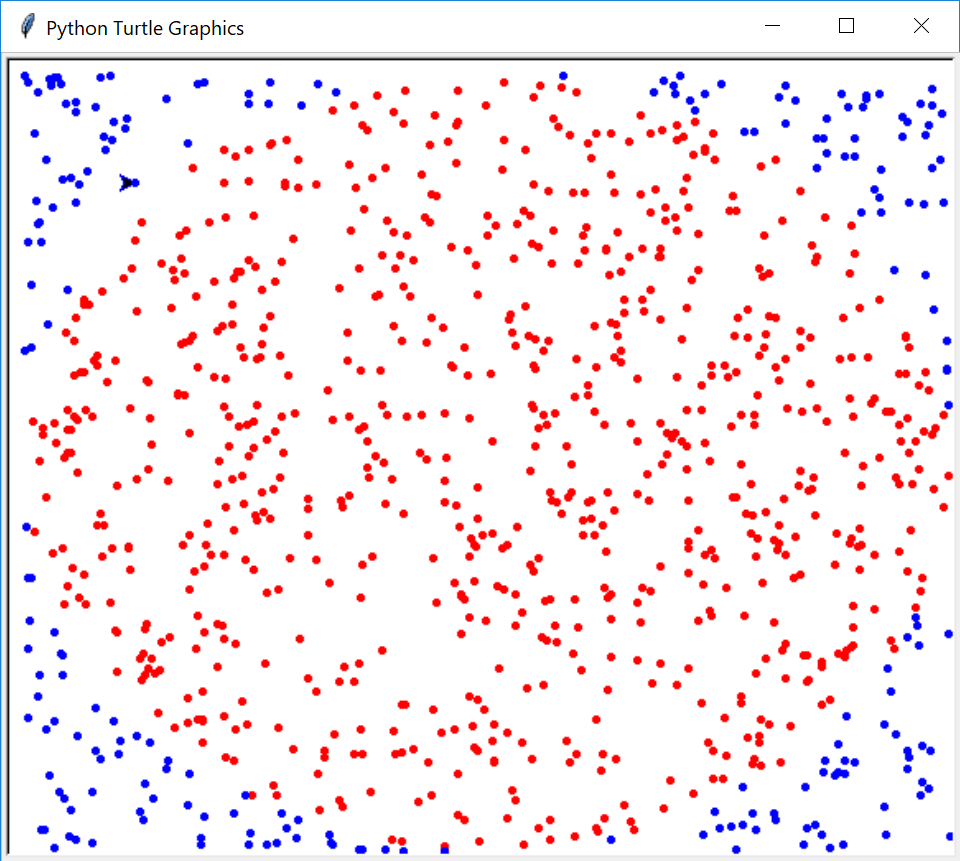
#output when numdarts=10000
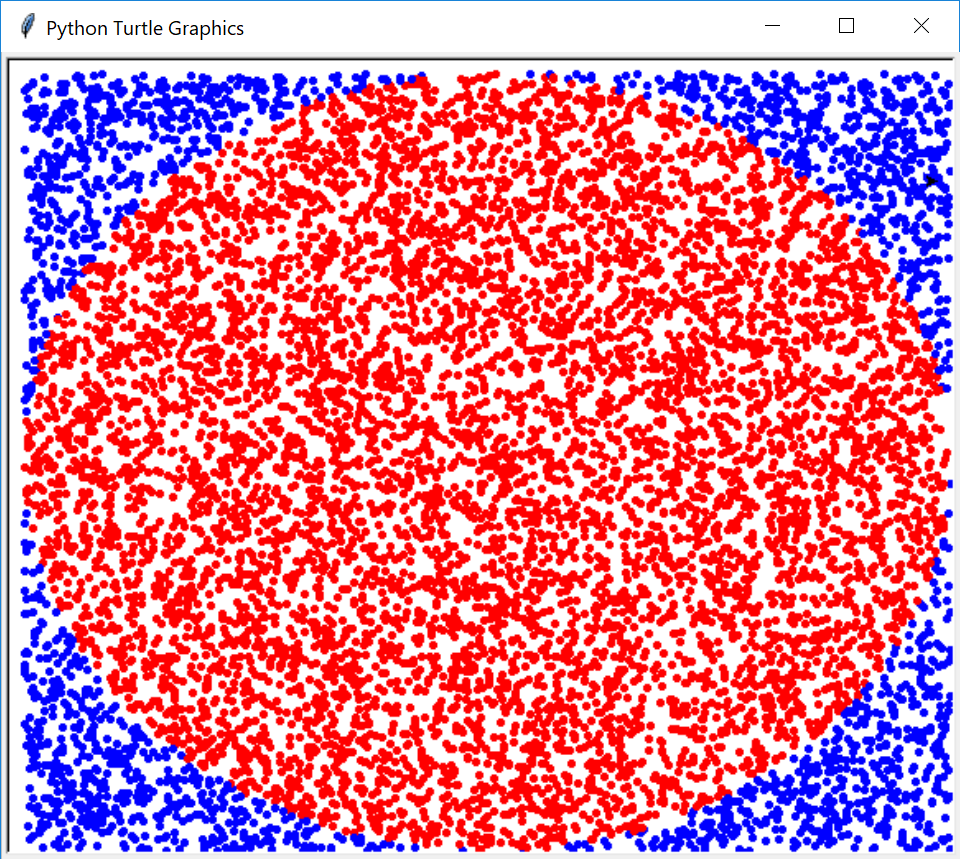
 venereology answered 2 months ago
Related Solutions
a) Give the mathematical equilibrium constant expression Kc and Kp (not the value!) for the reaction...
1. Create a symbolic constant called PI in two different manners. For both, the value that...
In statistics, the mode of a set of values is the value that occurs most often...
\(\int_{0}^{\pi}e^xsinx dx\) with n=6 subdivisions 1) Find the exact value of the integral 2) Approximate...
\(\int_{0}^{\pi}e^xsinx dx\) with n=6 subdivisions 1) Find the exact value of the integral 2) Approximate...
Submit a c++ file: 2. Write a program that defines the named constant PI, const double...
Find the real Fourier series of the piece-wise continuous periodic function f(x)=1+x+x^2 -pi<x<pi
Common stock valuelong dash—Constant growth Use the constant-growth model (Gordon model) to find the value of...
2. Find the value of ? in the following cases: a. ?(−? ≤ ? ≤ ?)...
Part A. Find the horizontal and vertical asymptotes of ?(?)= (6x^2) / (7(x^2 + 8)) Part...
- On January 1, 2018, bonds with a face value of $ 79,000 were sold. The bonds...
- How do I make this sort in true alphabetical order instead of ascii(ABCabc) order? I am...
- As a healthcare provider in physical therapy, athletic training, or as an exercise scientist and personal...
- in the market for makeup artists, what happens after the invention of high-definition tv allowing viewers...
- 10. What are the three monetary policy tools of the Fed? Briefly describe how each tool...
- In what ways would the role of a manager working in a nonstandard international assignment arrangement...
- Write a Bash script called move that could replace the UNIX command mv. 'move' tries to...