Question
In: Computer Science
Use Matlab GUIDE to create a program with graphic user interfac(GUI). The program is designed to...
Use Matlab GUIDE to create a program with graphic user interfac(GUI). The program is designed to convert the temperature from Celsius to Fahrenheit and the opposite.
(Hint: use radio button)
Solutions
Expert Solution
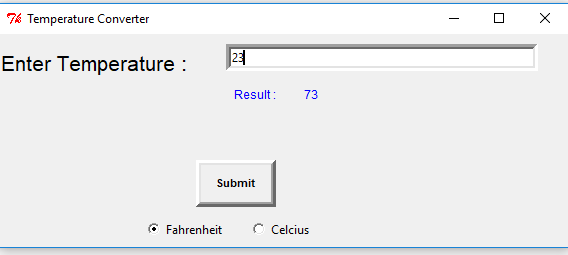
# Hi i have solve this question using radio button if you have any query feel free to ask
# I have attach image file go through it
# Temperature Converter Program
from Tkinter import*
def submit():
entTemp = 0
entTemp = fahEntry.get()
Fahrenheit = 0
if var.get() == 1:
Fahrenheit = (int(entTemp) * 9/5) + 32
lalresult.set(Fahrenheit);
else:
fahToCel = (int(entTemp) - 32) * 5/9
lalresult.set(fahToCel);
# Program Starts from Here
root = Tk()
root.title("Temperature Converter")
mainframe = Frame(root)
mainframe.grid()
var = IntVar()
celTempVar = IntVar()
celTempVar.set(int(0))
fahTempVar = IntVar()
fahTempVar.set(int(0))
var.set(1)
lalresult = IntVar()
celLabel = Label (mainframe, text = "Enter Temperature : ", font
= ("Arial", 16), fg = "black")
celLabel.grid(row = 2, column = 0, pady = 15, sticky = NW)
celLabelresultLbl = Label (mainframe, text = "Result : ", font =
("Arial",9) ,fg = "blue")
celLabelresultLbl.grid(row = 2, column = 1, pady = 50, padx = 35 ,
sticky = NW)
celLabel1 = Label (mainframe, text = "Result : ", font =
("Arial",9), textvariable = lalresult ,fg = "blue")
celLabel1.grid(row = 2, column = 1, pady = 50, padx = 105 , sticky
= NW)
fahEntry = Entry (mainframe, width = 50, bd = 5, textvariable =
fahTempVar)
fahEntry.grid(row = 2, column = 1, pady = 10, sticky = NW, padx =
30 )
radioButton = Radiobutton(root, text="Fahrenheit", variable = var ,
value=1 )
radioButton1 = Radiobutton(root, text="Celcius" , variable = var ,
value=2)
radioButton.grid(row = 1, pady = 5, sticky = NW, padx = 145 )
radioButton1.grid(row = 1, pady = 5, sticky = NW, padx = 250 )
submitButton = Button (mainframe, text = "Submit", font =
("Arial", 8, "bold"), relief = RAISED, bd=5, justify = CENTER,
highlightbackground = "red", overrelief = GROOVE, activebackground
= "green", activeforeground="blue", command = submit )
submitButton.grid(row = 5, column = 1,ipady = 8, ipadx = 12, pady =
5, sticky = NW)
root.mainloop()
# Output
 venereology answered 2 months ago
Related Solutions
The purpose of this problem is to use graphic user interface (GUI) to interactively store grades...
Create in java an interactive GUI application program that will prompt the user to use one...
Use the below info to create a java program A GUI interface to ensure a user...
modify the code below to create a GUI program that accepts a String from the user...
USE MATLAB Write a program in Matlab that would continuously ask the user for an input...
Create a simple Graphical User Interface (GUI): Create new JFrameForm and use the Palette to drag...
Create a matlab program that calculates equivalent cpacitance and charge by asking the user whether the...
Using matlab: Build a graphical user interface (GUI) the will read the two corners of a...
Create a GUI matlab code that computes for the position, velocity, and acceleration of the equation...
Create a java Swing GUI application that presents the user with a “fortune”. Create a java...
- An Auditor may decide to make use of a specialist in obtaining sufficient appropriate audit evidence...
- Dirac's Theorem states that "A simple graph with n vertices (n >= 3) is Hamiltonian if...
- Two 10-cm-diameter charged rings face each other, 15cm apart. The left ring is charged to -29nC...
- Under what conditions would it be possible for an excise tax to have no efficiency cost...
- explain the difference between activities and financial statements of service businesses and merchandising businesses.
- 2. Compare and compare the matrix multiplication algorithm and the Floyd-Warshall algorithm to find all pairs...
- Q: 50.00 ml of 0.5216 M copper(II) nitrate solution is combined with 100.0 ml of 0.5580...