Question

In: Computer Science

Using SQL 1. Create a table (Passenger) based on the specifications below: Field Name Type/Length PassID...

Using SQL

1. Create a table (Passenger) based on the specifications below: Field Name Type/Length

PassID text 5 fixed (Primary Key)

PassLName text 25 variable

PassFName text 20 variable

PassAge numeric Maint_DT date

2. Add the 5 records below using the INSERT command. For the Maint_DT attribute use the following Access function “Date()”.

PassID PassLName PassFName PassAge

00001 Morris Lucy 50

00002 Smith Trudy 61

00003 Collins Harry 32

00004 Dean Mark 27

00005 Hunter Alan 12

3. Select all passengers sorted from oldest to youngest.

4. Select PassID, PassLName, and Maint_DT for all records.

Solutions

Expert Solution

Answer ::
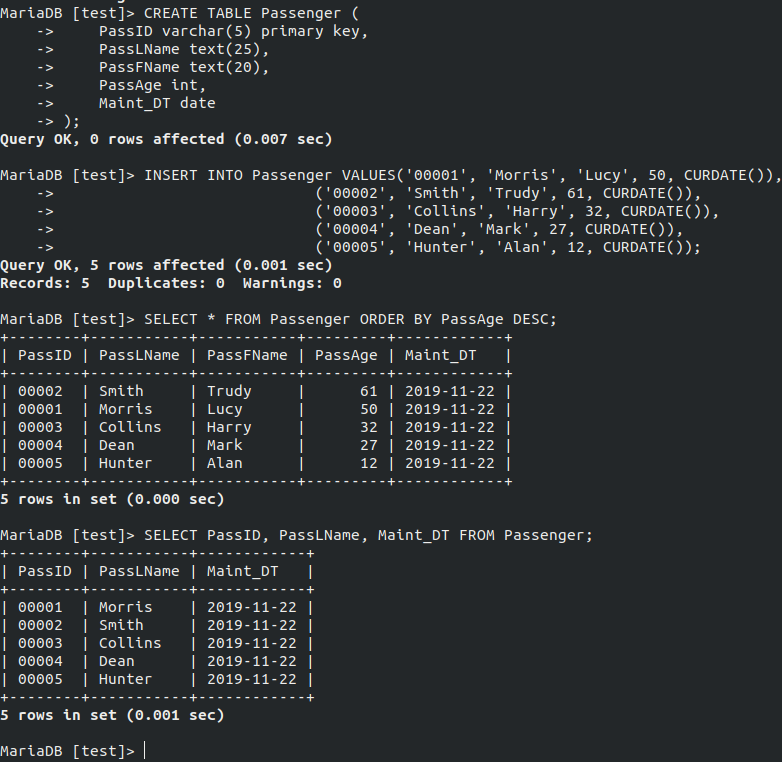
Raw Code ::

CREATE TABLE Passenger (

        PassID varchar(5) primary key,

        PassLName text(25),

        PassFName text(20),

        PassAge int,

        Maint_DT date

);

INSERT INTO Passenger VALUES ('00001', 'Morris', 'Lucy', 50, CURDATE()),

                                                    ('00002', 'Smith', 'Trudy', 61, CURDATE()),

                                                    ('00003', 'Collins', 'Harry', 32, CURDATE()),

                                                    ('00004', 'Dean', 'Mark', 27, CURDATE()),

                                                    ('00005', 'Hunter', 'Alan', 12, CURDATE());

SELECT * FROM Passenger ORDER BY PassAge DESC;

SELECT PassID, PassLName, Maint_DT FROM Passenger;


Related Solutions

(SQL Coding) Create a view based on the Job History table. Name the view: view_job_history. Select...
(SQL Coding) Create a view based on the Job History table. Name the view: view_job_history. Select all columns to be included in the view. Add a WHERE clause to restrict the employee_id to be greater than 150. Add the WITH READ ONLY option. Show me the code used to create the view and the results of a select statement on the view.
Create the following SQL queries using the lyrics database below 1. List the first name, last...
Create the following SQL queries using the lyrics database below 1. List the first name, last name, and region of members who do not have an email. 2. List the first name, last name, and region of members who do not have an email and they either have a homephone ending with a 2 or a 3. 3. List the number of track titles that begin with the letter 's' and the average length of these tracks in seconds 4....
USING SQL Create a table named Zones with the attributes and assumptions indicated below. Attributes: the...
USING SQL Create a table named Zones with the attributes and assumptions indicated below. Attributes: the zone ID, the lowest and the highest accepted temperature. Assumptions: the ID will be the primary key and have one or two digits, the temperatures (in Fahrenheit) will be at most two digits and a possible minus sign, none of the temperatures can be NULL. Populate table Zones so that it has the following rows: id lowerTemp higherTemp 2 -50 -40 3 -40 -30...
IN SQL Create a table called product containing a product no, company name, model_no,product name. What...
IN SQL Create a table called product containing a product no, company name, model_no,product name. What is my primary key? Which datatypes should I use?Pleasesubmit a printout of the commands used for creating the above table and the resultsof your queries/commands
USE SQL CREATE TABLE IF NOT EXISTS football_games ( visitor_name VARCHAR(30),       /* Name of the visiting...
USE SQL CREATE TABLE IF NOT EXISTS football_games ( visitor_name VARCHAR(30),       /* Name of the visiting team                     */ home_score SMALLINT NOT NULL,   /* Final score of the game for the Buffs         */ visitor_score SMALLINT NOT NULL,/* Final score of the game for the visiting team */ game_date DATE NOT NULL,        /* Date of the game                              */ players INT[] NOT NULL,         /* This array consists of the football player ids (basically a foreign key to the football_player.id) */ PRIMARY KEY(visitor_name, game_date)...
c. Taking every 20th passenger in your sorted table, create a new table that lists Passenger...
c. Taking every 20th passenger in your sorted table, create a new table that lists Passenger ID and Rating for the 20 data points you will now have (In excel please) with formula. I am stomped by this. TABLE C5-1: PASSENGER ID and CUSTOMER EXPERIENCE RATING Passenger ID Rating (1-5) T006 4 T007 5 T008 1 T009 4 T010 5 T011 3 T012 2 T013 3 T014 2 T015 3 T016 4 T017 4 T018 4 T019 5 T020 3...
Create a ‘Student’ table using SQL query. The table must have at least five attributes from...
Create a ‘Student’ table using SQL query. The table must have at least five attributes from your choice with different data types.
Using SQL create a new database called school_app. Create a student table with fields id (auto...
Using SQL create a new database called school_app. Create a student table with fields id (auto increment), first_name, last_name. Create a course table with fields id (auto increment), course code (such as ITC or MTH), and course number (such as 100 or 295). Note that the relationship between student and course is many-to-many (n:m). Create a join table called student_course that implements the n:m relationship with fields id (auto increment), student_id, course_id, and grade (which has values 0, 1, 2,...
Using Triggers (5 pts.) Execute the following SQL to create the customer_audit table in the premier...
Using Triggers (5 pts.) Execute the following SQL to create the customer_audit table in the premier schema. CREATE TABLE IF NOT EXISTS customer_audit ( customer_num CHAR(3) NOT NULL,   customer_name VARCHAR(35) NOT NULL, street VARCHAR(15), city VARCHAR(15), state CHAR(2), zip CHAR(5), credit_limit DECIMAL(8,2), date_changed DATETIME NOT NULL, changed_by VARCHAR(45) NOT NULL); Notice that the audit table does not have a primary key defined. Explain why this might be acceptable. Based on the current attributes in the customer_audit table, suggest a possible...
DBMS Create/Insert/Update SQL I need the create, insert, and update SQL statement for this table as...
DBMS Create/Insert/Update SQL I need the create, insert, and update SQL statement for this table as if it were being added to MySQL (please give explanations for each line of SQL code and a copy of the code as it would be entered into the query by itself: Customer PK Customer ID Text Phone Number int name text address ID int email text FK vendor ID int Vendor is the name of the table the FK comes from.
ADVERTISEMENT
ADVERTISEMENT
ADVERTISEMENT