Question

In: Computer Science

For the following C++ code, identify the 10 errors and rewrite the code using the space...

For the following C++ code, identify the 10 errors and rewrite the code using the space provided below. Do not write a new program just add, remove or change the characters/words that make the code incorrect. #include "iostream> using namespace std: class Line { public: Line( double L ) [ setLength(L); } void setLength( double L ) { length = L } double getLength( void ) { return length; } private= double length; }; int main() { double len; cout >> "How long is this line? " cin >> len; Line = line(len); Line *LPtr = line; cout << "Length of line : " << LPtr.getLength() << endl; }

Solutions

Expert Solution

/* CORRECTED 10 ERRORS AND SEE COMMENT TO KNOW ERRORS */

#include <iostream> // 1-> (") incorrect use <
using namespace std; // 2- > use ;
class Line {
   public:   
       Line( double L ) { // 3-> ([) incorrect use {
           setLength(L);
       }
       void setLength( double L ) {
           length = L; // 4-> missed ;
       }
       double getLength( void ) {
           return length;
       }
   private: // 5-> use :
      double length;
};
int main() {
   double len;
   // 6-> use (<<) insted of (>>) 7-> missing ;
   cout << "How long is this line? ";
   cin >> len;
   Line line(len); // 8-> (=) no need
   Line *LPtr = &line; // 9-> use &
   cout << "Length of line : " << LPtr->getLength() << endl; // use -> instead of .
}

/* OUTPUT */
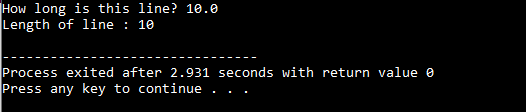
/* PLEASE UPVOTE */


Related Solutions

There are 10 errors in the listed reference. Please find the 10 errors and rewrite the...
There are 10 errors in the listed reference. Please find the 10 errors and rewrite the citation, using APA style. Jones, D. R. & Doe, Jane. (2003) Reactions Of enzymes in everyday Life. Journal of Chemistry, volume 23, issue 7, 42-50. DOI: 10.1026/rkt.1062.
There are two errors in this code. Identify the errors and give the correct code that...
There are two errors in this code. Identify the errors and give the correct code that will make the program to display the following output: Rectangle: height 2.0 width 4.0 Area of the Rectangle is 8.0 ----- public interface Shape { public double getArea(); } class Rectangle implements Shape { double height; double width; public Rectangle(double height, double width) { this.height=height; this.width=width; } public double getArea() { return height*width; } public String toString() { return "Rectangle: height "+height+" width "+width;...
USING C++ ONLY. Please study the code posted below. the goal is to rewrite the code...
USING C++ ONLY. Please study the code posted below. the goal is to rewrite the code implementing a template class using a linked list instead of an array. Note: The functionality should remain the same. /** * Queue implementation using linked list C style implementation ( no OOP). */ #include <cstdio> #include <cstdlib> #include <climits> #include <iostream> #define CAPACITY 100 // Queue max capacity using namespace std; /** Queue structure definition */ struct QueueType { int data; struct QueueType *...
Explain the errors in the C code that cause the output NOT to be -10. (Hint:...
Explain the errors in the C code that cause the output NOT to be -10. (Hint: There are 2 errors): #include <stdio.h> #include <stdlib.h> #include <pthread.h>    #define SIZE 5 void *threadFunc(void *arg); int *changingVal; int a[SIZE]; // Assume a[] = { 13444, 3320, 31020, 3302, 31313 }; int main() { int i; int min; int * changeVal = malloc (sizeof(int*)); *changeVal = -10; // Thread creation pthread_t thread1; pthread_attr_t attr; pthread_attr_init(&attr);    for (i = 0; i < SIZE;...
identify the syntax errors in the following code:             public class Hello {                    &
identify the syntax errors in the following code:             public class Hello {                         private static int main(String [] args) {                                     string Msg=”Hello, Wrld!;                                     Sytem.out.println(msg+ “Ken")
USING YOUR KNOWLEDGE OF MODULES, REWRITE THE FOLLOWING BATCH OF CODE USING PSEUDOCODE AND CREATE A...
USING YOUR KNOWLEDGE OF MODULES, REWRITE THE FOLLOWING BATCH OF CODE USING PSEUDOCODE AND CREATE A FLOWCHART TO REPRESENT THE LOGIC: There’s one thing every coder must understand. The System.out.println command. There’s one thing every coder must understand. The System.out.println command.
Note- can you rewrite the code in C++. Circle Class c++ code Write a circle class...
Note- can you rewrite the code in C++. Circle Class c++ code Write a circle class that has the following member variables: • radius: a double • pi: a double initialized with the value 3.14159 The class should have the following member functions: • Default Constructor. A default constructor that sets radius to 0.0. • Constructor. Accepts the radius of the circle as an argument . • setRadius. A mutator function for the radius variable. • getRadius. An acccssor function...
C PROGRAMMING Identify and correct the errors in each of the following. [Note: There may be...
C PROGRAMMING Identify and correct the errors in each of the following. [Note: There may be more than one error in each piece of code.] a) if ( sales => 5000 ) puts( "Sales are greater than or equal to $5000" ) else puts( "Sales are less than $5000 ) b) int x = 1, product = 0; while ( x <= 10 ); { product *= x; ++x; } c) While ( x <= 100 ) total =+ x;...
1. Using the following code identify the fault. 2. Using the following code indentify a test...
1. Using the following code identify the fault. 2. Using the following code indentify a test case that results in an error, but not a failure. public static int lastZero (int[] x) { //Effects: if x == null throw NullPointerException //else return the index of the last 0 in x. //Return -1 if 0 does not occur in x for (int i = 0; i < x.length; i++) { if (x[i] == 0) { return i; } } return -1;...
NEED TO REWRITE THIS IN OOP MODE ######## HOMEWORK 19 ###### Rewrite the code in the...
NEED TO REWRITE THIS IN OOP MODE ######## HOMEWORK 19 ###### Rewrite the code in the OOP mode (class mode). ########################### lambda trick ##### first: changing label properties: after you've created a label, you ##### may want to change something about it. To do that, use configure method: ## label.configure(text = 'Yes') ## label.configure(bg = 'white', fg = 'black') ### that change the properties of a label called label. ################################################### ## from tkinter import * abc = 'ABCDEFGHIJKLMNOPQRSTUVWXYZ' def callback(x):...
ADVERTISEMENT
ADVERTISEMENT
ADVERTISEMENT