Question
In: Computer Science
Instructions:DevelopaprogramnamedMakeStudentsthat Reads student data from Readme.txt and creates student instances o usetheStudentclassprovidedforthelab Saves student...
Instructions:DevelopaprogramnamedMakeStudentsthat
-
Reads student data from Readme.txt and creates student instances
o usetheStudentclassprovidedforthelab
-
Saves student instances in an array list
-
Displays the size of the list
-
Iterates through the list displaying students one student per line, as in:
for (Student s: myList) { System.out.println(s);
}
new File("Readme.txt")).useDelimiter(",");
Then to get each token we can use f.next() or f.nextBoolean()
Note that student gender is of type char, and that char value can be obtained usingf.next().charAt(0)
YoumustusetheStudentclassgivenalongwiththislab. ThisversionofStudentissimpler than the one in the text – this version makes no reference to the Subject class (not needed for this lab).
Your BlueJ project will include
Readme.txt, Student.java, and MakeStudents.java
SubmitMakeStudents.javatotheemailcorrespondingtoyourlabsectionwithsubject Lab 10
Copy the student data provided for this lab to Readme.txt. The data comprises comma-
separated values for fields: first name, last name, gender and active.
Previously we have used the Scanner class with its default delimiter of whitespace. In this
lab, use the Scanner class with comma as the delimiter:
Scanner f = new Scanner
------------------------------------------------------
public class Student {
// class fields
private static int lastId;
// instance fields
private int id;
private String firstName;
private String lastName;
private char gender;
private boolean active;
// first constructor, no arguments
public Student(){
id = nextId();
// default values for a student:
firstName = "unknown";
lastName = "unknown";
gender = '?';
active = false;
}
// second constructor, four arguments
public Student (String firstName, String lastName, char gender, boolean active){
id = nextId();
//
// when parameters and fields have the same
// name they are distinquished this way:
// a field name alone refers to the parameter
// a field name prefixed with "this."
// refers to an object's fields.
this.firstName = firstName;
this.lastName = lastName;
this.gender = gender;
this.active = active;
}
private int nextId(){
// increment lastId and return the new value
// to be used for the new student.
return ++lastId;
}
public int getId(){
return id;
}
public static int getLastId(){
return lastId;
}
public String getFirstName(){
return firstName;
}
public String getLastName(){
return lastName;
}
public char getGender(){
return gender;
}
public boolean isActive(){
return active;
}
public void setLastId(int newLastId){
lastId = newLastId;
}
// no setter for the student's id field
// public void setId(int newId){
// id = newId;
// }
public void setFirstName(String newFirstName){
firstName = newFirstName;
}
public void setLastName(String newLastName){
lastName = newLastName;
}
public void setGender(char newGender){
gender = newGender;
}
public void setActive(boolean newActive){
active = newActive;
}
public String toString(){
return id+" "+firstName+" "+lastName;
}
public boolean equals(Student s){
return id == s.id;
}
}
---------------------------------------------------------
Readme.txt
Harry,Potter,m,true,Albus,Dumbledore,m,true,Serverus,Snape,m,true,Rubeus,Sirius,m,true,Hermione,Granger,f,true,Ron,Weasley,m,true,Draco,Malfoy,m,true,Luna,Lovegood,f,true,Regulus,Black,m,true,Neville,Longbottom,m,true,Nymphadora,Tonks,f,true,Remus,Lupin,m,true,Fleur,Delacour,f,true,Dolores,Umbridge,f,true,Gellert,Grindelwald,m,true
Solutions
Expert Solution
A) Program for the above question is given below. Name the file
name as MakeStudents.java. The other files Student.java and
Readme.txt should be in the same folder.
Explanation:
The student data is read form Readme.txt using Scanner class as
specified with comma as the delimiter and student instances are
created using the Student class provided. The Student instances are
stored in an ArrayList as specified. Later the size of the list is
printed and the ArrayList is iterated and the students one per line
are also printed.
Code:
import java.util.*;
import java.io.File;
import java.io.IOException;
public class MakeStudents {
public static void main(String[] args)
{
ArrayList<Student> studentList = new
ArrayList<Student>();
try {
Scanner sc = new Scanner(new
File("Readme.txt")).useDelimiter(",");
while (sc.hasNext()) {
String firstName
= sc.next();
String lastName = sc.next();
char gender = sc.next().charAt(0);
boolean active = sc.nextBoolean();
Student student = new Student(firstName,
lastName, gender, active);
studentList.add(student);
}
sc.close();
} catch (IOException e) {
e.printStackTrace();
}
System.out.println("Size of the list: " +
studentList.size());
for (Student s: studentList) {
System.out.println(s);
}
}
}
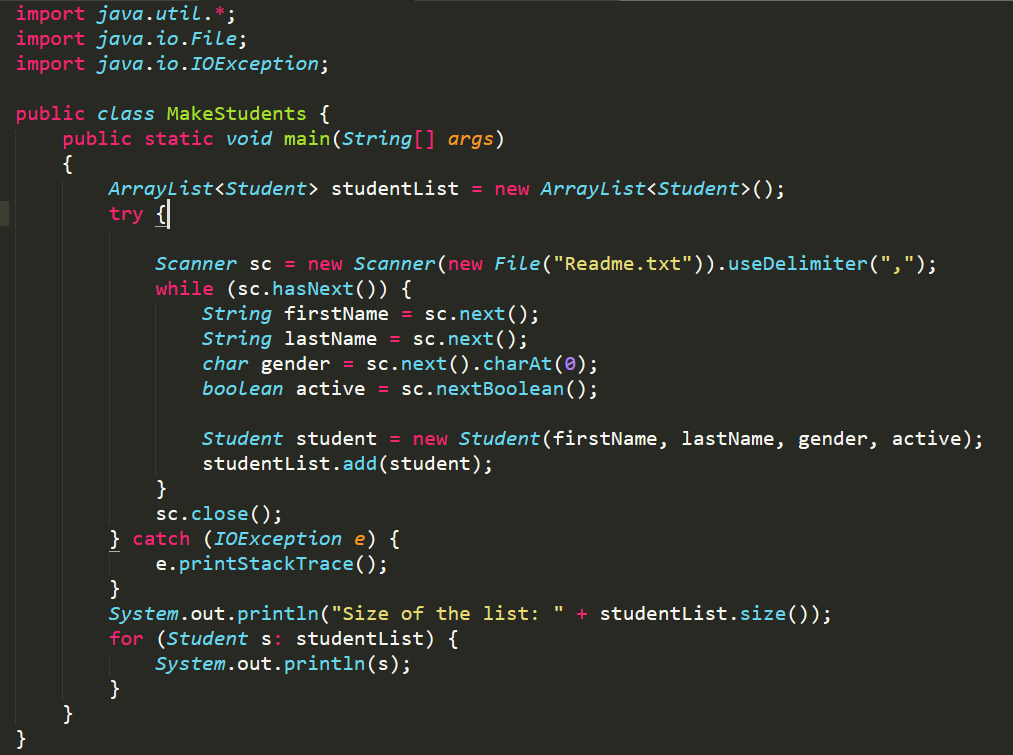
Please refer to the screenshot of the code to understand the indentation of the code
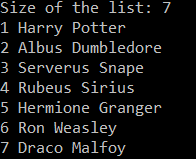
Output: The output is given for the Readme.txt
file provided.
import java.util.*; import java.io.File; import java.io.IOException; public class MakeStudents { public static void main(String[] args) ArrayList<Student> studentList = new ArrayList<Student>(); try {l Scanner sc = new Scanner(new File("Readme.txt")).useDelimiter(","); while (sc.hasNext()) { String firstName = sc.next(); String lastName = sc.next(); char gender = sc.next().charAt(@); boolean active = sc.nextBoolean(); Student student = new Student(firstName, lastName, gender, active); studentList.add(student); sc.close(); '} catch (IOException e) { e.printStackTrace(); System.out.println("Size of the list: " + studentList.size()); for (Student s: studentList) { System.out.println(s);
Size of the list: 7 1 Harry Potter 2 Albus Dumbledore 3 Serverus Snape 4 Rubeus Sirius 5 Hermione Granger 6 Ron Weasley 7 Draco Malfoy
 venereology answered 1 hour ago
Related Solutions
Specification This script reads in class data from a file and creates a dictionary. It then...
In this assignment you will write a PHP program that reads from a data file, creates...
in. java Write a program that reads a string from the user, and creates another string...
Create a program that: Creates a sales receipt, displays the receipt entries and totals, and saves...
Create a C++ program that creates instances of a Struct using an Array (you can choose...
Write a program, which reads a list of student records from a file in batch mode....
A data set includes data from student evaluations of courses.
Create a program that creates a sorted list from a data file. The program will prompt...
c++ Create a program that creates a sorted list from a data file. The program will...
A student creates 150ml of a buffer that is .018M in formic acid and .016M in...
- Most health care organization now have some type of online portal where patients can review test...
- Instructions:DevelopaprogramnamedMakeStudentsthat Reads student data from Readme.txt and creates student instances o usetheStudentclassprovidedforthelab Saves student...
- What mass of potassium fluoride must be added to 500.0 mL of water to give a...
- What domain expertise specific information is collected and organized during the problem definition step of a...
- A beam of electrons is shot into a uniform downward electric field of magnitude 1.10 103...
- For this problem, carry at least four digits after the decimal in your calculations. Answers may...
- how to make a business plan about a truck acessory business? Im really struggling how to...