Question
In: Computer Science
Javascript/HTML/CSS Problem (Only use pure javascript, DO NOT USE ANY JAVASCRIPT FRAMEWORKS) Create a non-predictive T9-like...
Javascript/HTML/CSS Problem
(Only use pure javascript, DO NOT USE ANY JAVASCRIPT FRAMEWORKS)
Create a non-predictive T9-like keypad. For those who do not know what a T9 keypad looks like, use the following shell in an html file to get a sense of what it looked like on pre-smart cellular phones:
<h3>T9 Keypad</h3>
<input id="in" type="text"/>
<br>
<button>abc</button>
<button>def</button>
<br>
<button>ghi</button>
<button>jkl</button>
<button>mno</button>
<br>
<button>pqrs</button>
<button>tuv</button>
<button>wxyz</button>
<script>
// your code here
</script>
How it functions for the assignment:
* If a button contains a letter you want to type, click on the
button N number of times associated to the order the letters are
in. So if you wanted "c", you push the second button 3 times.
* If you push the button more than the number of letters in the
button, it will wrap-around and return the letter after. For
example, clicking the first button 5 times returns "b".
* (Bonus 5 points) The input field only shows the letter once
you've completed a sequence of < 500 ms clicks. If you stop
clicking for > 500 ms, the letter associated with the number of
clicks so far, is appended to the input string.
Solutions
Expert Solution
CODE:
NOTE- For writing the t-9 code no external js library has been used, only for the UI structuring bootstrap-4 is used.
index.html:
<!DOCTYPE html>
<html lang="en">
<head>
<meta charset="UTF-8">
<meta name="viewport" content="width=device-width, initial-scale=1.0">
<meta http-equiv="X-UA-Compatible" content="ie=edge">
<title>T-9 Keypad</title>
<!-- Latest compiled and minified CSS -->
<link rel="stylesheet" href="https://maxcdn.bootstrapcdn.com/bootstrap/4.3.1/css/bootstrap.min.css">
<!-- jQuery library -->
<script src="https://ajax.googleapis.com/ajax/libs/jquery/3.4.1/jquery.min.js"></script>
<!--Bootstrap script-->
<script src="https://stackpath.bootstrapcdn.com/bootstrap/4.3.1/js/bootstrap.min.js"></script>
<!--Our Script-->
<script src="script.js"></script>
</head>
<body>
<div class="container">
<div class="row">
<div class="col-md-4">
</div>
<div class="col-md-4">
<div class="form-group">
<textarea class="form-control well" id="input" readonly="true"></textarea>
</div>
<div class="form-group">
<div class="row">
<div class="col-md-4 col-sm-4 col-xs-4"><button onclick="key_Press(this);" class="btn btn-default btn-lg btn-primary" id="1">
<div class="text-center">1</div>
<div class="text-center"><small>. , !</small></div>
</button></div>
<div class="col-md-4 col-sm-4 col-xs-4"><button onclick="key_Press(this);" class="btn btn-default btn-lg btn-primary" id="2">
<div class="text-center">2</div>
<div class="text-center"><small>a b c</small></div>
</button></div>
<div class="col-md-4 col-sm-4 col-xs-4"><button onclick="key_Press(this);" class="btn btn-default btn-lg btn-primary" id="3">
<div class="text-center">3</div>
<div class="text-center"><small>d e f</small></div>
</button></div>
</div>
</div>
<div class="form-group">
<div class="row">
<div class="col-md-4 col-sm-4 col-xs-4"><button onclick="key_Press(this);" class="btn btn-default btn-lg btn-primary" id="4">
<div class="text-center">4</div>
<div class="text-center"><small>g h i</small></div>
</button></div>
<div class="col-md-4 col-sm-4 col-xs-4"><button onclick="key_Press(this);" class="btn btn-default btn-lg btn-primary" id="5">
<div class="text-center">5</div>
<div class="text-center"><small>j k l</small></div>
</button></div>
<div class="col-md-4 col-sm-4 col-xs-4"><button onclick="key_Press(this);" class="btn btn-default btn-lg btn-primary" id="6">
<div class="text-center">6</div>
<div class="text-center"><small>m n o</small></div>
</button></div>
</div>
</div>
<div class="form-group">
<div class="row">
<div class="col-md-4 col-sm-4 col-xs-4"><button onclick="key_Press(this);" class="btn btn-default btn-lg btn-primary" id="7">
<div class="text-center">7</div>
<div class="text-center"><small>p q r s</small></div>
</button></div>
<div class="col-md-4 col-sm-4 col-xs-4"><button onclick="key_Press(this);" class="btn btn-default btn-lg btn-primary" id="8">
<div class="text-center">8</div>
<div class="text-center"><small>t u v</small></div>
</button></div>
<div class="col-md-4 col-sm-4 col-xs-4"><button onclick="key_Press(this);" class="btn btn-default btn-lg btn-primary" id="9">
<div class="text-center">9</div>
<div class="text-center"><small>w x y z</small></div>
</button></div>
</div>
</div>
<div class="form-group">
<div class="row">
<div class="col-md-4 col-sm-4 col-xs-4"><button onclick="key_Press(this);" class="btn btn-default btn-lg btn-primary" id="*">
<div class="text-center">*</div>
<div class="text-center"><small></small></div>
</button></div>
<div class="col-md-4 col-sm-4 col-xs-4"><button onclick="key_Press(this);" class="btn btn-default btn-lg btn-primary" id="0">
<div class="text-center">0</div>
<div class="text-center"><small></small></div>
</button></div>
<div class="col-md-4 col-sm-4 col-xs-4"><button onclick="key_Press(this);" class="btn btn-default btn-lg btn-primary" id="#">
<div class="text-center">#</div>
<div class="text-center"><small></small></div>
</button></div>
</div>
</div>
</div>
<div class="col-md-4">
</div>
</div>
</body>
</html>
script.js:
var input = document.getElementById("input");
var timer;
var pause_init = 0;
// pause time window
var pause_time = 500;
// start time to measure the pause
var startTime;
// end time to measure the pause
var endTime;
// is this first press of the key stroke
var first_press = true;
// stores the active key strokes
var activeKey=[];
var current;
var lastKey;
// t-9 key key array in row:x column:y format
var r1_c1 = [".",",","!", "1"];
var r1_c2 = ["a","b","c", "2"];
var r1_c3 = ["d","e","f", "3"];
var r2_c1 = ["g","h","i", "4"];
var r2_c2 = ["j","k","l", "5"];
var r2_c3 = ["m","n","o", "6"];
var r3_c1 = ["p","q","r","s", "7"];
var r3_c2 = ["t","u","v", "8"];
var r3_c3 = ["w","x","y","z", "9"];
var r4_c1= ["*"];
var r4_c2 = [" ","0"];
var r4_c3 = ["#"];
var entered_txt=[];
// assigns the word based on key press
function set_word(){
lastKey=null;
current = 0;
first_press=true;
}
// check for a pause interval
function checkPause(){
endTime = new Date().getTime();
if (endTime - startTime >= pause_time) {
clearInterval(timer);
set_word();
}
}
// main function doing the capturing of the key press
function key_Press(e){
if (e.getAttribute('id') != lastKey) {
current = 0;
first_press = true;
}
if (e.getAttribute('id') === "0") {
// 0 space
activeKey = r4_c2;
} else if (e.getAttribute('id') === "1") {
// 1
activeKey = r1_c1;
} else if (e.getAttribute('id') === "2") {
// 2 a b c
activeKey = r1_c2;
} else if (e.getAttribute('id') === "3") {
// 3 d e f
activeKey = r1_c3;
} else if (e.getAttribute('id') === "4") {
// 4 g h i
activeKey = r2_c1;
} else if (e.getAttribute('id') === "5") {
// 5 j k l
activeKey = r2_c2;
} else if (e.getAttribute('id') === "6") {
// 6 m n o
activeKey = r2_c3;
} else if (e.getAttribute('id') === "7") {
// 7 p q r s
activeKey = r3_c1;
} else if (e.getAttribute('id') === "8") {
// 8 t u v
activeKey = r3_c2;
} else if (e.getAttribute('id') === "9") {
// 9 w x y z
activeKey = r3_c3;
}
else if (e.getAttribute('id') === "*") {
// *
activeKey = r4_c1;
current = 0;
first_press = true;
}
else if (e.getAttribute('id') === "#") {
// #
activeKey = r4_c3;
current = 0;
first_press = true;
}
if (current < activeKey.length-1) {
current++;
}else{
current = 0;
first_press=true;
}
if (first_press) {
current = 0;
first_press = false;
}
// clear the pause timer
clearInterval(timer);
startTime = new Date().getTime();
pause_init = 0;
timer = setInterval(checkPause, 5);
if (e.getAttribute('id') != lastKey) {
entered_txt.push(activeKey[current]);
}else{
entered_txt.pop();
entered_txt.push(activeKey[current]);
}
// final diaply of the text appeded with older entries
document.getElementById("input").value=entered_txt.join("");
lastKey = e.getAttribute('id');
}
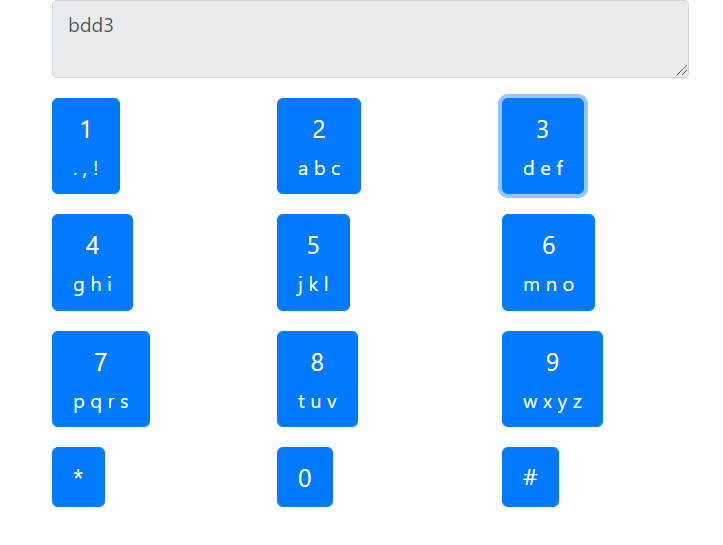
RESULT:
 venereology answered 3 weeks ago
Related Solutions
Task 1: HTML and CSS Create a website using HTML5 and CSS3 only. Please no JavaScript...
Develop a personal web page for yourself using HTML, CSS, and Javascript Use the following HTML...
Build a html form (making use of CSS and Javascript) with the following elements. The form...
2. HTML/CSS/JavaScript Under 'project’ create a subdirectory titled ‘travelsite’. Create a slide show for a travel...
Write a log-in log-out session using PHP, CSS, and HTML only. NO MYSQL and JavaScript allowed....
Project 2c (Javascript/HTML/CSS)– Mouse Chase: Create a page with a nice, shiny, pretty button on it....
Create a Web Page Using HTML, CSS, JS, jQuery • Create a web profile, including any...
Please use HTML and CSS - Create the overlay and popup: Note: this is my original...
Create a footer for web page using HTML,CSS,Javascript. The footer should contain 1.Back to top button...
HTML/CSS/JavaScript Create a page that converts 4 different measurements (i.e. length, volume, area, distance) to either...
- 1.List 3 differences between Packet Switching and Circuit Switching 2.Briefly explain HOL Blocking 3.List 3 differences...
- 1. Market and firm in short-run and long-run. Suppose, instead of a permanent increase in income,...
- IT Project Management: Explain in detail and give 3 references: What are some ways to manage...
- “A working mother receives $300,000 salary, while spends $30,000 for hiring baby-sitter.” What's the impact on...
- In a women's 100-m race, accelerating uniformly, Laura takes 1.90 s and Healan 3.15 s to...
- The HUANG Company currently has one bond issue outstanding. This bond pays a coupon rate of...
- These two waves travel along the same string: y1 = (3.52 mm) sin(1.75?x - 470?t) y2...