Question
In: Computer Science
Java 1. Program Specification This will focus on strengthening your skills with manipulating Strings. The String...
Java
1. Program Specification
This will focus on strengthening your skills with manipulating Strings. The String class provides many useful methods, in which this assignment will give you further practice with. You will read in dates in a variety of different formats, parse the dates, and then print them out in a converted format. The dates will be entered in one line by the user, and they will be separated by the word “and”.
2. Date formats
Your program will parse a line of dates written in three styles: day first, month first, and all-numbers.
Day first: The day of the month is first, followed by the month, followed by the year. The month string must be at least 3 letters long, and can be a mix of upper and lowercase letters. Spaces should separate the three parts. Spaces are not allowed between numbers or month names.
ex: 8 Aug 2015
24 February 1988
Month first: The month is first, followed by the day, a comma, then the year. The month may be fully spelled out or an abbreviation at least 3 letters long and be upper or lower case. A space must separate the month and day, but there may be multiple spaces between the two.
ex: March 15, 1967
Jan 17, 1990
All numbers: Month, day, and year are entered as numbers with dashes between them. There may be many spaces around the dashes or none. Spaces are not allowed between the numbers.
ex: 12-4-2008
1-8-2003
3. Requirements
-
Your program must read a single line that may contain many dates in many formats separated by the word “and”. It will parse out the dates, and print them all in the correct format. The correct format is day first, a space, followed by the full name of the month with the first letter capitalized, a space, and then the year.
-
Your program must give an error message if a date is invalid. It should give a specific error message for the following cases:
o A month name or abbreviation is misspelled or too short (less
than three characters)
o A day or month number is incorrect. Months must be between 1 and
12. Days must be
valid for the month (ignore leap years)
o A year number is too low or high (1900 to 2019). o There are too
many dashes in All Numbers format.
It is ok if your program crashes when calling Integer.parseInt and the argument is not valid.
4. Implementation
There are some specific requirements for how you write the program.
Use the below build-in methods
o String class: substring, trim, split, toLowerCase, indexOf, or
lasIndexOf o Integer class: parseInt
-
In the main() method, you must prompt the user to enter the dates, read the line of dates, break the line into separate Strings based on the delimiter (“and”), and for each date print “Date : ”. You must also call the appropriate parser here.
-
One method for parsing each kind of date. These methods either output an error message or the corresponding standard date string.
o public static void parseDayFirst(String dateStr)
o public static void parseMonthFirst(String dateStr) o public
static void parseAllNumbers(String dateStr)
public static boolean isValidMonthDay(int day, int
month)
o returns true if the month and day numbers form a valid day of the
year (leap years
excluded)
public static int monthToNumber(String monthStr)
o Takes a string that should be the name or abbreviation of the
month name and returns
the number of the month. It returns zero if the name doesn’t match any month or is too short. This method is provided for you.
public static boolean isValidMonthAbbr(String month)
Takes a month as a String and returns boolean value. True means the
passed in month string represents a valid month string (the length
of the trimmed month string is greater than or equals 3, and the
month string abbreviation is correctly spelled!!!).
Hint: indexOf along with the provided static String array fullNameMonths declared at
the top of the class may be useful here for. public static boolean isValidYear(int year)
o returns true if the year is valid (1900 to 2018)
public static String standardDateString(int day, int month,
int year)
o takes a day, month, and year as numbers and returns a String
containing the date in the
correct format, Day Month Year. (ex. 13 March 2006)
5. Sample Output
Welcome to the Date Converter!
Enter line of dates:8 Aug 2015 and March 15, 1967 and 12-4-2008
Date 1: 8 August 2015
Date 2: 15 March 1967
Date 3: 4 December 2008
Goodbye!
Welcome to the Date Converter!
Enter line of dates:15 xyz 2000 and
Date 1: ERROR: Invalid month string
Date 2: ERROR: Too many dashes
Date 3: ERROR: Invalid month string
Date 4: ERROR: Invalid month or day number
Goodbye!
Welcome to the Date Converter!
Enter line of dates:
ERROR: Empty input line
Goodbye!
Welcome to the Date Converter!
Enter line of dates:and 2-0-2222 and Jan 13, 1190 and March
12,2222 and 9 Date 1: ERROR: No date entered
Date 2: ERROR: Invalid month or day number
Date 3: ERROR: Invalid Year-too low or hi
Date 4: ERROR: Invalid Year-too low or hi Date 5: 9 September 2018
Goodbye!
2-2-22222-and J 10, 2004 andFeb 45 , 2012
- 9-2018
------------------------------------------
Code Provided
package cs251_HW2;
import java.util.Scanner;
public class DateConversion {
//Static variable you can use throughout this class
//contains the months in shorter form
private static String[] abbrMonths = { "jan", "feb", "mar", "apr", "may", "jun", "jul", "aug", "sep",
"oct", "nov", "dec" };
//Another static variable you can use, except these contain the months fully spelled out
private static String[] fullNameMonths = { "january", "february", "march", "april", "may", "june", "july", "august", "september",
"october", "november", "december" };
public static void main(String[] args) {
Scanner stdIn = new Scanner(System.in);
System.out.println("Welcome to the CS251 Date Converter!\n");
System.out.print("Enter line of dates:");
String dateEntries = stdIn.nextLine();
//TODO
System.out.println("\nGoodbye!");
stdIn.close();
}
public static void parseDayFirst(String dateStr) {
//TODO
}
public static void parseMonthFirst(String dateStr) {
//TODO
}
public static void parseAllNumbers(String dateStr) {
//TODO
}
public static boolean isValidMonthDay(int day, int month) {
//TODO
}
public static int monthToNumber(String monthStr) {
String lowerCaseMonthStr = monthStr.toLowerCase().substring(0, 3);
int mNumber = 0;
for(int i = 0; i < abbrMonths.length; i++){
if(abbrMonths[i].equals(lowerCaseMonthStr)){
mNumber = i + 1;
break;
}
}
return mNumber;
}
public static boolean isValidMonthAbbr(String str) {
//TODO
}
public static boolean isValidYear(int year) {
//TODO
}
public static String standardDateString(int d, int m, int y) {
//TODO
}
}
Solutions
Expert Solution
//package cs251_HW2;
import java.util.Scanner;
public class DateConversion {
// Static variable you can use throughout this
class
// contains the months in shorter form
private static String[] abbrMonths = { "jan", "feb",
"mar", "apr", "may", "jun", "jul", "aug", "sep", "oct",
"nov",
"dec" };
// Another static variable you can use, except
these contain the months fully
// spelled out
private static String[] fullNameMonths = { "january",
"february", "march", "april", "may", "june", "july",
"august",
"september",
"october", "november", "december" };
public static void main(String[] args) {
Scanner stdIn = new Scanner(System.in);
System.out.println("Welcome to the CS251 Date Converter! ");
String dateEntries = null;
while (true) {
System.out.print("Enter line of dates:");
dateEntries =
stdIn.nextLine();
// TODO
if (dateEntries
!= "") {
break;
}
System.out.println("Please enter a Date. ");
}
String[] dates = dateEntries.split("and");
for (int dateCount = 0;
dateCount < dates.length; dateCount++) {
String dateStr =
dates[dateCount].trim();
System.out.print("Date " + dateCount + ": ");
if
(dateStr.matches("[0-9]{1,2}[s]*[-]+[s]*[0-9]{1,2}[s]*[-]+[s]*[0-9]{4}[-]*"))
{
parseAllNumbers(dateStr);
} else if
(dateStr.matches("[a-z|A-Z]{3,9}[s]*[0-9]{1,2},[s]*[0-9]{4}"))
{
parseMonthFirst(dateStr);
} else if
(dateStr.matches("[0-9]{1,2}[s]+[a-z|A-Z]{3,9}[s]+[0-9]{4}"))
{
parseDayFirst(dateStr);
} else
System.out.println("Invalid Date Format, try
again. ");
}
System.out.println(" Goodbye!");
stdIn.close();
}
public static void parseDayFirst(String dateStr) {
// TODO
String[] datePart =
dateStr.split("s+");
int day =
Integer.parseInt(datePart[0]);
String month = datePart[1];
int year = Integer.parseInt(datePart[2]);
if (isValidMonthAbbr(month))
{
if
(isValidMonthDay(day, monthToNumber(month))) {
if (isValidYear(year)) {
System.out.print(standardDateString(day, monthToNumber(month),
year) + " ");
} else {
System.out.print("Error -
Invalid Year. ");
}
} else {
System.out.print("Error - Invalid day or month.
");
}
} else {
System.out.print("Invalid Month Abreviation. ");
}
}
public static void parseMonthFirst(String dateStr) {
// TODO
dateStr = dateStr.replace(",",
"");
String[] datePart =
dateStr.split("s+");
int day = Integer.parseInt(datePart[1]);
String month = datePart[0];
int year = Integer.parseInt(datePart[2]);
if (isValidMonthAbbr(month))
{
if
(isValidMonthDay(day, monthToNumber(month))) {
if (isValidYear(year)) {
System.out.print(standardDateString(day, monthToNumber(month),
year) + " ");
} else {
System.out.print("Error -
Invalid Year. ");
}
} else {
System.out.print("Error - Invalid day or month.
");
}
} else {
System.out.print("Invalid Month Abreviation. ");
}
}
public static void parseAllNumbers(String dateStr) {
// TODO
String[] datePart =
dateStr.split("[s]*[-][s]*");
int day = Integer.parseInt(datePart[1]);
int month = Integer.parseInt(datePart[0]);
int year = Integer.parseInt(datePart[2]);
if (isValidMonthDay(day, month))
{
if
(isValidYear(year)) {
System.out.print(standardDateString(day, month,
year) + " ");
} else {
System.out.print("Error - Invalid Year.
");
}
} else {
System.out.print("Error - Invalid day or month. ");
}
}
public static boolean isValidMonthDay(int day, int month) {
//TODO
if(day > 31 || day <= 0)
{
return
false;
}
switch(month) {
case 2: //
feb
if (day > 28)
{
return false;
}
break;
case 4: //
apr
case 6: //
jun
case 9: //
sep
case 11:
// nov
if (day > 30)
{
return false;
}
break;
case 1: //
jan
case 3: //
mar
case 5: //
may
case 7: //
jul
case 8: //
aug
case 10:
// oct
case 12:
// dec
if (day > 31)
{
return false;
}
break;
default:
return
false;
}
return true;
}
public static int monthToNumber(String monthStr) {
String lowerCaseMonthStr = monthStr.toLowerCase().substring(0, 3);
int mNumber = 0;
for (int i = 0; i <
abbrMonths.length; i++) {
if
(abbrMonths[i].equals(lowerCaseMonthStr)) {
mNumber = i + 1;
break;
}
}
return mNumber;
}
public static boolean isValidMonthAbbr(String month) {
// TODO
return (month.length() >=
3)
&& (month.substring(0,
3).toLowerCase().equals(abbrMonths[0]) || monthToNumber(month) !=
0);
}
public static boolean isValidYear(int year) {
// TODO
return !(year < 1900 || year
> 2018);
}
public static String standardDateString(int d, int m, int y) {
// TODO
return String.format("%s %s %s",
d,
fullNameMonths[m - 1].substring(0,
1).toUpperCase() + fullNameMonths[m -
1].substring(1).toLowerCase(),
y);
}
}
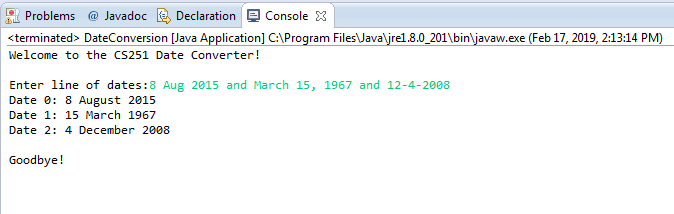
EL Problems @ Javadoc 다 Declaration g Console X sterminated> DateConversion [Java Application] C: Program Files Javaljre1.8.0 2011binljavaw.exe (Feb 17, 2019, 213:14 PM) Welcome to the CS251 Date Converter! Enter line of dates:8 Aug 2015 and March 15, 1967 and 12-4-2008 Date : 8 August 2015 Date 1: 15 March 1967 Date 2: 4 December 2008 Goodbye!
 venereology answered 1 month ago
Related Solutions
6.6 Parsing strings (Java) (1) Prompt the user for a string that contains two strings separated...
3. Write a Java program that generates a set of random strings from a given string...
write a java prog that include an array of strings of size 50 String[] strings...
Java RECURSIVE methods: => intersection(String s1, String s2): takes two strings and returns the string consisting...
implement a JavaFX program to demonstrate skills and knowledge using the following: 1.General Java programming skills...
String Manipulator Write a program to manipulate strings. (Visual Studio C++) In this program take a...
Write a program that removes a target item (a string) from a list of strings, and...
IN JAVA write a program that creates an array of strings with 8 people in it....
1. In your program, demo the split() method for strings and attach it to one of the...
in. java Write a program that reads a string from the user, and creates another string...
- Jackson County Senior Services is a nonprofit organization devoted to providing essential services to seniors who...
- A survey across generations of workers gathered data on engagement at work. The results for a...
- Please answer! This assignment is due in an hour. When choosing an item from a group,...
- LiOH(s) + CO2(g) → Li2CO3(s) + H2O(l) If 92.4 grams of lithium hydroxide reacts with excess...
- Premier Consulting’s two consultants, Avery and Baker, can be scheduled to work for clients up to...
- Using the following data reactions: ?H
- JAVA PLEASE Creating Classes Create a class that will keep track of a yes/no survey. You...