Question
In: Computer Science
this is java code package calculator; import java.util.Scanner; import java.lang.Math; public class Calculator { public static...
this is java code
package calculator;
import java.util.Scanner;
import java.lang.Math;
public class Calculator {
public static void main(String[] args) {
double numx, numy;
Scanner scanner = new Scanner(System.in);
System.out.println(" Enter an operation :");
System.out.println("1: Addition");
System.out.println("2: Subtraction");
System.out.println("3: Multiplication");
System.out.println("4: Division");
System.out.println("5: Modulus");
System.out.println("6: Power");
System.out.println("7: Square");
System.out.println("8: Factorial");
System.out.println("9: Log");
System.out.println("10: Sin");
System.out.println("11: Absolute value");
System.out.println("12: Average Of Array Elements");
String operator = scanner.next();
System.out.println();
double output;
switch(operator)
{
case "1":
System.out.print("Enter first number:");
/* We are using data type double so that user
* can enter integer as well as floating point
* value
*/
numx = scanner.nextDouble();
System.out.print("Enter second number:");
numy = scanner.nextDouble();
output = sum( numx, numy);
break;
case "2":
System.out.print("Enter first number:");
/* We are using data type double so that user
* can enter integer as well as floating point
* value
*/
numx = scanner.nextDouble();
System.out.print("Enter second number:");
numy = scanner.nextDouble();
output = Subtraction( numx, numy);
break;
case "3":
System.out.print("Enter first number:");
/* We are using data type double so that user
* can enter integer as well as floating point
* value
*/
numx = scanner.nextDouble();
System.out.print("Enter second number:");
numy = scanner.nextDouble();
output = Multiplication( numx,numy);
break;
case "4":
System.out.print("Enter first number:");
/* We are using data type double so that user
* can enter integer as well as floating point
* value
*/
numx = scanner.nextDouble();
System.out.print("Enter second number:");
numy = scanner.nextDouble();
output = Division( numx, numy );
break;
case "5":
System.out.print("Enter first number:");
/* We are using data type double so that user
* can enter integer as well as floating point
* value
*/
numx = scanner.nextDouble();
System.out.print("Enter second number:");
numy = scanner.nextDouble();
output =Modulus( numx,numy);
break;
case "6":
System.out.print("Enter first number:");
numx = scanner.nextDouble();
System.out.print("Enter second number:");
numy = scanner.nextDouble();
output = power( numx, numy);
break;
case "7":
System.out.print("Enter first number:");
numx = scanner.nextDouble();
output= Square_root( numx);
break;
case "8":
System.out.print("Enter first number:");
numx = scanner.nextDouble();
output=factorial( numx);
break;
case "9":
System.out.print("Enter first number:");
numx = scanner.nextDouble();
output=log1( numx); // log function
break;
case "10":
System.out.print("Enter first number:");
numx = scanner.nextDouble();
output=sin1( numx); //sin finction
break;
case "11":
System.out.print("Enter first number:");
numx = scanner.nextDouble();
output=absolute( numx); //absolute function
break;
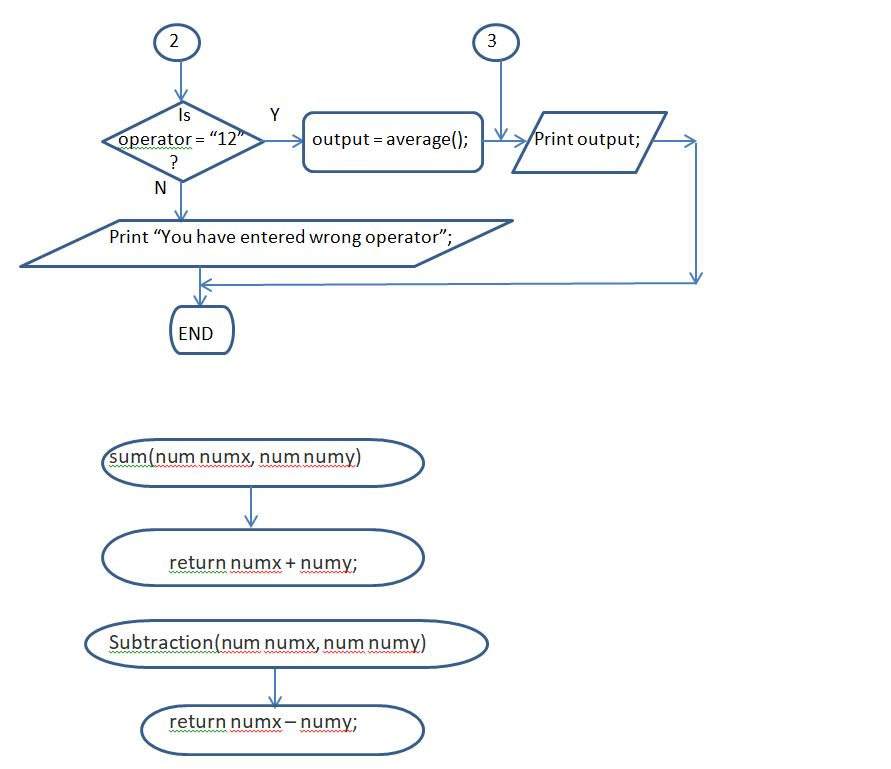
case "12":
output= average( );
break;
/* If user enters any other operator apart from
* then display an error message to user
*
*/
default:
System.out.printf("You have entered wrong operator");
return;
}
System.out.println(output);
}
public static double sum(double numx, double numy)
{
double sum=0;
return sum=numx+numy;
}
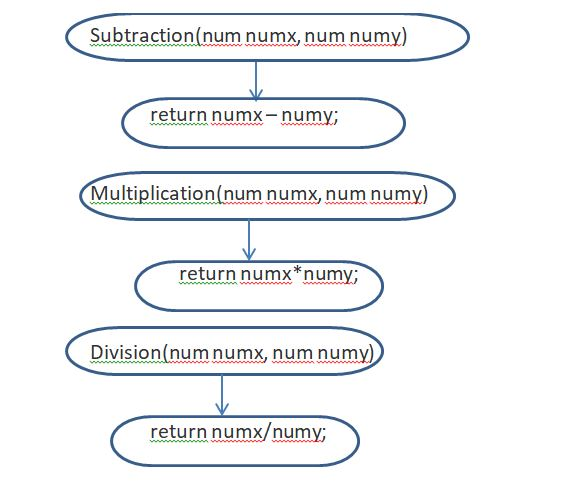
public static double Subtraction(double numx, double numy)
{
double sub=0;
return sub=numx-numy;
}
public static double Multiplication(double numx, double numy)
{
double Mul=0;
return Mul=numx*numy;
}
public static double Division(double numx, double numy)
{
double Division=0;
return Division=numx/numy;
}
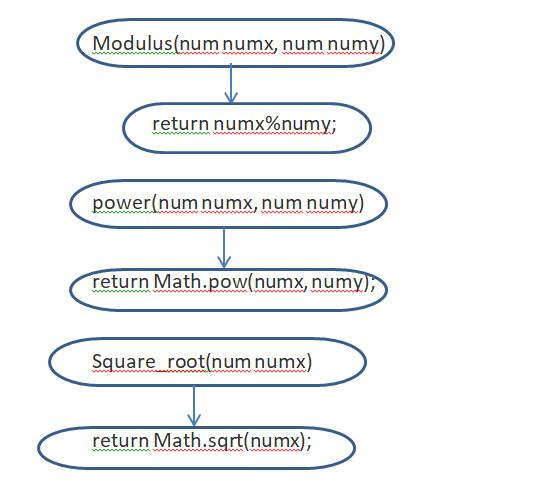
public static double Modulus(double numx, double numy)
{
double Mod=0;
return Mod=numx%numy;
}
public static double power(double numx, double numy)
{
double output = Math.pow(numx, numy);
return output;
}
public static double Square_root(double numx)
{
double output = Math.sqrt(numx);
return output;
}
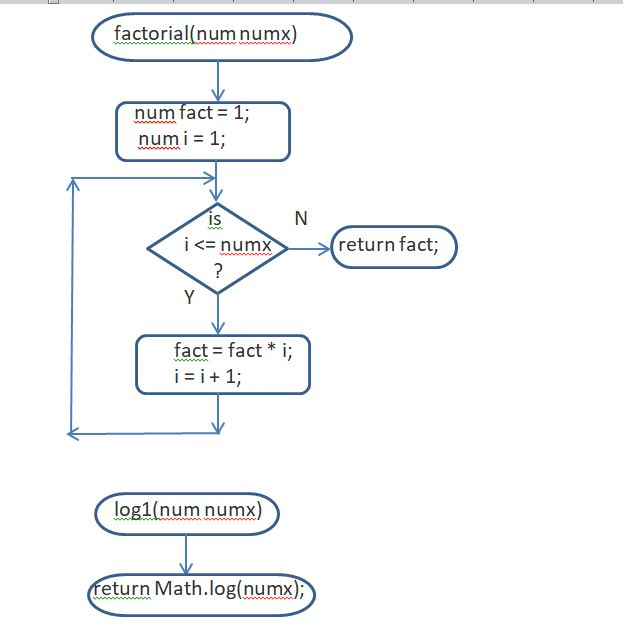
public static double factorial(double numx)
{
double factorial=1;
for(int i = 1; i <= numx; ++i) //loop for calculation of factorial
{
// factorial = factorial * i;
factorial *= i;
}
return factorial;
}
public static double log1(double numx)
{
double output=1;
return output=Math.log(numx);
}
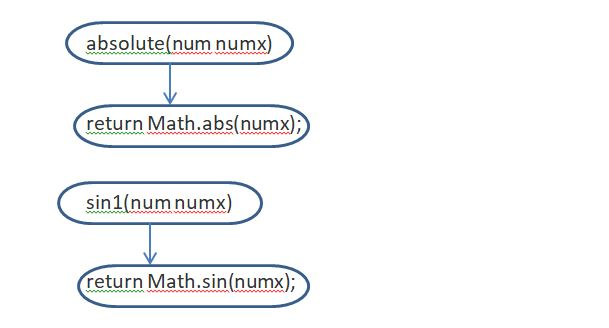
public static double absolute(double numx)
{
double output=1;
return output=Math.abs(numx);
}
public static double sin1(double numx)
{
double output=1;
return output=Math.sin(numx);
}
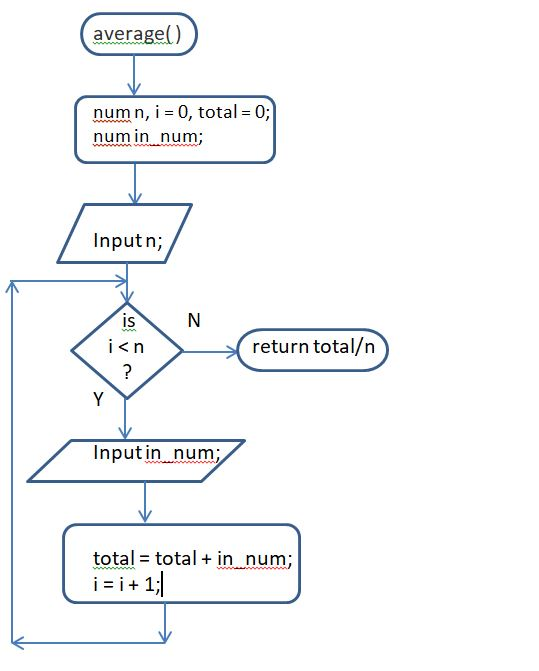
public static double average( )
{
int n =1;
Scanner scanner = new Scanner(System.in);
double total = 0;
System.out.println("Enter size of array");
n=scanner.nextInt();
int i=0;
double[] arr = new double[n];
while(i<arr.length) // while loop for getting elements in array
{
System.out.print("Enter Element No."+(i+1)+": ");
arr[i] = scanner.nextDouble();
i++;
}
for(int j=0; j<arr.length; j++){ // loop to calculate sum of array
total = total + arr[j];
}
double average = total / arr.length;
return average;
}
}
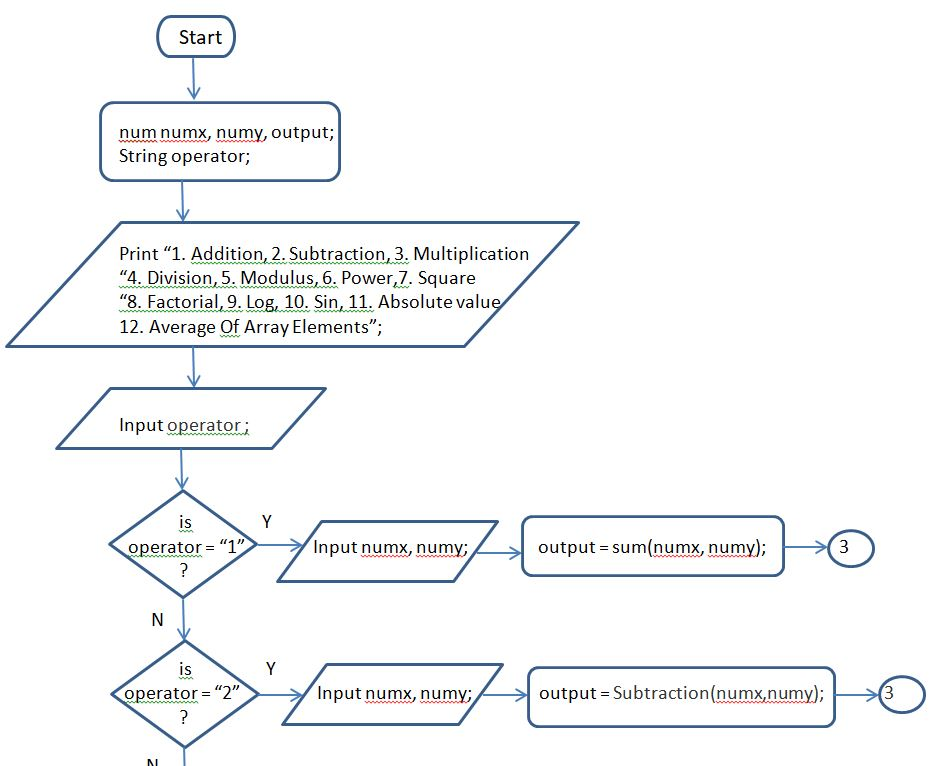
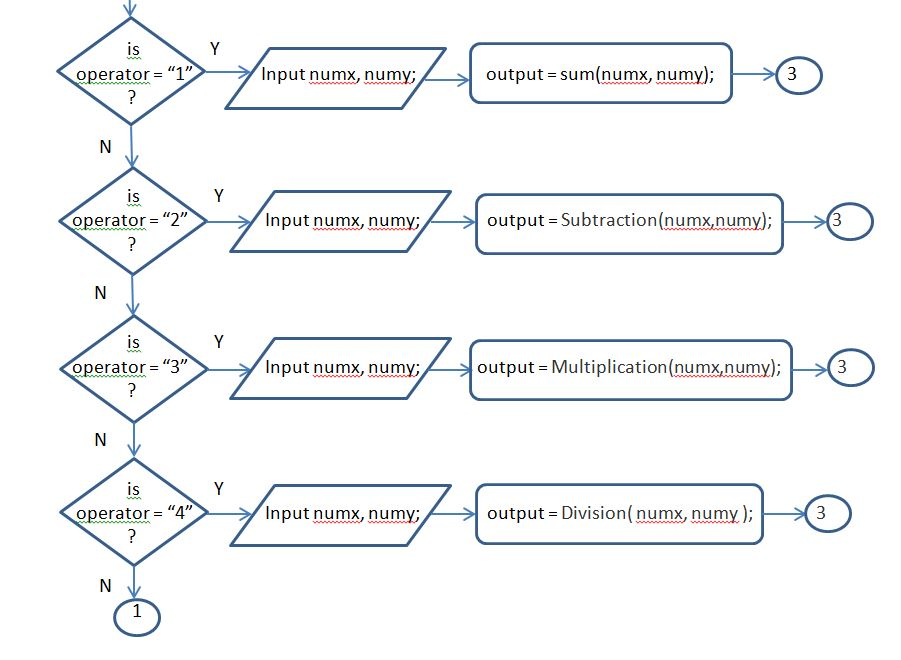
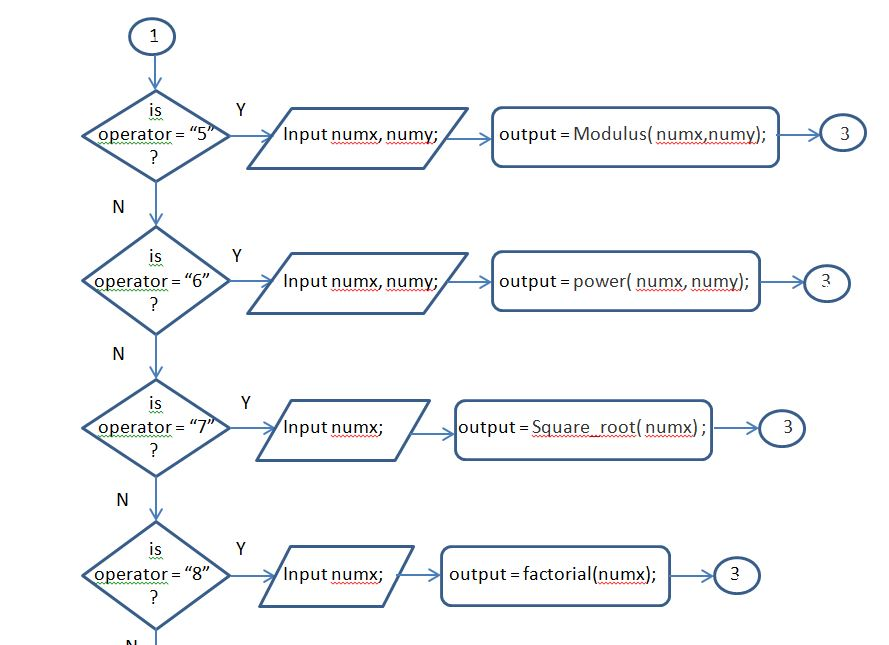
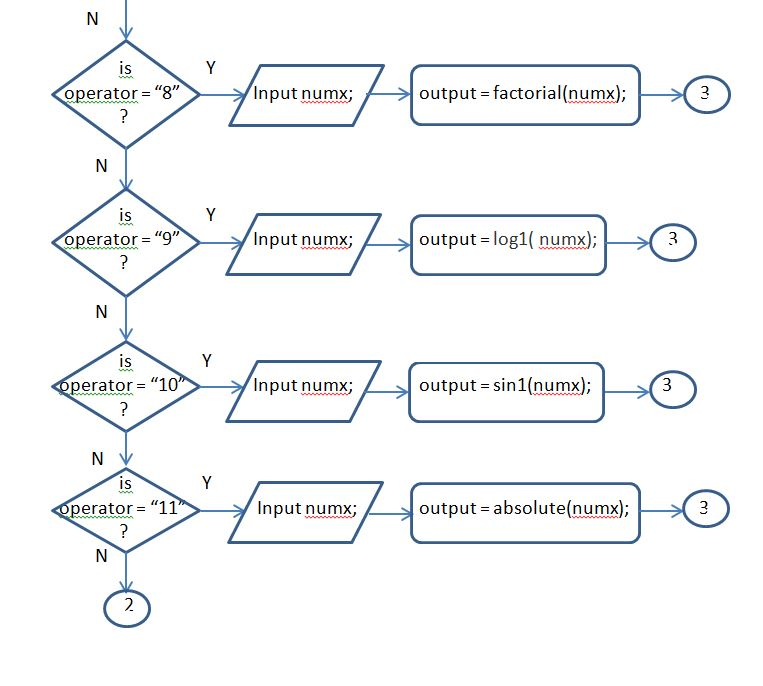
for this code draw High level flowchart.
Solutions
 venereology answered 3 months ago
Related Solutions
WRITE THIS JAVA CODE IN PSEUDOCODE!! import java.util.Scanner; public class License { public static void main(String[]...
Java Starter Code: import java.util.Scanner; public class GameScore { static Scanner keyboard = new Scanner(System.in); public...
My code: import java.util.Random; import java.util.Scanner; public class RollDice { public static void main(String[] args) {...
Correct the code: import java.util.Scanner; public class Ch7_PrExercise5 { public static void main(String[] args) { ...
Write program in Java import java.util.Scanner; public class Lab7Program { public static void main(String[] args) {...
Consider the following code: import java.util.Scanner; public class Main { public static void main(String[] args)...
Using the following in Java- package intersectionprinter; import java.awt.Rectangle; public class IntersectionPrinter { public static void...
I need to translate my java code into C code. import java.util.Scanner; class CS_Lab3 { public...
I need this Java code transform to Python Code PROGRAM: import java.util.Scanner; public class Main {...
Language java Rewrite the method getMonthusing the "this" parameter CODE: import java.util.Scanner; public class DateSecondTry {...
- An experiment to measure the value of g is constructed using a tall tower outfitted with...
- Discuss the two estimation methods of classification-type data mining models while considering ANN as a classifier.
- For the equilibrium: CO2(g) + H2(g) ⇌ CO(g) + H2O(g), Kp = 10-5 at 25°C and...
- Sanyu Sony started a new business and completed these transactions during December. Dec. 1 Sanyu Sony...
- A crate rests on a frictionless incline, and is attached to a bucket of nails through...
- e) LIST the three effects that account for the downward slope of the AD curve.
- Complete a 1- to 2-page table using the template provided comparing your opinion of the rights...