Question
In: Computer Science
The four methods needed for the assignment are specified in the Main class. Include a documentation...
The four methods needed for the assignment are specified in the Main class. Include a documentation comment with proper annotations for each of these four methods. Keep in mind that all four methods will be static and void. Additionally, there should be no throws clauses for any of the methods of this program. All exceptions should be properly handled with try-catch blocks. Refer to the following directions for each of the makeFile,readFile, writeFile, and deleteFile methods, respectively:
●Use the createNewFile() method of Java’s File class to add files to a subdirectory (folder)within the project directory. Let the user know if the file was successfully created or if anything goes wrong during the file creation process.
●Read from files using the Scanner class. Be sure to properly handle any exceptions inthe event that the file cannot be found or that the contents of the file cannot be read.Print the contents of the file to the console.
●Write to files using a combination of the FileWriter and PrintWriter classes. New content should be appended to the file rather than overwriting the current contents. Check that the file exists and throw an exception if it does not; do not rely on the PrintWriter class to create a new file to write to. Be sure to properly handle any exceptions in the event that the file cannot be found or that content cannot be written to the file.
●Use the delete() method of Java’s File class to delete files from the subdirectory. Let the user know if the file was successfully deleted or if anything goes wrong during the file deletion process.
The program used is Java script and requires two classes for the project, one- Main class and the second- FileHandler class. the File handler class should be able to create, read, write, and delete files.
public class Main
{
public static void main(String[] args)
{
Scanner keyboard = new
Scanner(System.in); // Scanner object to read user
input
String fileName = "";
// The name of a file to
perform actions on
String content = "";
// Content to be written to a
file
String line = "";
// An
individual line of content
int choice = -1;
// User's
selection
while (choice != 5)
{
System.out.println("1. Create a file\n2. Read from a file\n3. Write
to a file\n" +
"4. Delete a file\n5. Exit the program");
System.out.print("Please enter the number of your selection:
");
choice =
keyboard.nextInt();
keyboard.nextLine();
switch
(choice)
{
// Create a new file
case 1:
System.out.print("Please
enter the name of the new file: ");
fileName =
keyboard.nextLine();
FileHandler.makeFile(fileName);
break;
// Read from a file
case 2:
System.out.print("Please
enter the name of the file to read: ");
fileName =
keyboard.nextLine();
FileHandler.readFile(fileName);
break;
// Write to a file
case 3:
System.out.print("Please
enter the name of the file to write to: ");
fileName =
keyboard.nextLine();
line = "";
do
{
System.out.print("Please enter content to be added to the file
('end' to stop): ");
line =
keyboard.nextLine();
if
(!line.equals("end"))
content += line + "\n";
} while
(!line.equals("end"));
FileHandler.writeFile(fileName, content);
break;
// Delete a file
case 4:
System.out.print("Please
enter the name of the file to delete: ");
fileName =
keyboard.nextLine();
FileHandler.deleteFile(fileName);
break;
// Exit the program
case 5:
break;
// Warning for invalid input
default:
System.out.println("Please
enter a number from 1-5");
}
}
}
}
Solutions
Expert Solution
Short Summary:
Ø There is a defect in the given main method. Content has to be cleared before getting input for next try.
See the highlighted line in the main method
Ø FileHandler class does all the file operations with the subdirectory. User has to provide relative path always and it creates/reads/writes and deletes the file from the sub directory
Ø Created a method ‘getSubDirectoryFile’ in FileHandler which maps the input file to sub directory file.
Ø All the methods in FileHandler class are static and handled all the exceptions appropriately.
Source Code:
Main.java file:
import java.util.Scanner;
public class Main
{
public static void main(String[] args)
{
Scanner keyboard = new Scanner(System.in); // Scanner object to read user input
String fileName = ""; // The name of a file to perform actions on
String content = ""; // Content to be written to a file
String line = ""; // An individual line of content
int choice = -1; // User's selection
while (choice != 5)
{
System.out.println("1. Create a file\n2. Read from a file\n3. Write to a file\n" +
"4. Delete a file\n5. Exit the program");
System.out.print("Please enter the number of your selection: ");
choice = keyboard.nextInt();
keyboard.nextLine();
switch (choice)
{
// Create a new file
case 1:
System.out.print("Please enter the name of the new file: ");
fileName = keyboard.nextLine();
FileHandler.makeFile(fileName);
break;
// Read from a file
case 2:
System.out.print("Please enter the name of the file to read: ");
fileName = keyboard.nextLine();
FileHandler.readFile(fileName);
break;
// Write to a file
case 3:
System.out.print("Please enter the name of the file to write to: ");
fileName = keyboard.nextLine();
line = "";
//Clear the content before getting content for next try
content = "";
do
{
System.out.print("Please enter content to be added to the file ('end' to stop): ");
line = keyboard.nextLine();
if (!line.equals("end"))
content += line + "\n";
} while (!line.equals("end"));
FileHandler.writeFile(fileName, content);
break;
// Delete a file
case 4:
System.out.print("Please enter the name of the file to delete: ");
fileName = keyboard.nextLine();
FileHandler.deleteFile(fileName);
break;
// Exit the program
case 5:
break;
// Warning for invalid input
default:
System.out.println("Please enter a number from 1-5");
}
}
}
}
FileHandler.java File:
import java.io.BufferedWriter;
import java.io.File;
import java.io.FileWriter;
import java.io.IOException;
import java.io.PrintWriter;
import java.util.Scanner;
public class FileHandler {
final static String SUB_DIRECTORY = "Data";
static String getSubDirectoryFile(String fileName){
return SUB_DIRECTORY + "\\" + fileName;
}
/**
* Adds the file to the sub directory within the project directory
* @param fileName - to be created
*/
static void makeFile(String fileName){
// Use relative path
File newfile = new File(getSubDirectoryFile(fileName));
//Make sure that parent directory exists
//If not, create the parent directory
newfile.getParentFile().mkdirs();
try {
if(newfile.exists()){
throw new IOException("File already exists");
}
else{
//Create the file using createNewFile() method
newfile.createNewFile();
//show a successful message, if it is created
System.out.println("File has been created");
}
} catch (IOException e) {
//If there is any exception, catch it and display it to user
System.out.println("makeFile failed: " + e.getMessage());
}
}
/**
* Read lines from the file and displays on the console
* @param fileName - to be read
*/
static void readFile(String fileName) {
try {
//Create the scanner using file
try (Scanner sc = new Scanner(new File(getSubDirectoryFile(fileName)))) {
//Check if it has lines
if(!sc.hasNext()){
System.out.println("File is empty");
}
else{
//Check if it is has line
while (sc.hasNext()) {
//Read the line and print it on the screen
String line = sc.nextLine();
System.out.println(line);
}
}
}
} catch (IOException e) {
//If there is any exception, catch it and display it to user
System.out.println("readFile failed: " + e.getMessage());
}
}
/**
* Append the content into a file
* @param fileName
* @param content
*/
static void writeFile(String fileName, String content) {
try {
//Create file object using File
File file = new File(getSubDirectoryFile(fileName));
//If the file does not exist, throw an exception
if(!file.exists()){
throw new IOException("File does not exist " + fileName);
}
else{
//Use file wirter and pass true to append the contenr
FileWriter fw = new FileWriter(file,true);
BufferedWriter bw = new BufferedWriter(fw);
try (PrintWriter pw = new PrintWriter(bw)) {
//Write the content into the file
pw.print(content);
}
System.out.println("Content successfully appended at the end of file");
bw.close();
fw.close();
}
} catch (IOException e) {
//If there is any exception, catch it and display it to user
System.out.println("writeFile failed: " + e.getMessage());
}
}
static void deleteFile(String fileName) {
//If there is any exception, catch it and display it to user
try
{
File file = new File(getSubDirectoryFile(fileName));
//If the file does not exist, throw an exception
if(!file.exists()){
throw new IOException("File does not exist " + fileName);
}
if(file.delete()) //returns Boolean value
{
System.out.println(file.getName() + " deleted"); //getting and printing the file name
}
else
{
System.out.println(file.getName() + " file not deleted");
}
} catch (IOException e) {
//If there is any exception, catch it and display it to user
System.out.println("deleteFile failed: " + e.getMessage());
}
}
}
Sample Run:
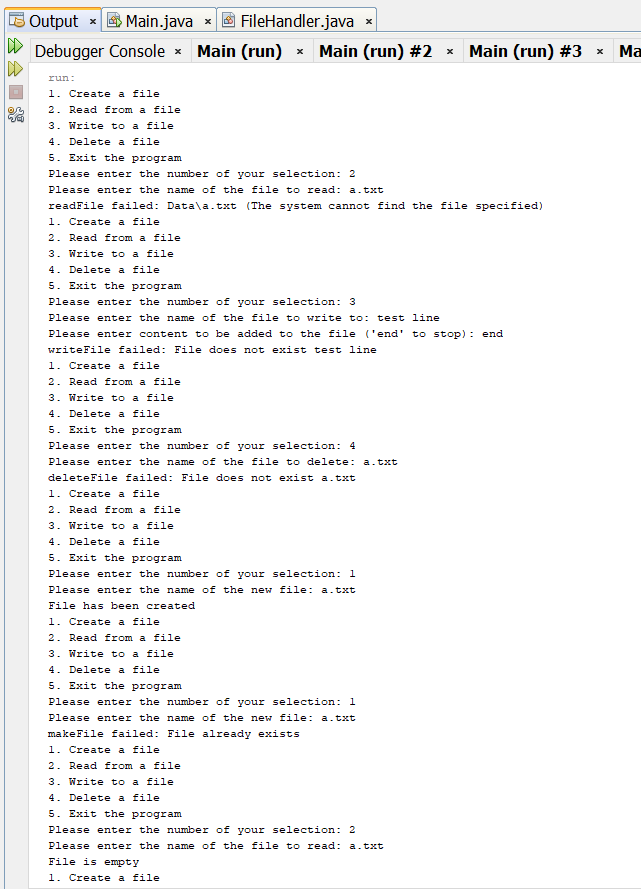
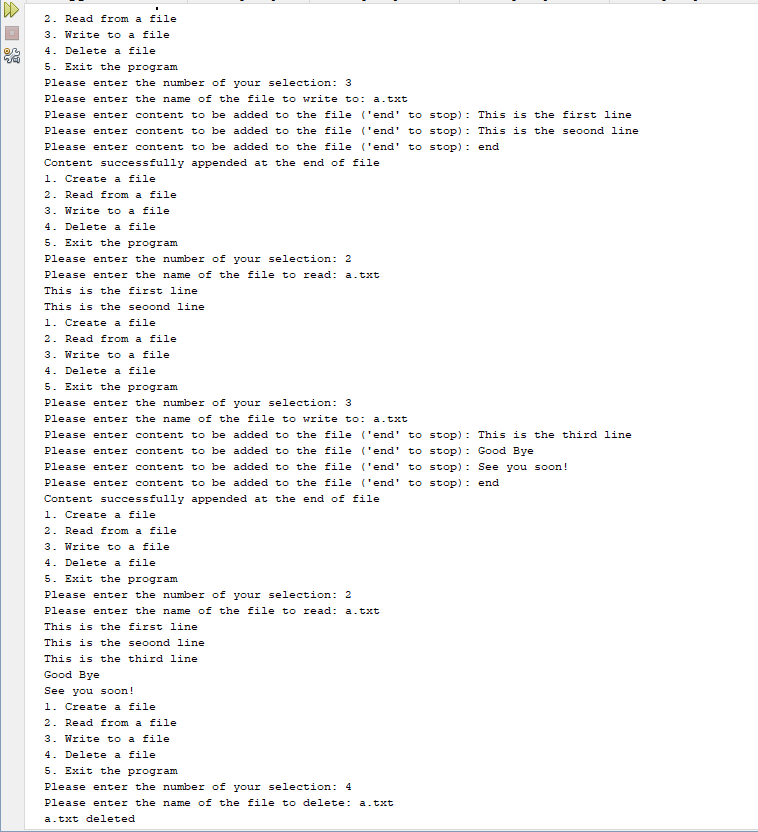

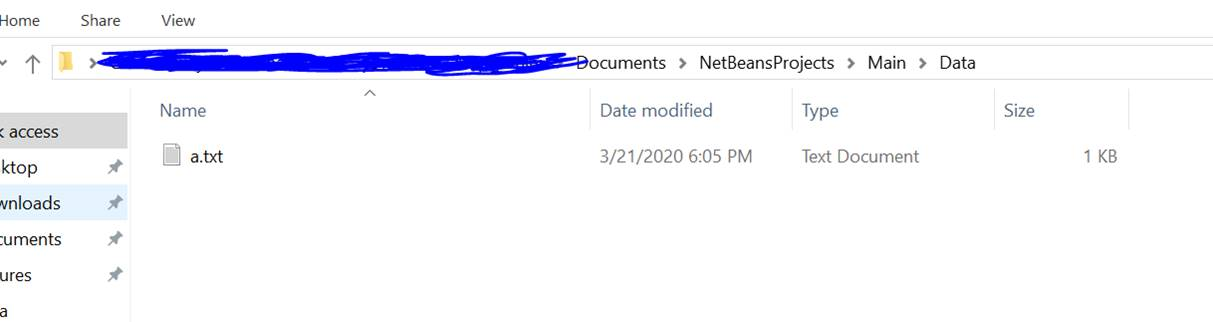
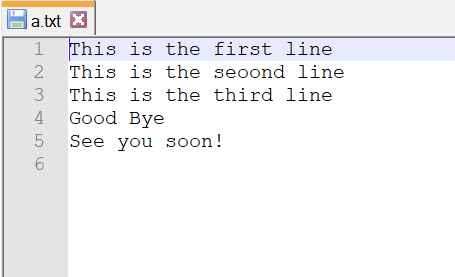
Output files:
- It adds the file to the sub directory which is same level as my project directory.
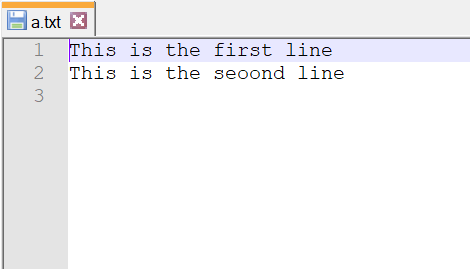
- Initial Write:
- After adding more lines:
******************************************************************************
Feel free to rate the answer and comment your questions, if you have any.
Happy Studying!!!
******************************************************************************
 venereology answered 3 months ago
Related Solutions
C++ Assignment 1) Write a C++ program specified below: a) Include a class called Movie. Include...
Challenge: Dog Description: Create a Dog class that contains specified properties and methods. Create an instance...
Problem: Implement a class named StringParser, along with specified methods, that can read words from a...
Description: Create a class in Python 3 named Animal that has specified attributes and methods. Purpose:...
Overview For this assignment, design and implement the methods for a class that can be used...
Implement the Nickel class. Include Javadoc comments for the class, public fields, constructors, and methods of...
Given the main method of a driver class, write a Fraction class. Include the following instance...
For this week's assignment please share with the class: 1. Why is closing process needed in...
Needed in C++ In this assignment, you are asked to create a class called Account, which...
package design; public class FortuneEmployee { /** * FortuneEmployee class has a main methods where you...
- Assignment # 12: Email Presentation Learning Objectives and Outcomes Design a PowerPoint presentation appropriate for middle...
- Identify which of the perspectives you believe is the BEST for accurately explaining human behavior and...
- What trade policies should a country adopt? why? Explain. Also, find some reference materials on this...
- In Java: Suppose you want to implement a Sudoku game that consists of 9x9 rows and...
- What is the percent yield of the solid product when 17.62 g of iron(III) nitrate reacts...
- Kilgore Natural Gas has $1,000 par value bonds outstanding at 12% interest. The bonds will mature...
- 19.20 grams of barium hydroxide, Ba(OH)2 is dissolved in 178.0 ml of water (you may assume...