Question
In: Computer Science
In the Gui need a file in and out writter. That also takes from in file...
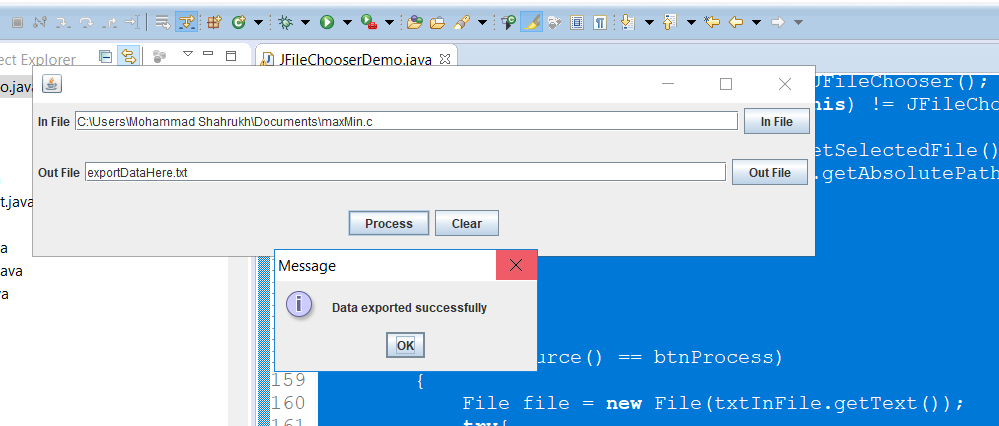
In the Gui need a file in and out writter. That also takes from in file and out file. Write errors to no file found or wrong file. Clear button and Process buttons need to work.
import java.awt.Container;
import java.awt.FlowLayout;
import java.awt.GridLayout;
import java.awt.event.ActionEvent;
import java.awt.event.ActionListener;
import java.io.File;
import java.io.FileNotFoundException;
import java.io.PrintWriter;
import java.util.Scanner;
import java.io.*;
import javax.swing.*;
@SuppressWarnings("serial")
public class JFileChooserDemo extends JFrame implements
ActionListener
{
private JTextField txtInFile;
private JTextField txtOutFile;
private JButton btnInFile;
private JButton btnOutFile;
private JButton btnProcess;
private JButton btnClear;
public JFileChooserDemo()
{
Container canvas = this.getContentPane();
canvas.setLayout(new GridLayout (3,1));
canvas.add(createInputFilePanel());
canvas.add(createOutputFilePanel());
canvas.add(createButtonPanel());
this.setVisible(true);
this.setSize(800, 200);
this.setDefaultCloseOperation(JFrame.EXIT_ON_CLOSE);
}
public JPanel createInputFilePanel()
{
JPanel panel = new JPanel(new
FlowLayout(FlowLayout.LEFT));
panel.add(new JLabel("In File"));
txtInFile = new JTextField(60);
panel.add(txtInFile);
btnInFile = new JButton("In File");
panel.add(btnInFile);
btnInFile.addActionListener(this);
return panel;
}
public JPanel createOutputFilePanel()
{
JPanel panel = new JPanel(new
FlowLayout(FlowLayout.LEFT));
panel.add(new JLabel("Out File"));
txtOutFile = new JTextField(58);
panel.add(txtOutFile);
btnOutFile = new JButton("Out File");
panel.add(btnOutFile);
btnOutFile.addActionListener(this);
return panel;
}
public JPanel createButtonPanel()
{
JPanel panel = new JPanel(new
FlowLayout(FlowLayout.CENTER));
btnProcess =new JButton("Process");
btnProcess.addActionListener(this);
panel.add(btnProcess);
btnClear =new JButton("Clear");
btnClear.addActionListener(this);
panel.add(btnClear);
return panel;
}
public static void main(String[] args)
{
new JFileChooserDemo();
Scanner file = null;
PrintWriter fout= null;
try {
file = new Scanner(new
File("numbers.txt"));
fout = new PrintWriter("TotalSums.txt");
while(file.hasNext())
{
@SuppressWarnings("resource")
Scanner line = new
Scanner(file.nextLine());
int totalSum = 0;
while (line.hasNext()) {
int number = line.nextInt();
totalSum += number;
fout.print(number);
if (line.hasNext())
{
fout.print("+");
}
}
fout.println("=" + totalSum);
}
}
catch
(FileNotFoundException e)
{
System.out.println("NOT FOUND");
}
finally
{
if(fout!=null)fout.close();
}
if(file!=null)file.close();
}
public void clearInput()
{
txtInFile.setText(""); txtOutFile.setText("");
}
@Override
public void actionPerformed(ActionEvent e)
{
if(e.getSource() == btnInFile)
{
JFileChooser jfcInFile = new
JFileChooser();
if(jfcInFile.showOpenDialog(this)
!= JFileChooser.CANCEL_OPTION)
{
File inFile =
jfcInFile.getSelectedFile();
txtInFile.setText(inFile.getAbsolutePath());
}
else
{
}
}
if(e.getSource() == btnProcess)
{
File file = new
File(txtInFile.getText());
try
{
Scanner fin =
new Scanner(file);
}
catch (FileNotFoundException
e1)
{
e1.printStackTrace();
}
}
}
}
Solutions
Expert Solution
Please find the code below:
JFileChooserDemo.java
package classess6;
import java.awt.Container;
import java.awt.FlowLayout;
import java.awt.GridLayout;
import java.awt.event.ActionEvent;
import java.awt.event.ActionListener;
import java.io.File;
import java.io.FileNotFoundException;
import java.io.PrintWriter;
import java.util.Scanner;
import java.io.*;
import javax.swing.*;
@SuppressWarnings("serial")
public class JFileChooserDemo extends JFrame implements
ActionListener
{
private JTextField txtInFile;
private JTextField txtOutFile;
private JButton btnInFile;
private JButton btnOutFile;
private JButton btnProcess;
private JButton btnClear;
public JFileChooserDemo()
{
Container canvas =
this.getContentPane();
canvas.setLayout(new GridLayout
(3,1));
canvas.add(createInputFilePanel());
canvas.add(createOutputFilePanel());
canvas.add(createButtonPanel());
this.setVisible(true);
this.setSize(800, 200);
this.setDefaultCloseOperation(JFrame.EXIT_ON_CLOSE);
}
public JPanel createInputFilePanel()
{
JPanel panel = new JPanel(new
FlowLayout(FlowLayout.LEFT));
panel.add(new JLabel("In
File"));
txtInFile = new
JTextField(60);
panel.add(txtInFile);
btnInFile = new JButton("In
File");
panel.add(btnInFile);
btnInFile.addActionListener(this);
return panel;
}
public JPanel createOutputFilePanel()
{
JPanel panel = new JPanel(new
FlowLayout(FlowLayout.LEFT));
panel.add(new JLabel("Out
File"));
txtOutFile = new
JTextField(58);
panel.add(txtOutFile);
btnOutFile = new JButton("Out
File");
panel.add(btnOutFile);
btnOutFile.addActionListener(this);
return panel;
}
public JPanel createButtonPanel()
{
JPanel panel = new JPanel(new
FlowLayout(FlowLayout.CENTER));
btnProcess =new
JButton("Process");
btnProcess.addActionListener(this);
panel.add(btnProcess);
btnClear =new
JButton("Clear");
btnClear.addActionListener(this);
panel.add(btnClear);
return panel;
}
public static void main(String[] args)
{
new JFileChooserDemo();
Scanner file = null;
PrintWriter fout= null;
try {
file = new
Scanner(new File("numbers.txt"));
fout = new
PrintWriter("TotalSums.txt");
while(file.hasNext())
{
@SuppressWarnings("resource")
Scanner line = new
Scanner(file.nextLine());
int totalSum = 0;
while (line.hasNext()) {
int number =
line.nextInt();
totalSum += number;
fout.print(number);
if (line.hasNext())
{
fout.print("+");
}
}
fout.println("=" + totalSum);
}
}
catch (FileNotFoundException
e)
{
System.out.println("NOT FOUND");
}
finally
{
if(fout!=null)fout.close();
}
if(file!=null)file.close();
}
public void clearInput()
{
txtInFile.setText("");
txtOutFile.setText("");
}
@Override
public void actionPerformed(ActionEvent e)
{
if(e.getSource() ==
btnInFile)
{
JFileChooser
jfcInFile = new JFileChooser();
if(jfcInFile.showOpenDialog(this) !=
JFileChooser.CANCEL_OPTION)
{
File inFile = jfcInFile.getSelectedFile();
txtInFile.setText(inFile.getAbsolutePath());
}
else
{
}
}
if(e.getSource() ==
btnClear)
{
txtInFile.setText("");
txtOutFile.setText("");
}
if(e.getSource() ==
btnOutFile)
{
JFileChooser
jfcInFile = new JFileChooser();
if(jfcInFile.showOpenDialog(this) !=
JFileChooser.CANCEL_OPTION)
{
File inFile = jfcInFile.getSelectedFile();
txtOutFile.setText(inFile.getAbsolutePath());
}
else
{
}
}
if(e.getSource() ==
btnProcess)
{
File file = new
File(txtInFile.getText());
try{
Scanner fin = new Scanner(file);
File writerFile = new
File(txtOutFile.getText());
try{
PrintWriter writer = new
PrintWriter(writerFile);
while(fin.hasNextLine()){
writer.println(fin.nextLine());
}
JOptionPane.showMessageDialog(null, "Data exported
successfully");
writer.close();
}catch(FileNotFoundException e2){
JOptionPane.showMessageDialog(null, "Error!!! File not found+
"+writerFile.getName());
}
}
catch
(FileNotFoundException e1)
{
JOptionPane.showMessageDialog(null, "Error!!!
File not found+ "+file.getName());
e1.printStackTrace();
}
}
}
}
 venereology answered 5 months ago
Related Solutions
JAVA PROJECT CREATING GUI WITH ARRAY Read from a file that contains a paragraph of words....
JavaScript Write out a function that takes in array of numbers. You do not need to...
Modify this program so that it takes in input from a TEXT FILE and outputs the...
Hi, I need the Excel Formula for the below. Thanks much. A business takes out a...
I need a full java code. And I need it in GUI With the mathematics you...
Write a program that takes two sets ’A’ and ’B’ as input read from the file...
A family takes out a mortgage for $277,400.00 from the local bank. The loan is for...
For this question you will need to upload a file. It is question 3 from the...
This is all in Python. Also, the names come from a .txt file that i have...
Write a parameterized function that takes in a file name as a parameter, reads the file,...
- describe why independent oversight is important to taxpayers.
- Graph a Monopoly. Compare the price, quantity, and ATC of a monopoly with a perfectly competitive...
- Problem 18-12 Various shareholders' equity topics; comprehensive [LO18-1, 18-4, 18-5, 18-6, 18-7, 18-8] Part A In...
- Hello There, This is discussion Question For Advanced Database Systems Question: (a) Please define what a...
- Physicians at a clinic gave what they thought were drugs to 860860 patients. Although the doctors...
- On January 1, 2018, bonds with a face value of $ 79,000 were sold. The bonds...
- How do I make this sort in true alphabetical order instead of ascii(ABCabc) order? I am...