Question
In: Computer Science
Caesar’s cipher is a very well known and simple encryption scheme. The point of an encryption...
Caesar’s cipher is a very well known and simple encryption scheme. The point of an encryption scheme is to transform a message so that only those authorized will be able to read it. Caesar’s cipher conceals a message by replacing each letter in the original message (the plaintext), by a letter corresponding to a certain number of letters to the right on the alphabet. Of course, the message can be retrieved by replacing each letter in the encoded message (the ciphertext) with the letter corresponding to the same number of position to the left on the alphabet. To achieve this, the cipher has a key that needs to be kept private. Only those with the key can encode and decode a message. Such a key determines the shift that needs to be performed on each letter. For example, here is how a string containing the entire alphabet will be encrypted using a key equal to 3: Original: abcdefghijklmnopqrstuvwxyz Encrypted: defghijklmnopqrstuvwxyzabc Vigen`ere’s cipher is a slightly more complex encryption scheme, also used to transform a message. Thekey of this cipher consists of a word and the cipher works by applying multiple Caesar ciphers based on the letters of the keyword. Each letter can be associated with a number corresponding to its position in the English alphabet (counting from 0). For instance, the letter ‘a’ is associated to 0, ‘c’ to 2, and ‘z’ to 25. Therefore, the keyword of the cipher will provide as many integers as letters in the word and these integers will be used to implement different Caesar ciphers. Let’s see how: suppose the message to encrypt is “elephants” and the keyword is “rats”. The first thing to do is to repeat the keyword until its length matches the one of the message. Message: e l e p h a n t s Keyword: r a t s r a t s r Now, each letter of “ratsratsr” is associated to both a letter in the message and an integer. We can encrypt each letter of the message using a Caesar cipher where the key corresponds to the integer associated to it through the keyword. In this case ‘r’ corresponds to 17, so the first letter of the message which is an ‘e’ will be encrypted using a ‘v’, the second letter ‘l’ as an ‘l’ since ‘a’ is associated to 0, and so on. The entire message will be encrypted as “vlxhyaglj”. The goal of this exercise is to write several methods in order to create a program that encodes and decodes messages using Caesar’s and Vigen`ere’s ciphers. For the purpose of this exercise we will only consider messages written using lower case letters and blank spaces. All the code for this question must be placed in a file named Cipher.java. 2a. Encoding a character Let’s start by writing a simple method called charRightShift which takes a character and an integer n as inputs, and returns a character. The method should verify that the integer is a number between 0 and 25 (both included). If that’s not the case, the method should print out an error message and return the character with ASCII value 0. Note that ASCII value 0 is not ’0’, but is the char that maps to the value 0! Otherwise, if the character received as input is a lower case letter of the English alphabet, the method will return the letter of the alphabet which is n positions to the right on the alphabet. If the character received as input is not a lower case letter of the English alphabet, then the method returns the character itself with no modification. For example: • charRightShift(‘g’, 2 ) returns ‘i’, • charRightShift(‘#’, 2 ) returns ‘#’, and • charRightShift(‘h’, 32 ) returns the character with ASCII 0 and prints an error message. 2b. Decoding a character Write a method charLeftShift which practically reverses what the previous method does. This method also takes a character and an integer n as inputs, and returns a character. The method should verify that the integer is a number between 0 and 25 (both included). If that’s not the case it should print out an error message and return the character with ASCII value 0. Note that ASCII value 0 is not ’0’, but is the char that maps to the value 0! Otherwise, if the character received as input is a lower case letter of the English alphabet, the method will return the letter of the alphabet which is n positions to the left on the alphabet. If the character received as input is not a lower case letter of the English alphabet, then the method returns the character itself with no modification. For example: • charLeftShift(‘i’, 2 ) returns ‘g’, • charLeftShift(‘#’, 2 ) returns ‘#’, and Page 6 • charLeftShift(‘h’, 32 ) returns the character with ASCII 0 and prints an error message. Note: The two methods above are very similar. This suggests that you write one common method charShift which contains the shifting logic and can shift both left and right. Then charRightShift can simply call charShift with a positive n, and charLeftShift can call charShift with a negative version of n. 2c. Caesar’s cipher - Encoding Write a method caesarEncode that takes a String message and an int key as inputs and returns the string obtained by encrypting message using the Caesar’s cipher with key equal to key. To create the encrypted string you need to replace each letter in message, by the letter corresponding to key letters to the right on the alphabet. You should call and use charRightShift appropriately in order to get full points. The input key must be an integer from 0 to 25 (included). Your method should print out an error message and return the empty string if that’s not the case. For the purpose of this exercise you can assume that the strings to encrypt will only contain letters from the English alphabet in lower case and blank spaces. Blank spaces don’t get modified by the encryption. For example, caesarEncode(‘‘cats and dogs’’, 5) should return ‘‘hfyx fsi itlx’’. 2d. Caesar’s cipher - Decoding Write a method caesarDecode that takes a String message and an int key as inputs and retunrs the string obtained by decrypting message using the Caesar’s cipher with key equal to key. To decrypt the string you need to replace each letter in message, by the letter corresponding to key letters to the left on the alphabet. To get full points, you should call and use the method charLeftShift appropriately. As for caesarEncode, the key must be a number between 0 and 25. Your method should print an error message and return an empty string if that’s not the case. More over, you can expect strings to contain only lower case letters from the English alphabet and blank spaces which will not be modified by the decryption (as they were not modified by the encryption). For example, caesarDecode(‘‘hfyx fsi itlx’’, 5) should return ‘‘cats and dogs’’. 2e. From String to keys Write a method called obtainKeys which takes a String as input and returns an array of integers. The size of the array will be equal to the length of the String. The elements of the array correspond to the position (counting from 0) of each character in the String as a letter of the English alphabet. For instance obtainKeys(‘‘hello’’) returns [7, 4, 11, 11, 14]. For the purpose of this exercise you can assume that the input String to this method will only contain lower case letters of the English alphabet. 2f. Vigen`ere’s cipher - Encoding Write a method vigenereEncode that takes a String message and a String keyword as inputs and returns the string obtained by encrypting message using the Vigen`ere’s cipher with key equal to keyword. Remember that this cipher first associates each letter of the keyword to a letter of the message. Then it shifts (to the right) each letter of the message by the number of positions determined by the corresponding letter in the keyword. Use the methods obtainKeys and charRightShift appropriately in order to implement the encryption.The input keyword must contain only characters from the lower case English alphabet. Your method should print out an error message and return the empty string if that’s not the case. For the purpose of this exercise you can assume that the strings to encrypt will only contain letters from the English alphabet in lower case and blank spaces. Blank spaces don’t get modified by the encryption. For example, vigenereEncode(‘‘elephants and hippos’’, ‘‘rats’’) should return ‘‘vlxhyaglj tfu aagphk’’. 2g. Vigen`ere’s cipher - Decoding Finally, write a method vigenereDecode that takes a String message and a String keyword as inputs and returns the string obtained by decrypting the message using the Vigen`ere’s cipher with key equal to keyword. Remember that this cipher first associates each letter of the keyword to a letter of the message. Then it shifts (to the left) each letter of the message by the number of positions determined by the corresponding letter in the keyword. Use the methods obtainKeys and charLeftShift appropriately in order to implement the decryption. Again, the input keyword must contain only characters from the lower case English alphabet. Your method should print out an error message and return the empty string if that’s not the case. For the purpose of this exercise you can assume that the strings to decrypt will only contain letters from the English alphabet in lower case and blank spaces. For example, vigenereDecode(‘‘vlxhyaglj tfu aagphk’’, ‘‘rats’’) should return ‘‘elephants and hippos’’.
Solutions
Expert Solution
import java.util.Arrays;
public class Cipher {
public static void main(String[] args) {
// Outputs
System.out.println("charRightShift('g',2): " + charRightShift('g',
2));
System.out.println("charRightShift('#',2): " + charRightShift('#',
2));
System.out.print("charRightShift('h',32): ");
System.out.println(charRightShift('h', 32));
System.out.println("charLeftShift('i',2): " + charLeftShift('i',
2));
System.out.println("charLeftShift('#',2): " + charLeftShift('#',
2));
System.out.print("charLeftShift('h',32): ");
System.out.println(charLeftShift('h', 32));
System.out.println("ceasarEncode: "
+ caesarEncode("cats and dogs", 5));
System.out.println("ceasarDecode: "
+ caesarDecode("hfyx fsi itlx", 5));
System.out.println("obtainKeys(\"hello\"): "
+ Arrays.toString(obtainKeys("hello")));
System.out.println("vigenereEncode:
"
+ vigenereEncode("elephants and hippos",
"rats"));
System.out.println("vigenereDecode:
"
+ vigenereDecode("vlxhyaglj tfu aagphk",
"rats"));
}
public static char charRightShift(char input, int
n) {
if (n >= 0 && n <=
25) { // check if n is valid
if (input >=
'a' && input <= 'z') { // check if input character
is
// lower
case
return charShift(input, n);
} else {
return input;
}
} else {
System.out.println("Invalid int value");
return 0;
}
}
public static char charLeftShift(char input, int n)
{
if (n >= 0 && n <=
25) { // check if n i valid
if (input >=
'a' && input <= 'z') { // check if input character
is
// lower
case
return charShift(input, -1 * n);
} else {
return input;
}
} else {
System.out.println("Invalid int value");
return 0;
}
}
public static char charShift(char input, int n)
{
char ch = (char) (input + n); //
shifting the character
if (ch < 'a') { // check if
final character is between 'a' and 'z'
ch = (char) ('z'
+ ch - 'a' + 1); // modification such that final
//
character is between 'a' and
//
'z'
} else if (ch > 'z') {
ch = (char) ('a'
+ ch - 'z' - 1); // modification such that final
//
character is between 'a' and
//
'z'
}
return ch;
}
public static String caesarEncode(String inputStr,
int n) {
if (n >= 0 && n <=
25) { // input validation
char[] charArray
= inputStr.toCharArray();
for (int i = 0;
i < charArray.length; i++) {
charArray[i] = charRightShift(charArray[i], n);
// encrypt by
// shifting each
// character
}
return new
String(charArray); // Obtain final string
} else {
System.out.println("Invalid int value");
return "";
}
}
public static String caesarDecode(String inputStr,
int n) {
if (n >= 0 && n <=
25) { // input validation
char[] charArray
= inputStr.toCharArray();
for (int i = 0;
i < charArray.length; i++) {
charArray[i] = charLeftShift(charArray[i], n);
// decrypt by
// shifting each
// character
}
return new
String(charArray); // Obtain final string
} else {
System.out.println("Invalid int value");
return "";
}
}
public static int[] obtainKeys(String key) {
char[] charArray =
key.toCharArray();
int[] intArray = new
int[key.length()];
for (int i = 0; i <
charArray.length; i++) {
intArray[i] =
charArray[i] - 'a'; // obtain int value based on
//
difference with 'a'
}
return intArray;
}
public static String vigenereEncode(String message,
String keyword) {
char[] keyWordChars =
keyword.toCharArray();
for (char ch : keyWordChars)
{
if (ch < 'a'
|| ch > 'z') { // input keyword validation
System.out.println("Invalid keyword");
return "";
}
}
int[] intArray =
obtainKeys(keyword); // obtain key as integer array
char[] messageChars =
message.toCharArray();
for (int i = 0; i <
messageChars.length; i++) {
messageChars[i]
= charRightShift(messageChars[i], intArray[i
% keyword.length()]); //
encoding each character at a time
}
return new
String(messageChars);
}
public static String vigenereDecode(String message,
String keyword) {
char[] keyWordChars =
keyword.toCharArray();
for (char ch : keyWordChars)
{
if (ch < 'a'
|| ch > 'z') { // input keyword validation
System.out.println("Invalid keyword");
return "";
}
}
int[] intArray =
obtainKeys(keyword);
char[] messageChars =
message.toCharArray();
for (int i = 0; i <
messageChars.length; i++) {
messageChars[i]
= charLeftShift(messageChars[i], intArray[i
% keyword.length()]); //
decoding by shifting each character
// at a time
}
return new
String(messageChars);
}
}
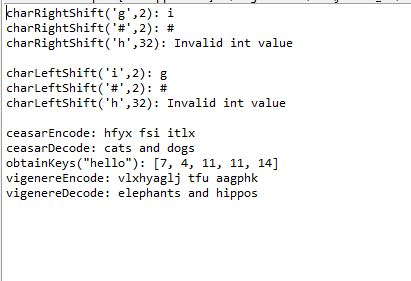
Output:
 venereology answered 3 weeks ago
Related Solutions
The Vigenère Cipher is an encryption algorithm that combines the use of a keyword with the...
In cryptography, a Caesar cipher, also known as Caesar's cipher, the shift cipher, Caesar's code or...
The textbook presents a very simple, linear scheme of the central dogma of molecular biology (text...
In C++, write a program to implement the Caesar Cipher for both encryption and decryption. The...
The mathematical expression of the encryption and decryption process of a Caesar cipher algorithm is expressed...
In cryptography, Caesar cipher is one of the simplest encryption techniques. The key idea of this...
2- Plain Text (Message): a) JERSEY b) CALIFORNIA Key: CSEC Scheme: Vigenere Cipher Cipher Text:
Topic: Encrypt-then-authenticate scheme, Cryptography Let ΠE = (GenE, EncE, DecE) be an encryption scheme and ΠM...
Topic: Encrypt-then-authenticate scheme, Cryptography Let ΠE = (GenE, EncE, DecE) be an encryption scheme and ΠM...
A very well-known author, Dan Green was visiting a friend to talk about topics for a...
- IT Project Management: Explain in detail and give 3 references: What are some ways to manage...
- “A working mother receives $300,000 salary, while spends $30,000 for hiring baby-sitter.” What's the impact on...
- In a women's 100-m race, accelerating uniformly, Laura takes 1.90 s and Healan 3.15 s to...
- The HUANG Company currently has one bond issue outstanding. This bond pays a coupon rate of...
- These two waves travel along the same string: y1 = (3.52 mm) sin(1.75?x - 470?t) y2...
- An analyte has been discovered ( so it's new) in the Tobago population. Define the term...
- A freestyle skier is training for the Olympics. In this sport the skier starts at the...