Question
In: Computer Science
JAVA - Write a program that prompts the user (at the command line) for 4 positive...
JAVA - Write a program that prompts the user (at the command line) for 4 positive integers, then draws a pie chart in a window. Convert the numbers to percentages of the numbers’ total sum; color each segment differently; use Arc2D. No text fields (other than the window title) are required. Provide a driver in a separate source file to test your class.
Please use the following:
java.lang.Object
java.awt.Graphics
java.awt.Graphics2D
Take note of the following:
setPaint
setStroke
fill
// imports
public class PieChartPanel extends JPanel {
// attributes
// constructor
public void paintComponent(Graphics g) {
super.paintComponent (g);
Graphics2D g2d = ( Graphics2D ) g;
...
}
There should be a paintComponent method that calls its parent
Solutions
Expert Solution
CODE:
import java.awt.Color;
import java.awt.Graphics;
import java.awt.Graphics2D;
import java.awt.Rectangle;
import java.util.Scanner;
import javax.swing.JComponent;
import javax.swing.JFrame;
// class to store the value and color mapping of the
// pie segment(slices)
class Segment {
double value;
Color color;
// constructor
public Segment(double value, Color color) {
this.value = value;
this.color = color;
}
}
class pieChartComponent extends JComponent {
private static final long serialVersionUID =
1L;
Segment[] Segments;
// Parameterized constructor
// create 4 segments of the pie chart
pieChartComponent(int v1, int v2, int v3, int v4)
{
Segments = new Segment[] { new
Segment(v1, Color.black), new Segment(v2, Color.green), new
Segment(v3, Color.yellow),
new Segment(v4, Color.red) };
}
// function responsible for calling the worker
method drawPie
public void paint(Graphics g) {
drawPie((Graphics2D) g,
getBounds(), Segments);
}
// worker function for creating the percentage wise
slices of the pie chart
void drawPie(Graphics2D g, Rectangle area, Segment[]
Segments) {
double total = 0.0D;
// fin the total of the all the
inputs provided by the user
for (int i = 0; i <
Segments.length; i++) {
total +=
Segments[i].value;
}
// Initialization
double curValue = 0.0D;
int strtAngle = 0;
// iterate till all the segments
are covered
for (int i = 0; i <
Segments.length; i++) {
// compute start
angle, with percentage
strtAngle =
(int) (curValue * 360 / total);
// find the area
angle of the segment
int arcAngle =
(int) (Segments[i].value * 360 / total);
g.setColor(Segments[i].color);
g.fillArc(area.x, area.y, area.width, area.height, strtAngle,
arcAngle);
curValue +=
Segments[i].value;
}
}
}
public class Graphic_Pie2D {
public static void main(String[] argv) {
System.out.println("Pleae
provide 4 values, to create the pie chart");
Scanner input = new
Scanner(System.in);
int v1, v2, v3, v4;
v1 = input.nextInt();
v2 = input.nextInt();
v3 = input.nextInt();
v4 = input.nextInt();
// create a JFrame with title
JFrame frame = new JFrame("Pie
Chart");
frame.getContentPane().add(new
pieChartComponent(v1,v2,v3,v4));
frame.setSize(500, 300);
frame.setVisible(true);
}
}
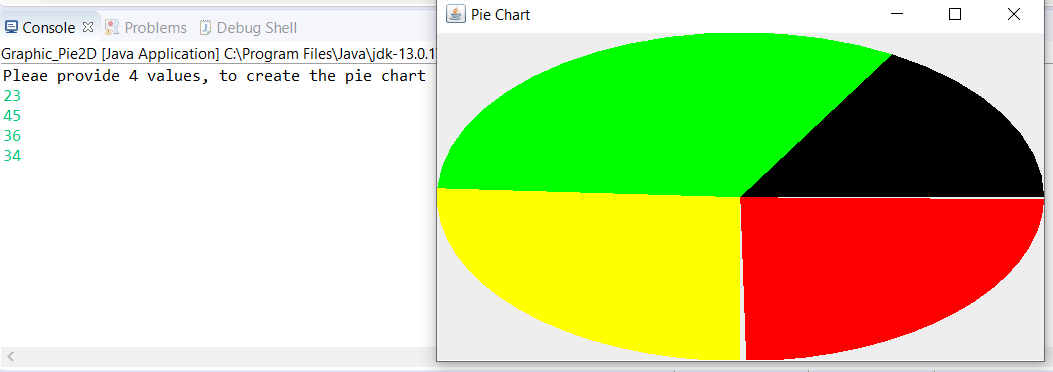
RESULT:
 venereology answered 3 months ago
Related Solutions
In Java: Write a program that prompts the user to enter a positive number until the...
JAVA Language: Write a program that prompts the user to enter a positive integer n (0...
Write a Java program (name it InputSum) that prompts the user to enter positive integer numbers...
Write a Java program which reads a positive integer from the command line, then displays the...
JAVA Program Write a program that prompts the user for data until the user wishes to...
Write a program that prompts the user to enter a positive integer and then computes the...
Write a program in C that reads prompts the user for a positive integer and then...
Write a program which: Prompts the user for a positive integer >= 0 Validates the user...
Write a program in JAVA that prompts the user for a lower bound and an upper...
JAVA: Write a program that prompts the user to input a type of medication and the...
- Two 10-cm-diameter charged rings face each other, 15cm apart. The left ring is charged to -29nC...
- Under what conditions would it be possible for an excise tax to have no efficiency cost...
- explain the difference between activities and financial statements of service businesses and merchandising businesses.
- 2. Compare and compare the matrix multiplication algorithm and the Floyd-Warshall algorithm to find all pairs...
- Q: 50.00 ml of 0.5216 M copper(II) nitrate solution is combined with 100.0 ml of 0.5580...
- This is a business law question. Explain how environmental laws regulate the use of toxic substances...
- A sky diver and her parachute system weigh a total of 800 N. She is falling...