Question
In: Computer Science
Write a Java program to do the following with your name. This can all be done...
Write a Java program to do the following with your name. This can all be done in the main() method.
1. Create a String variable called myName and assign your personal name to it. Use proper capitalization for a legal name. I.e. String myName = "Billy Bob";
2. Load myName with the upper case version of itself and display the result.
3. Load myName with the lower case version of itself and display the result.
4. Capitalize the first letter of each given name in the lowercased name and display the result. Load the result into myName. Hint: This is not a single method call. You will need a loop to perform this. Hint: The substring method will be very helpful as you should likely build a new string result. Avoid magic number references. This solution should work with any proper name.
5. Using the value of the variable myName from step 4:
a.Display the Initials of the name. ( This may require a
Loop)
b.Use the trim methd on myName and store the results into
myName.
c.Display the size of the name
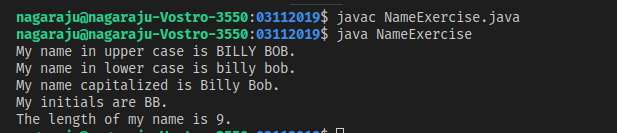
// Using Billy Bob as the name - here are the expected results:
My name in upper case is BILLY BOB.
My name in lower case is billy bob.
My name capitalized is Billy Bob.
My initials are BB.
The length of my name is 9.
Solutions
Expert Solution
if you have any doubts, please give me comment...
public class NameExercise{
public static void main(String[] args) {
String myName = "Billy Bob";
myName = myName.toUpperCase();
System.out.println("My name in upper case is "+myName+".");
myName = myName.toLowerCase();
System.out.println("My name in lower case is "+myName+".");
String result = "";
for(String temp: myName.split(" ")){
result += (temp.charAt(0)+"").toUpperCase()+temp.substring(1)+" ";
}
myName = result.trim();
System.out.println("My name capitalized is "+myName+".");
result = "";
for(String n: myName.split(" ")){
result += (myName.charAt(0)+"");
}
System.out.println("My initials are "+result+".");
System.out.println("The length of my name is "+myName.length()+".");
}
}
 venereology answered 4 months ago
Related Solutions
Write a program in Java Swing that can Display all the name list then will generate...
TreeSetDemo IN JAVA PLEASE The following program can be done all in the main method. It...
Create a Java Program to calculate compound interest. This can all be done in the main()...
You will write several classes for this program in Java. The name of all classes for...
Using jGRASP, write a Java program named LastnameFirstname10.java, using your last name and your first name,...
Using jGRASP, write a Java program named LastnameFirstname09.java, using your last name and your first name,...
Using jGRASP, write a Java program named LastnameFirstname11.java, using your last name and your first name,...
Specifications: Write a Java program called LifeRaft.java that will do all of the following: Display a...
This program must be done in JAVA. Write a program to monitor the flow of an...
Write a complete program in java that will do the following:
- Two 10-cm-diameter charged rings face each other, 15cm apart. The left ring is charged to -29nC...
- Under what conditions would it be possible for an excise tax to have no efficiency cost...
- explain the difference between activities and financial statements of service businesses and merchandising businesses.
- 2. Compare and compare the matrix multiplication algorithm and the Floyd-Warshall algorithm to find all pairs...
- Q: 50.00 ml of 0.5216 M copper(II) nitrate solution is combined with 100.0 ml of 0.5580...
- This is a business law question. Explain how environmental laws regulate the use of toxic substances...
- A sky diver and her parachute system weigh a total of 800 N. She is falling...