Question
In: Computer Science
Im writing a matlab script called vecadd that deals with vectors and is converting them between...
Im writing a matlab script called vecadd that deals with vectors and is converting them between polar and rectangular coordinates. It is supposed to function based upon the following parameters:
vecadd adds two vectors and outputs the resultant vector.
vecadd(A,B) assumes A and B are both in rectangular form. The first element of each vector is the "x" component and the second element is the "y" component. The resultant is output in rectangular form.
vecadd(A,B,'p') assumes A and B are both in polar form. The first element of each vector is the magnitude and the second element is the angle in degrees. The resultant is output in polar form.
vecadd(A,B,'r') is equivalent to vecadd(A,B).
vecadd(A,B,'p','r') assumes A is in polar form and B is in rectangular form. vecadd(A,B,'r','p') assumes A is in rectangular form and B is in polar form. The resultant is output in rectangular form.
vecadd(A,B,'p','r','p') outputs the resultant in polar form.
vecadd(A,B,'p','r','r') is equivalent to vecadd(A,B,'p','r').
[RES, FORM] = vecadd(A,B,'p','r','p') outputs the resultant and the format of the resultant vector ('polar' if the last input argument is 'p' and 'rectangular' if the last input argument is 'r').
I need some help getting on the right track. Anything will do. Thanks
Solutions
Expert Solution
Following is the code, hope this helps!
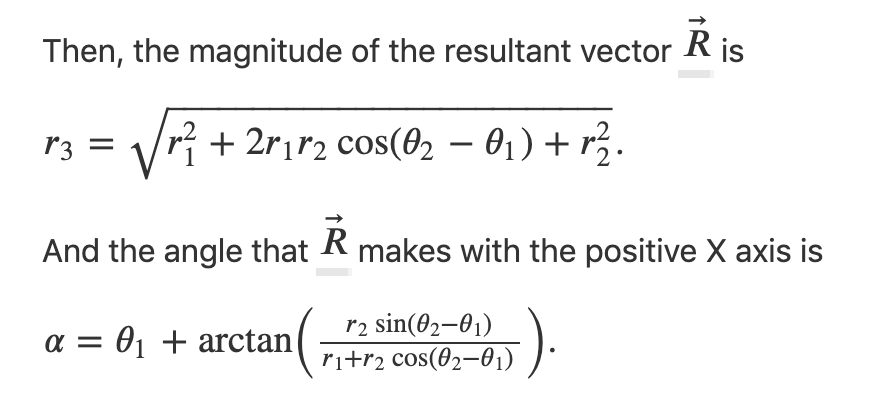
To add 2 vectors in polar form -
Code:
% sample run
vecadd([2, 30], [1, 1], 'p', 'r', 'r')
function ans = vecadd(A, B, varargin)
if(nargin == 2)
ans = addR(A, B);
elseif(nargin ==3) % for 3 arguments
if(varargin{1} == 'p')
ans = addP(A, B);
else
ans = addR(A, B);
end
elseif(nargin == 4) % for 4 arguments
if(varargin{1} == 'p' && varargin{2} == 'r')
tmp = [A(1)*cosd(A(2)), A(1)*sind(A(2))];
ans = addR(tmp, B);
end
if(varargin{1} == 'r' && varargin{2} == 'p')
tmp = [B(1) *cosd(B(2)), B(1)*sind(B(2))];
ans = addR(A, tmp);
end
elseif(nargin == 5) % for 5 arguments
if(varargin{1} == 'p' && varargin{2} == 'r' && varargin{3} == 'p')
tmp = [A(1)*cosd(A(2)), A(1)*sind(A(2))];
x = addR(tmp, B);
ans = [(x(1)^2 + x(2)^2)^(1/2), arctan(x(2)/x(1))];
end
if(varargin{1} == 'p' && varargin{2} == 'r' && varargin{3} == 'r')
tmp = [A(1)*cosd(A(2)), A(1)*sind(A(2))];
ans = addR(tmp, B);
end
end
end
% helper function to add polar coordinates
function ans = addP(A, B)
r = (A(1)^2 + 2*A(1)*B(1)*cos(B(2)-A(2)) + B(1)^2)^(1/2);
alpha = A(2) + arctan((B(1)*cos(B(2)-A(2))) / (A(1) + B(1)*cos(B(2)-A(2))));
ans = [r, alpha];
end
% helper function to add rectangular coordinates
function ans = addR(A, B)
ans = [A(1) + B(1), A(2) + B(2)];
end
Sample run:
ans =
2.7321 2.0000
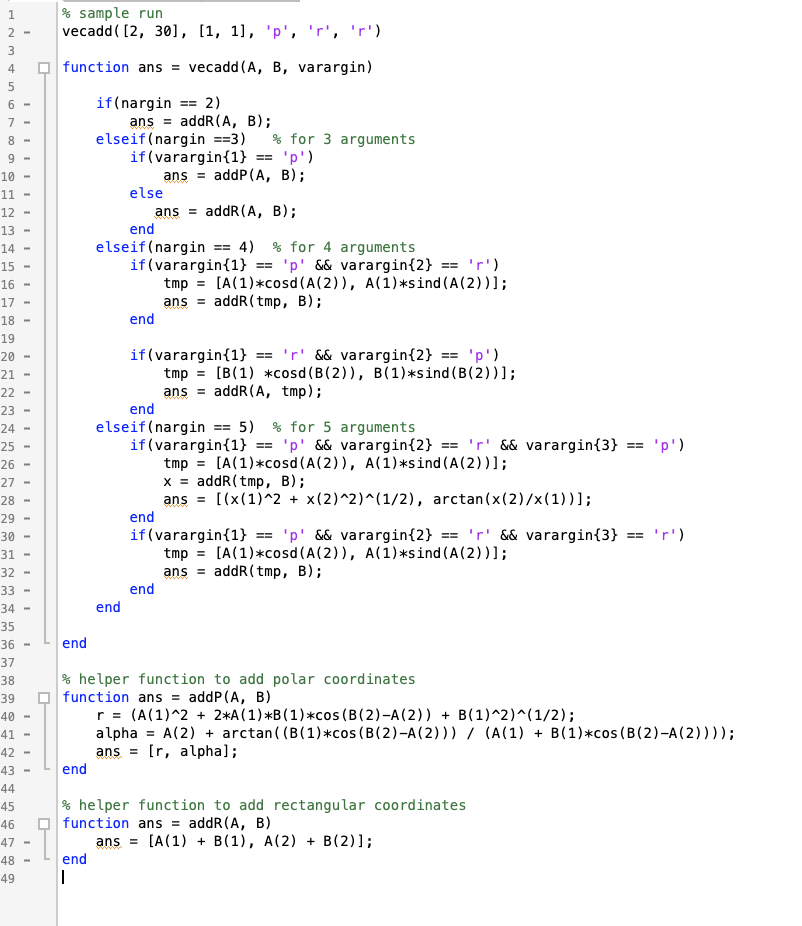
Code screenshots:
 venereology answered 4 months ago
Related Solutions
Write a Matlab script which creates two vectors from the table below; pne vector for the...
(MATLAB) im trying to solve an equation for gravitational force for 41 radius values in between...
USING MATLAB Where indicated in the script below, write a function, called myflip, which accepts one...
Using Matlab, Write a script that validates the relationship between sin u, cos u, and tan...
- Based on what you learned in this module, identify one person who you believe possesses primarily...
- An Auditor may decide to make use of a specialist in obtaining sufficient appropriate audit evidence...
- Dirac's Theorem states that "A simple graph with n vertices (n >= 3) is Hamiltonian if...
- Two 10-cm-diameter charged rings face each other, 15cm apart. The left ring is charged to -29nC...
- Under what conditions would it be possible for an excise tax to have no efficiency cost...
- explain the difference between activities and financial statements of service businesses and merchandising businesses.
- 2. Compare and compare the matrix multiplication algorithm and the Floyd-Warshall algorithm to find all pairs...