Question
In: Computer Science
In C Sharp with the use of the Try and Catch method create an application that...
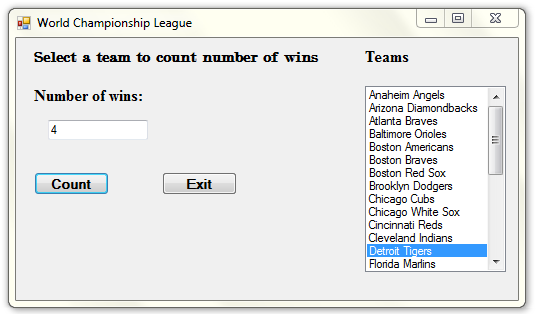
In C Sharp with the use of the Try and Catch method create an application that displays the contents of the Teams.txt file in a ListBox control. When the user selects a team in the ListBox, the application should display the number of times the team has won the World Series in the time period from 1903 through 2012.
Teams.txt--This file contains a list of several Major League baseball teams in alphabetical order. Each team listed in the file has won the World Series at least once.
WorldSeriesWinners.txt - This file contains a chronological list of the World Series' winning teams from 1903 through 2012. (The first line in the file is the name of the team that won in 1903, and the last line is the name of the team that won in 2012. Note that the World Series was not played in 1904 or 1994.)
Hint: Read the contents of the WorldSeriesWinners.text file into a List. When the user selects a team in the ListBox, the application should display the number of times the selected team appears.
Solutions
Expert Solution
C-Sharp Windows Application:
File: Form1.Designer.cs
namespace worldChampionship
{
partial class Form1
{
/// <summary>
/// Required designer variable.
/// </summary>
private System.ComponentModel.IContainer components = null;
/// <summary>
/// Clean up any resources being used.
/// </summary>
/// <param name="disposing">true if managed resources should
be disposed; otherwise, false.</param>
protected override void Dispose(bool disposing)
{
if (disposing && (components != null))
{
components.Dispose();
}
base.Dispose(disposing);
}
#region Windows Form Designer generated code
/// <summary>
/// Required method for Designer support - do not modify
/// the contents of this method with the code editor.
/// </summary>
private void InitializeComponent()
{
this.lbTeams = new System.Windows.Forms.ListBox();
this.lblHeading = new System.Windows.Forms.Label();
this.lblResult = new System.Windows.Forms.Label();
this.label1 = new System.Windows.Forms.Label();
this.btnCount = new System.Windows.Forms.Button();
this.btnExit = new System.Windows.Forms.Button();
this.txtWins = new System.Windows.Forms.TextBox();
this.SuspendLayout();
//
// lbTeams
//
this.lbTeams.FormattingEnabled = true;
this.lbTeams.Location = new System.Drawing.Point(349, 48);
this.lbTeams.Name = "lbTeams";
this.lbTeams.Size = new System.Drawing.Size(141, 186);
this.lbTeams.TabIndex = 0;
//
// lblHeading
//
this.lblHeading.AutoSize = true;
this.lblHeading.Font = new System.Drawing.Font("Modern No. 20",
12F, System.Drawing.FontStyle.Bold,
System.Drawing.GraphicsUnit.Point, ((byte)(0)));
this.lblHeading.Location = new System.Drawing.Point(15, 9);
this.lblHeading.Name = "lblHeading";
this.lblHeading.Size = new System.Drawing.Size(292, 18);
this.lblHeading.TabIndex = 1;
this.lblHeading.Text = "Select a team to count number of
wins";
//
// lblResult
//
this.lblResult.AutoSize = true;
this.lblResult.Font = new System.Drawing.Font("Times New Roman",
12F, System.Drawing.FontStyle.Bold,
System.Drawing.GraphicsUnit.Point, ((byte)(0)));
this.lblResult.Location = new System.Drawing.Point(14, 48);
this.lblResult.Name = "lblResult";
this.lblResult.Size = new System.Drawing.Size(118, 19);
this.lblResult.TabIndex = 2;
this.lblResult.Text = "Number of wins:";
//
// label1
//
this.label1.AutoSize = true;
this.label1.Font = new System.Drawing.Font("Times New Roman", 12F,
System.Drawing.FontStyle.Bold, System.Drawing.GraphicsUnit.Point,
((byte)(0)));
this.label1.Location = new System.Drawing.Point(345, 9);
this.label1.Name = "label1";
this.label1.Size = new System.Drawing.Size(53, 19);
this.label1.TabIndex = 4;
this.label1.Text = "Teams";
//
// btnCount
//
this.btnCount.Font = new System.Drawing.Font("Microsoft Sans
Serif", 9.75F, System.Drawing.FontStyle.Bold,
System.Drawing.GraphicsUnit.Point, ((byte)(0)));
this.btnCount.Location = new System.Drawing.Point(18, 134);
this.btnCount.Name = "btnCount";
this.btnCount.Size = new System.Drawing.Size(75, 23);
this.btnCount.TabIndex = 5;
this.btnCount.Text = "Count";
this.btnCount.UseVisualStyleBackColor = true;
this.btnCount.Click += new
System.EventHandler(this.btnCount_Click);
//
// btnExit
//
this.btnExit.Font = new System.Drawing.Font("Microsoft Sans Serif",
9.75F, System.Drawing.FontStyle.Bold,
System.Drawing.GraphicsUnit.Point, ((byte)(0)));
this.btnExit.Location = new System.Drawing.Point(146, 134);
this.btnExit.Name = "btnExit";
this.btnExit.Size = new System.Drawing.Size(75, 23);
this.btnExit.TabIndex = 6;
this.btnExit.Text = "Exit";
this.btnExit.UseVisualStyleBackColor = true;
this.btnExit.Click += new
System.EventHandler(this.btnExit_Click);
//
// txtWins
//
this.txtWins.Location = new System.Drawing.Point(32, 82);
this.txtWins.Name = "txtWins";
this.txtWins.Size = new System.Drawing.Size(100, 20);
this.txtWins.TabIndex = 7;
//
// Form1
//
this.AutoScaleDimensions = new System.Drawing.SizeF(6F, 13F);
this.AutoScaleMode = System.Windows.Forms.AutoScaleMode.Font;
this.ClientSize = new System.Drawing.Size(502, 262);
this.Controls.Add(this.txtWins);
this.Controls.Add(this.btnExit);
this.Controls.Add(this.btnCount);
this.Controls.Add(this.label1);
this.Controls.Add(this.lblResult);
this.Controls.Add(this.lblHeading);
this.Controls.Add(this.lbTeams);
this.Name = "Form1";
this.Text = "World Championship League";
this.Load += new System.EventHandler(this.Form1_Load);
this.ResumeLayout(false);
this.PerformLayout();
}
#endregion
private System.Windows.Forms.ListBox lbTeams;
private System.Windows.Forms.Label lblHeading;
private System.Windows.Forms.Label lblResult;
private System.Windows.Forms.Label label1;
private System.Windows.Forms.Button btnCount;
private System.Windows.Forms.Button btnExit;
private System.Windows.Forms.TextBox txtWins;
}
}
File: Form1.cs
using System;
using System.Collections.Generic;
using System.ComponentModel;
using System.Data;
using System.Drawing;
using System.Linq;
using System.Text;
using System.Windows.Forms;
using System.IO;
namespace worldChampionship
{
public partial class Form1 : Form
{
//List to hold winners data
List<string> winners = new List<string>();
public Form1()
{
InitializeComponent();
}
private void Form1_Load(object sender, EventArgs e)
{
//Loading WorldSeriesWinners.txt file into list
loadWinnersFile();
//Opening file for reading
StreamReader sr = new StreamReader("Teams.txt");
string team = "";
try
{
//Reading team
team = sr.ReadLine();
//Read till end of file is reached
while (team != null)
{
this.lbTeams.Items.Add(team);
//Reading next team
team = sr.ReadLine();
}
//closing file
sr.Close();
}
catch (Exception ex)
{
MessageBox.Show(ex.ToString());
}
finally
{
//closing file
sr.Close();
}
}
/* Method that loads winners data from file into list */
public void loadWinnersFile()
{
//Opening file for reading
StreamReader sr = new StreamReader("WorldSeriesWinners.txt");
string team = "";
try
{
//Reading team
team = sr.ReadLine();
//Read till end of file is reached
while (team != null)
{
winners.Add(team);
//Reading next team
team = sr.ReadLine();
}
//closing file
sr.Close();
}
catch (Exception ex)
{
MessageBox.Show(ex.ToString());
}
finally
{
//closing file
sr.Close();
}
}
//Count button click event handler
private void btnCount_Click(object sender, EventArgs e)
{
string teamSelected;
//Getting the team selected
teamSelected = lbTeams.SelectedItem.ToString();
int won = 0;
//Iterating over winners list
for (int i = 0; i < winners.Count; i++)
{
//If team is found
if (winners[i].Equals(teamSelected))
{
//Incrementing number of wins
won = won + 1;
}
}
//Writing number of wins to label
txtWins.Text = won.ToString();
}
private void btnExit_Click(object sender, EventArgs e)
{
Application.Exit();
}
}
}
_______________________________________________________________________________________________
Sample Run:
 venereology answered 5 months ago
Related Solutions
Create in C Sharp : Create an application that predicts the approximate size of a population...
Instead of using int.TryParse, use int.Parse instead and use try/catch in C# to handle possible errors...
(in C# please.) EXCEPTION HANDLING Concept Summary: 1. Use of try… catch in a program 2....
Find the readData() method Inside this method is a try block without any catch statements. Add...
create your own function that wraps it with try catch. Pass in the string to parse,...
A brief explanation is needed for these true/false questions. a) A method that contains a try-catch-finally...
What is Try and Catch in Java with example?
programming language is c#. Create a method that prompts a user of your console application to...
Create an C# application named ConvertMilesToKilometers whose Main() method prompts a user for a number of...
Exercise 2: Try-Catch Exercise Write a Java code that does the following: Create a class MyClass...
- describe why independent oversight is important to taxpayers.
- Graph a Monopoly. Compare the price, quantity, and ATC of a monopoly with a perfectly competitive...
- Problem 18-12 Various shareholders' equity topics; comprehensive [LO18-1, 18-4, 18-5, 18-6, 18-7, 18-8] Part A In...
- Hello There, This is discussion Question For Advanced Database Systems Question: (a) Please define what a...
- Physicians at a clinic gave what they thought were drugs to 860860 patients. Although the doctors...
- On January 1, 2018, bonds with a face value of $ 79,000 were sold. The bonds...
- How do I make this sort in true alphabetical order instead of ascii(ABCabc) order? I am...