Question
In: Computer Science
use the following codes and change In the main-content div, for content, add three select dropdowns separated...
use the following codes and change In the main-content div, for content, add three select dropdowns separated by line breaks. One will have ID changeFont, one will have ID bgColor and the third will have ID resizeDiv. For changeFont, the options should be: [CHANGE FONT SIZE] value blank, 8 pt. value 8t, 10 pt. value 10pt, 12 pt. value 12pt, 14 pt. value 14pt, and 16 pt. value 16pt. For bgColor the options should be [CHANGE BG COLOR] value blank, black value #00000, red value #ff0000, green value #00ff00, blue value #0000ff, white value #ffffff. For resizeDiv the options should be [RESIZE MAIN DIV] value blank, 150px value 150px, 250px value 250px, 350px value 350px, 450px value 450px, 550px value 550px, 650px value 650px.
3. Write three functions: changeFont(), changeBGColor(), and resizeDiv(). changeFont will change the font size of the main div based on what the user selects, or the default of 12pt if the user selects [CHANGE FONT SIZE]. changeBGColor will change the background color to the color selected, and ALSO set the font color to white if the selection is black, red, or blue, and font color will be black if white or green. The default for changeBGColor will be white with black font. resizeDiv will resize the main content div to the PX selected, or 85% if nothing is selected. HINT: onchange.
HTML
<head>
<!-- title for web page -->
<title>jen's CISS221 JavaScript Template</title>
<meta charset="UTF-8">
<meta name="viewport" content="width=device-width, initial-scale=1">
<!-- <link> is used for external stylesheet -->
<link href="JStemplate.css" rel="stylesheet">
</head>
<body>
<div id="banner" class="banner">Mat's Javascript Template</div>
<div id="left-content" class="left-content">Left content</div>
<div id="main-content" class="main-content">This is Main are</div>
<div id="footer" class="footer">©2019 Mat cantor for CISS 221</div>
</body>
</html>
CSS
/* style rule for body */
body{
background-color: #66ff66;
}
/* style rule for banner */
#banner{
padding-top:20pt;
Padding-bottom:20pt;
color:#141414;
background-color:#cccc33;
text-align: center;
font-size: 18pt;
border: 2px solid green ;
padding: 20px;
}
/* style rule for left-content */
#left-content{
background-color: #000000 ;
text-align: center;
height: 45pt;
Width:50pt;
padding-top: 100pt;
color :#cccc33;
float:left;
border: 2px solid green ;
padding: 65px;
}
/* style rule for main-content */
#main-content{
background-color:#ffffff;
text-align: center;
padding-top:120pt;
Padding-bottom:10pt;
color :#cccc33;
border: 2px solid green;
}
/* style rule for footer */
#footer {
background-color: #cccc33;
text-align: center;
font-size: 8pt;
padding-top:10pt;
Padding-bottom:15pt;
border: 2px solid green ;
padding: 20px;
clear:both
}
Solutions
Expert Solution
The Following Code will serve the purpose, I have used an onload property of body tag to run all the function to set Default values when Page Loads.
index.html file
<HTML>
<head>
<!-- title for web page -->
<title>jen's CISS221 JavaScript Template</title>
<meta charset="UTF-8">
<meta name="viewport" content="width=device-width,
initial-scale=1">
<!-- <link> is used for external stylesheet -->
<link href="JStemplate.css" rel="stylesheet">
</head>
<body onload="ChangeFont(),changeBGColor(), ResizeDiv()
>
<div id="banner" class="banner">Mat's Javascript
Template</div>
<div id="left-content" class="left-content">Left
content</div>
<div id="main-content" class="main-content">This is Main
are
</br>
<!-- // adding Font Menu : -->
Select Font :
<select id="changeFont" onchange="ChangeFont()">
<option value="" >[CHANGE FONT SIZE]</option>
<option value="8px">8px</option>
<option value="10px">10px</option>
<option value="12px">12px</option>
<option value="14px">14px</option>
<option value="16px">16px</option>
</select>
</br>
<!-- // adding Bg Menu : -->
Select Background Colour :
<select id="bgColor" onchange="changeBGColor()">
<option value="" >[CHANGE BG COLOR]</option>
<option value="#000000">Black</option>
<option value="#ff0000">Red</option>
<option value="#00ff00">Green</option>
<option value="#0000ff">Blue</option>
<option value="#ffffff">White</option>
</select> </br>
<!-- // adding Resize Div Menu : -->
Select Div Size :
<select id = "resizeDiv" onchange="ResizeDiv()">
<option value="" selected>[CHANGE MAIN
DIV]</option>
<option value="150px">150px</option>
<option value="250pxpx">250px</option>
<option value="350px">350px</option>
<option value="450px">450px</option>
<option value="650px">650px</option>
</select> </br>
</div>
<div id="footer" class="footer">©2019 Mat cantor for CISS 221</div>
<script src="app.js"></script>
</body>
</html>
CSS File code
/* style rule for body */
body{
background-color: #66ff66;
}
/* style rule for banner */
#banner{
padding-top:20pt;
Padding-bottom:20pt;
color:#141414;
background-color:#cccc33;
text-align: center;
font-size: 18pt;
border: 2px solid green ;
padding: 20px;
}
/* style rule for left-content */
#left-content{
background-color: #000000 ;
text-align: center;
height: 45pt;
Width:50pt;
padding-top: 100pt;
color :#cccc33;
float:left;
border: 2px solid green ;
padding: 65px;
}
/* style rule for main-content */
#main-content{
background-color:#ffffff;
text-align: center;
padding-top:120pt;
Padding-bottom:10pt;
color :#cccc33;
border: 2px solid green;
}
/* style rule for footer */
#footer {
background-color: #cccc33;
text-align: center;
font-size: 8pt;
padding-top:10pt;
Padding-bottom:15pt;
border: 2px solid green ;
padding: 20px;
clear:both
}
JavaScript Code app.js file
// variable to grab main-content Div
var mainContent = document.getElementById("main-content");
//function to cahnge Background colour
function ChangeFont() {
var e = document.getElementById("changeFont");
var result = e.options[e.selectedIndex].value;
var txt = e.options[e.selectedIndex].text;
if(txt == "[CHANGE FONT SIZE]")
{
result = "12px";
}
mainContent.style.fontSize = result;
}
//function to cahnge background Colour
function changeBGColor() {
var e = document.getElementById("bgColor");
var result1 = e.options[e.selectedIndex].value;
var txt = e.options[e.selectedIndex].text;
if(txt == "[CHANGE BG COLOR]")
{
result1 = "white";
}
if(result1 == "#000000" || result1 == "#ff0000" || result1 ==
"#0000ff" )
{
mainContent.style.color = "#ffffff";
}
else
{
mainContent.style.color = "#000000";
}
mainContent.style.background = result1;
}
// function to change size of div
function ResizeDiv() {
var e = document.getElementById("resizeDiv");
var result = e.options[e.selectedIndex].value;
var txt = e.options[e.selectedIndex].text;
if(txt == "[CHANGE MAIN DIV]")
{
result = "85%";
}
mainContent.style.height = result;
}
OUTPUT :
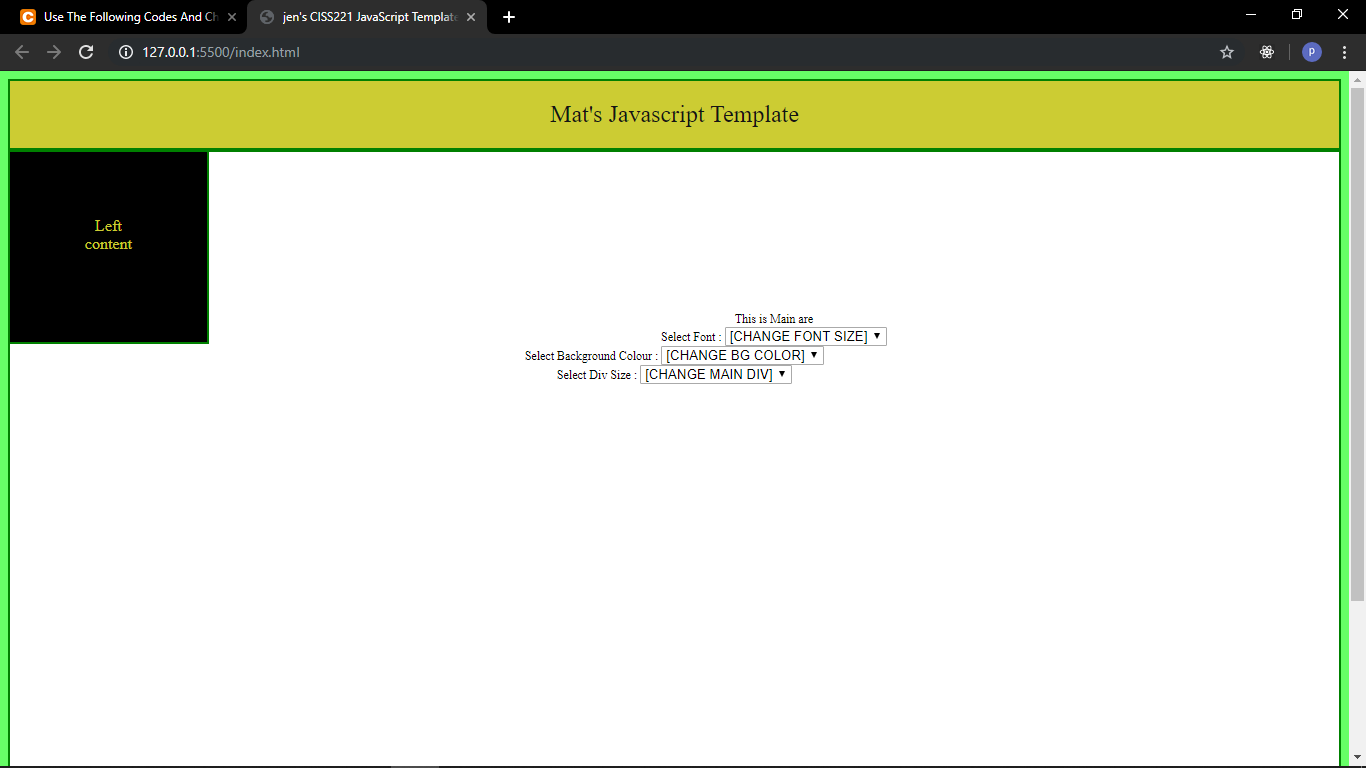
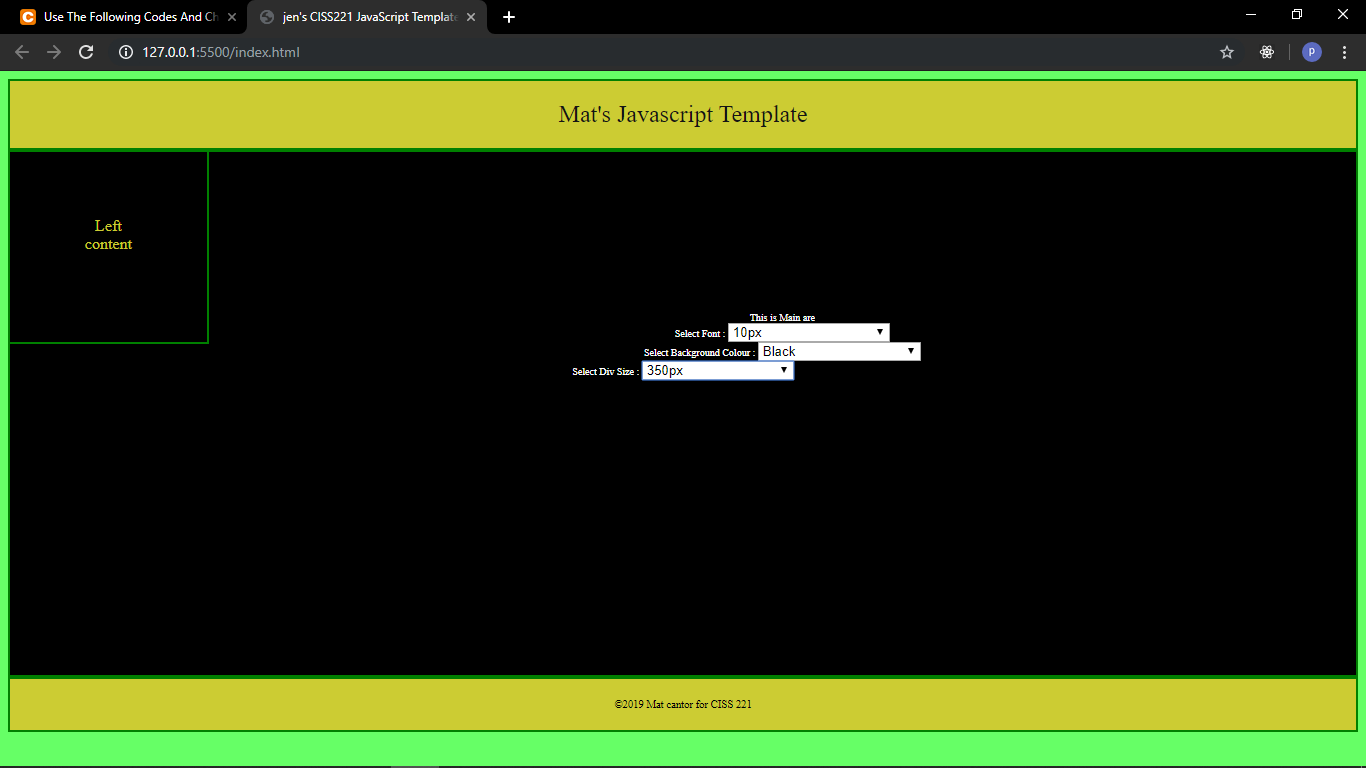
After Selecting Values from drop down menus.
 venereology answered 19 hours ago
Related Solutions
Create Lab project Add the following codes to your main method. Compile and run the program...
Complete the attached program by adding the following: a) add the Java codes to complete the...
• Implement the codes must use the LinkedList implementation • Add an additional empty node (“dummy...
5 – What cmdlet will add content to a file? 7 - How would you use...
REWRITE THE FOLLOWING CODES USING FOR LOOP. PLS USE C LANGUAGE FORMAT #include <stdio.h> int main(void)...
What are the main alternatives firms can use to select a price index for use in...
IN MIPS!!! Question: Change this program to use XOR and ADD and take out XORI and...
Use the internet as a research resource and find codes of conduct for three different healthcare...
Use the Guiding Principles document provided in the main menu. Select THREE guiding principles and explain how they can be applied to the HEART.
1. List three main tools available to the Fed to change the money supply in the...
- python3 Let x0,...,xn−1 be n numbers stored in the list x. The median of x, denoted...
- Raintree Cosmetic Company sells its products to customers on a credit basis. An adjusting entry for...
- 1. The larger the calculated χ2 value in a goodness-of-fit test, the _______ likely the data...
- tcp 16115
- #include <iostream> #include <fstream> #include <vector> #include <string> using namespace std; // Define a Person class,...
- Draw and label a schematic of an Ag/AgCl reference electrode. As part of your answer, include...
- Garrett Kelly. Corporation's identified their current production capacity to range from 6,500 units to 22,000 units....