Question
In: Computer Science
This program extends the earlier "Online shopping cart" program. (Consider first saving your earlier program). (1)...
This program extends the earlier "Online shopping cart" program. (Consider first saving your earlier program).
(1) Extend the ItemToPurchase class per the following specifications:
Private fields
string itemDescription - Initialized in default constructor to "none"
Parameterized constructor to assign item name, item description, item price, and item quantity (default values of 0). (1 pt)
Public member methods
setDescription() mutator & getDescription() accessor (2 pts)
printItemCost() - Outputs the item name followed by the quantity, price, and subtotal
printItemDescription() - Outputs the item name and description
Ex. of printItemCost() output:
Bottled Water 10 @ $1 = $10
Ex. of printItemDescription() output:
Bottled Water: Deer Park, 12 oz.
(2) Create two new files:
ShoppingCart.java - Class definition
ShoppingCartManager.java - Contains main() method
Build the ShoppingCart class with the following specifications. Note: Some can be method stubs (empty methods) initially, to be completed in later steps.
Private fields
String customerName - Initialized in default constructor to "none"
String currentDate - Initialized in default constructor to "January 1, 2016"
ArrayList cartItems
Default constructor
Parameterized constructor which takes the customer name and date as parameters (1 pt)
Public member methods
getCustomerName() accessor (1 pt)
getDate() accessor (1 pt)
addItem()
Adds an item to cartItems array. Has parameter ItemToPurchase. Does not return anything.
removeItem()
Removes item from cartItems array. Has a string (an item's name) parameter. Does not return anything.
If item name cannot be found, output this message: Item not found in cart. Nothing removed.
modifyItem()
Modifies an item's description, price, and/or quantity. Has parameter ItemToPurchase. Does not return anything.
If item can be found (by name) in cart, check if parameter has default values for description, price, and quantity. If not, modify item in cart.
If item cannot be found (by name) in cart, output this message: Item not found in cart. Nothing modified.
getNumItemsInCart() (2 pts)
Returns quantity of all items in cart. Has no parameters.
getCostOfCart() (2 pts)
Determines and returns the total cost of items in cart. Has no parameters.
printTotal()
Outputs total of objects in cart.
If cart is empty, output this message: SHOPPING CART IS EMPTY
printDescriptions()
Outputs each item's description.
Ex. of printTotal() output:
John Doe's Shopping Cart - February 1, 2016
Number of Items: 8

Nike Romaleos 2 @ $189 = $378
Chocolate Chips 5 @ $3 = $15
Powerbeats 2 Headphones 1 @ $128 = $128

Total: $521
Ex. of printDescriptions() output:
John Doe's Shopping Cart - February 1, 2016

Item Descriptions
Nike Romaleos: Volt color, Weightlifting shoes
Chocolate Chips: Semi-sweet
Powerbeats 2 Headphones: Bluetooth headphones
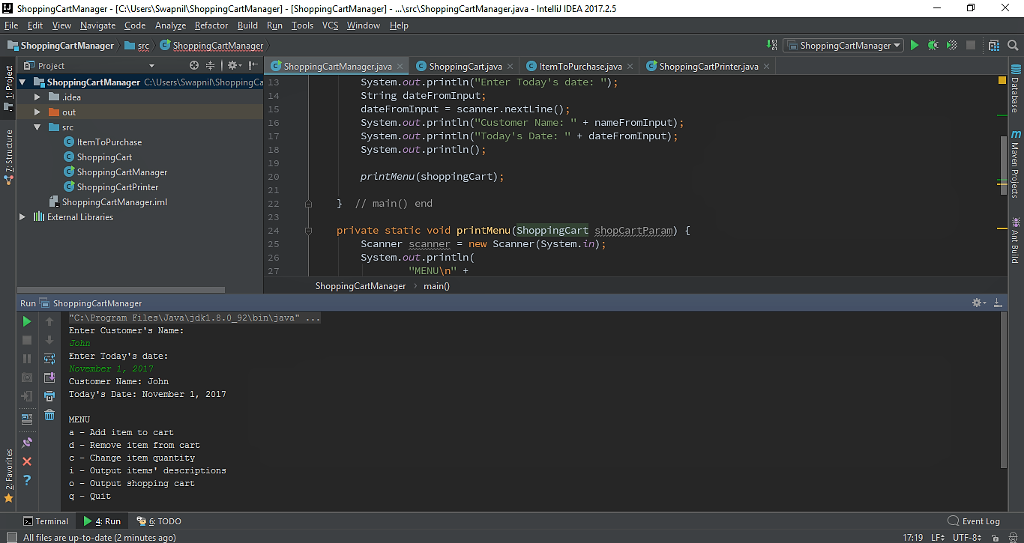
(3) In main(), prompt the user for a customer's name and today's
date. Output the name and date. Create an object of type
ShoppingCart. (1 pt)
Ex.
Enter Customer's Name:
John Doe
Enter Today's Date:
February 1, 2016

Customer Name: John Doe
Today's Date: February 1, 2016
(4) Implement the printMenu() method. printMenu() has a
ShoppingCart parameter, and outputs a menu of options to manipulate
the shopping cart. Each option is represented by a single
character. Build and output the menu within the method.
If the an invalid character is entered, continue to prompt for a
valid choice. Hint: Implement Quit before implementing other
options. Call printMenu() in the main() method. Continue to
execute the menu until the user enters q to Quit. (3 pts)
Ex:
MENU
a - Add item to cart
d - Remove item from cart
c - Change item quantity
i - Output items' descriptions
o - Output shopping cart
q - Quit

Choose an option:
(5) Implement Output shopping cart menu option. (3 pts)
Ex:
OUTPUT SHOPPING CART
John Doe's Shopping Cart - February 1, 2016
Number of Items: 8

Nike Romaleos 2 @ $189 = $378
Chocolate Chips 5 @ $3 = $15
Powerbeats 2 Headphones 1 @ $128 = $128

Total: $521
(6) Implement Output item's description menu option. (2 pts)
Ex.
OUTPUT ITEMS' DESCRIPTIONS
John Doe's Shopping Cart - February 1, 2016

Item Descriptions
Nike Romaleos: Volt color, Weightlifting shoes
Chocolate Chips: Semi-sweet
Powerbeats 2 Headphones: Bluetooth headphones
(7) Implement Add item to cart menu option. (3 pts)
Ex:
ADD ITEM TO CART
Enter the item name:
Nike Romaleos
Enter the item description:
Volt color, Weightlifting shoes
Enter the item price:
189
Enter the item quantity:
2
(8) Implement Remove item menu option. (4 pts)
Ex:
REMOVE ITEM FROM CART
Enter name of item to remove:
Chocolate Chips
(9) Implement Change item quantity menu option. Hint: Make new
ItemToPurchase object and use ItemToPurchase modifiers before using
modifyItem() method. (5 pts)
Ex:
CHANGE ITEM QUANTITY
Enter the item name:
Nike Romaleos
Enter the new quantity:
3
My starting code for ItemToPurchase is :
public class ItemToPurchase
{
private String itemName;
private int itemPrice;
private int itemQuantity;
public ItemToPurchase()
{
this.itemName = "none";
this.itemPrice = 0;
this.itemQuantity = 0;
}
public ItemToPurchase(String itemName, int itemPrice, int
itemQuantity)
{
this.itemName = itemName;
this.itemPrice = itemPrice;
this.itemQuantity = itemQuantity;
}
public void setName(String itemName)
{
this.itemName = itemName;
}
public String getName()
{
return itemName;
}
public void setPrice(int itemPrice)
{
this.itemPrice = itemPrice;
}
public int getPrice()
{
return itemPrice;
}
public void setQuantity(int itemQuantity)
{
this.itemQuantity = itemQuantity;
}
public int getQuantity()
{
return itemQuantity;
}
}
Solutions
Expert Solution
// program extends the earlier "Online shopping cart" program
// Code follows the required program
import java.util.Scanner;
public class ShoppingCartManager {
public static void main(String[] args) {
Scanner scanner = new Scanner(System.in);
ShoppingCart shoppingCart = new ShoppingCart();
System.out.println("Enter Customer's Name: ");
String nameFromInput;
nameFromInput = scanner.nextLine();
System.out.println("Enter Today's date: ");
String dateFromInput;
dateFromInput = scanner.nextLine();
System.out.println("Customer Name: " + nameFromInput);
System.out.println("Today's Date: " + dateFromInput);
System.out.println();
printMenu(shoppingCart);
} // main() end
private static void printMenu(ShoppingCart shopCartParam)
{
Scanner scanner = new Scanner(System.in);
System.out.println(
"MENU\n" +
"a - Add item to cart\n" +
"d - Remove item from cart\n" +
"c - Change item quantity\n" +
"i - Output items' descriptions\n" +
"o - Output shopping cart\n" +
"q - Quit\n" +
"\n" +
"Choose an option: ");
String selectedMenu;
}
} // class end
------------------------------------------------------------------------------------------------------
ShoppingCart.java
--------------------------------------
import java.util.ArrayList;
import java.util.Scanner;
public class ShoppingCart {
Scanner scanner = new Scanner(System.in);
String customerName;
String currentDate;
ArrayList<ItemToPurchase> cartItems = new ArrayList();
public ShoppingCart() {
customerName = "none";
currentDate = "January 1, 2016";
}
public ShoppingCart(String name, String date) {
customerName = name;
currentDate = date;
}
public String getDate() {
return currentDate;
}
public void addItem(ItemToPurchase item) {
cartItems.add(item);
}
public void removeItem(String name) {
Boolean itemToBeDeletedIsFound = false;
for (int i=0; i<cartItems.size(); i++) {
if ( name.equals(cartItems.get(i).getItemName()) ) {
cartItems.remove(i);
itemToBeDeletedIsFound = true;
}
}
if (itemToBeDeletedIsFound == false)
System.out.println("Item not found in cart. Nothing
removed.");
}
public void modifyItem(ItemToPurchase itemParam) {
ItemToPurchase _default = new ItemToPurchase();
// check if item is in cart
for (int i=0; i<cartItems.size(); i++) {
if ( itemParam.getItemName().equals(cartItems.get(i).getItemName())
) {
// item is in cart, check if it has default value
if (
(cartItems.get(i).getDescription().equals(_default.getDescription()))
) {
System.out.println(itemParam.getItemName() + ", description is
default");
}
else {
System.out.println("Enter new description: ");
String newDescription;
newDescription = scanner.nextLine();
itemParam.setDescription(newDescription);
}
if ( (cartItems.get(i).getItemPrice() == _default.getItemPrice()) )
{
System.out.println(itemParam.getItemName() + ", price is
default");
}
else {
System.out.println("Enter new price: ");
int newPrice;
newPrice = scanner.nextInt();
itemParam.setItemPrice(newPrice);
}
if ( (cartItems.get(i).getItemQuantity() ==
_default.getItemQuantity()) ) {
System.out.println(itemParam.getItemName() + ", price is
default");
}
else {
System.out.println("Enter new quantity: ");
int newQuantity;
newQuantity = scanner.nextInt();
itemParam.setItemQuantity(newQuantity);
}
}
else {
System.out.println("Item not found in cart. Nothing
modified.");
}
}
}
public int getNumItemsInCart() {
return cartItems.size();
}
public int getCostOfCart() {
int total = 0;
for (int i=0; i<cartItems.size(); i++) {
total = total + cartItems.get(i).getItemPrice();
}
return total;
}
public void printTotal() {
System.out.println(customerName + "'s " + "Shopping Cart - " +
currentDate);
System.out.println("Number of Items: " + cartItems.size());
System.out.println();
for (int i=0; i<cartItems.size(); i++) {
cartItems.get(i).printItemCost();
}
System.out.println();
System.out.println("Total: " + getCostOfCart());
}
public void printDescriptions() {
System.out.println(customerName + "'s Shopping Cart - " +
currentDate);
System.out.println();
System.out.println("Item Descriptions");
for (int i=0; i<cartItems.size(); i++) {
System.out.println(cartItems.get(i).getItemName() + ": " +
cartItems.get(i).getDescription());
}
}
} // end of class
-------------------------------------------------------------------------------------------------------------
ItemToPurchase.java
-----------------------------------------
public class ItemToPurchase {
private String itemName;
private int itemPrice;
private int itemQuantity;
private String itemDescription;
// default constructor
public ItemToPurchase() {
itemName = "none";
itemPrice = 0;
itemQuantity = 0;
itemDescription = "none";
}
// constructor
public ItemToPurchase(String name, String description, int price,
int quantity) {
itemName = name;
itemPrice = price;
itemQuantity = quantity;
itemDescription = description;
}
// itemName mutator and accessor
public void setItemName(String givenName) {
itemName = givenName;
}
public String getItemName() {
return itemName;
}
// itemPrice mutator and accessor
public void setItemPrice(int price) {
itemPrice = price;
}
public int getItemPrice() {
return itemPrice;
}
// itemQuantity mutator and accessor
public void setItemQuantity(int number) {
itemQuantity = number;
}
public int getItemQuantity() {
return itemQuantity;
}
// setDescription() mutator & getDescription() accessor (2
pts)
public void setDescription(String description) {
itemDescription = description;
}
public String getDescription() {
return itemDescription;
}
// printItemCost() - Outputs the item name followed by the quantity, price, and subtotal
public void printItemCost() {
System.out.println(itemName + " " + itemQuantity + " @ $" +
itemPrice + " = $" + itemQuantity*itemPrice );
}
// printItemDescription() - Outputs the item name and description
public void printItemDescription() {
System.out.println(itemName + ": " + itemDescription);
}
} // end of class
-------------------------------------------------------------------------------------------------
ShoppingCartPrinter.java
------------------------------------------
import java.util.Scanner;
public class ShoppingCartPrinter {
public static void main(String[] args) {
Scanner sc = new Scanner(System.in);
String strinput; // stores input from user
int intinput; // stores input too
ItemToPurchase Item1 = new ItemToPurchase();
ItemToPurchase Item2 = new ItemToPurchase();
// Item 1 ------------------------------------
System.out.println("Item 1");
System.out.println();
System.out.print("Enter the item name: ");
strinput = sc.nextLine();
Item1.setItemName(strinput);
System.out.print("Enter the item price: ");
intinput = sc.nextInt();
Item1.setItemPrice(intinput);
System.out.print("Enter the item quantity: ");
intinput = sc.nextInt();
Item1.setItemQuantity(intinput);
System.out.println();
sc.nextLine();
// Item 2 ------------------------------------
System.out.println("Item 2");
System.out.println();
System.out.print("Enter the item name: ");
strinput = sc.nextLine();
Item2.setItemName(strinput);
System.out.print("Enter the item price: ");
intinput = sc.nextInt();
Item2.setItemPrice(intinput);
System.out.print("Enter the item quantity: ");
intinput = sc.nextInt();
Item2.setItemQuantity(intinput);
System.out.println();
sc.nextLine();
// total cost
System.out.println("TOTAL COST");
System.out.println(Item1.getItemName() + " " +
Item1.getItemQuantity() + " @ " + " $" + Item1.getItemPrice() + " =
" + " $" + Item1.getItemQuantity()*Item1.getItemPrice());
System.out.println(Item2.getItemName() + " " +
Item2.getItemQuantity() + " @ " + " $" + Item2.getItemPrice() + " =
" + " $" + Item2.getItemQuantity()*Item2.getItemPrice());
System.out.println();
System.out.println("Total: $" +
(Item1.getItemPrice()*Item1.getItemQuantity() +
Item2.getItemQuantity()*Item2.getItemPrice()));
}
}
ShoppingCartManager [CUsersSwapnillShoppingCartManager]
ShoppingCartManager] .srcShoppinCaraagrjava-Intell IDEA 2017.2.5
Eile
 -----------------------------------------------------------------------------------------------------
%%%%%%%%%%%%%%%%%%% Please Give Rating%%%%%%%%%%%%%%%%%
 venereology answered 12 hours ago
Related Solutions
This program extends the earlier "Online shopping cart" program. (Consider first saving your earlier program). (1)...
This program extends the earlier "Online shopping cart" program. (Consider first saving your earlier program). (1)...
C++.This program extends the earlier "Online shopping cart" program. (Consider first saving your earlier program). (1)...
7.7 Ch 7 Program: Online shopping cart (continued) (C) This program extends the earlier "Online shopping...
IN C++ 7.22 LAB*: Program: Online shopping cart (Part 2) This program extends the earlier "Online...
In python 3 please: This program extends the earlier "Online shopping cart" program. (Start working from...
This week you will write a program that mimics an online shopping cart . You will...
Python This week you will write a program in Python that mimics an online shopping cart...
Python This week you will write a program in Pyhton that mimics an online shopping cart...
5.9 Online shopping cart (Java) Create a program using classes that does the following in the...
- Give the expected ground-state electron configurations for the following elements: a) Ti b) Ru c) Sn...
- determine the [OH-] and pH of a solution tht is 0.140 M in F-.
- 1. ONLY VISUAL STUDIO C# CONSOLE APPLIACTION (NO JAVA CODING) In this part of the assignment,...
- How does the Ricardian equivalence view of the effect of tax cuts (and budget deficits) differ...
- define culture and what it means, compare and contrast subcultures and counter cultures, compare and contrast...
- I know headquarters wants us to add that new product line,” said Dell Havasi, manager of...
- 9.Consider the exothermic equilibrium 2I(g) ? I2(g) What would be the effect on the position of...