Question

In: Computer Science

def get_words(filename): ''' (str) -> list of str    Given the name of a file which...

def get_words(filename):
'''
(str) -> list of str
  
Given the name of a file which contains many words
(one word per line), return a list of all these words.
  
The file may have comments and a blank space at the beginning
of the file, which should be ignored. All comment lines start with
a semicolon ';'.
'''

Python

Solutions

Expert Solution

TEXTFILE Content :


;efsf
;gwe

privacy
pepper
abolish
desk

;hk
introduce

finish;
quarter
courage
fabricate
duck

amputate
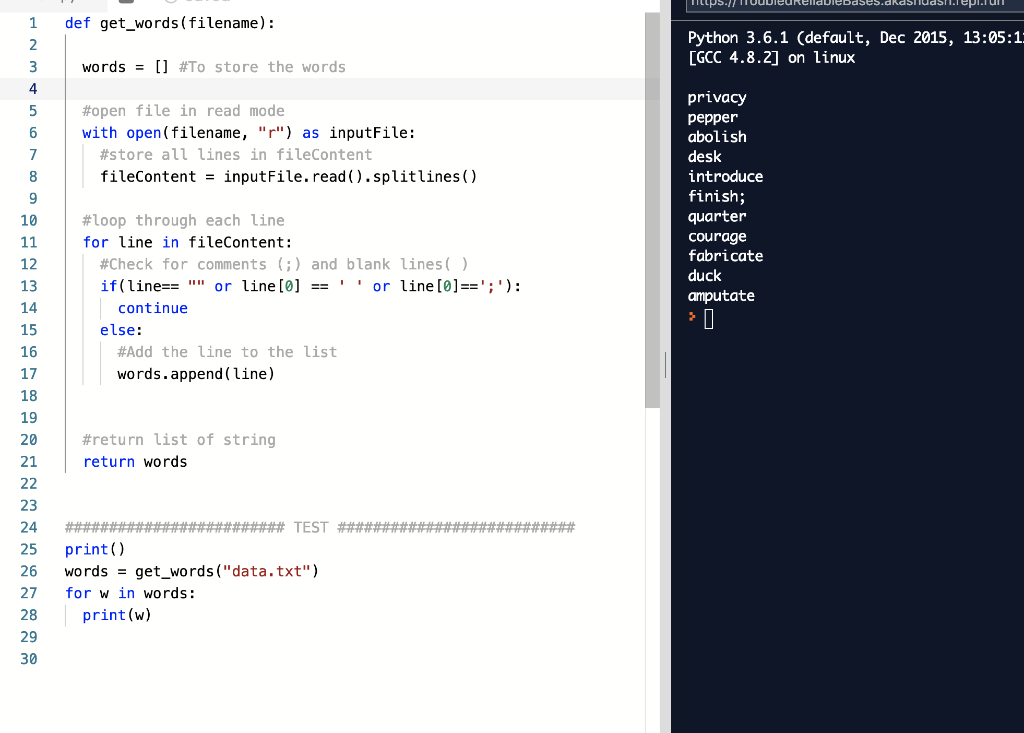
def get_words(filename):

words = [] #To store the words

#open file in read mode

with open(filename, "r") as inputFile:

   #store all lines in fileContent

   fileContent = inputFile.read().splitlines()

#loop through each line    

for line in fileContent:

   #Check for comments (;) and blank lines( )

   if(line== "" or line[0] == ' ' or line[0]==';'):

     continue

   else:

     #Add the line to the list

     words.append(line)


#return list of string

return words


######################### TEST ###########################

print()

words = get_words("data.txt")

for w in words:

print(w)


Related Solutions

A file name is supposed to be in the form filename , ext . Write a...
A file name is supposed to be in the form filename , ext . Write a function that will determine whether a string is in the form of a name followed by a dot followed by a three - character extension , or not . The function should return 1 for logical true if it is in that form , or 0 for false if not ,
Python code def plot_dataset(file_path): """ Read in a text file where the path and filename is...
Python code def plot_dataset(file_path): """ Read in a text file where the path and filename is given by the input parameter file_path There are 4 columns in the text dataset that are separated by colons ":". c1:c2:c3:c4 Plot 3 datasets. (x axis vs y axis) c1 vs c2 (Legend label "n=1") c1 vs c3 (Legend label "n=1") c1 vs c4 (Legend label "n=1") Make sure you have proper x and y labels and a title. The x label should be...
In Python write a function with prototype “def wordfreq(filename = "somefile.txt"):” that will read a given...
In Python write a function with prototype “def wordfreq(filename = "somefile.txt"):” that will read a given file that contains words separated by spaces (perhaps multiple words on a line) and will create a dictionary whose keys are the words and the value is the number of times the word appears. Convert each word to lower case before processing.
def compareRisk(compareCountry, countryList, filename):     filename = open(filename, "r")     content = filename.readlines()     returnList =...
def compareRisk(compareCountry, countryList, filename):     filename = open(filename, "r")     content = filename.readlines()     returnList = []     for row in content [1:]:         line = row.split(",")         name = line[0]         population = float(line[1])         infectedPopulation = float(line[2])     for compareCountry in content:         comparePopulation = float (line[1])         compareInfected = float (line[2])     for name in countryList:         if population < comparePopulation:             if infectedPopulation > compareInfected:                 returnList.append(name)             else:                 return "No countries"     return returnList...
def warmer_year(temps_then: List[int], temps_now: List[int]) -> List[str]: """Return a list of strings representing whether this year's...
def warmer_year(temps_then: List[int], temps_now: List[int]) -> List[str]: """Return a list of strings representing whether this year's temperatures from temps_now are warmer than past temperatures in temps_then. The resulting list should contain "Warmer" at the indexes where this year's temperature is warmer, and "Not Warmer" at the indexes where the past year was warmer, or there is a tie. Precondition: len(temps_then) == len(temps_now) >>> warmer_year([10], [11]) ['Warmer'] >>> warmer_year([26, 27, 27, 28], [25, 28, 27, 30]) ['Not Warmer', 'Warmer', 'Not Warmer',...
def read_words(filename, ignore='#'): """ Read a list of words ignoring any lines that start with the...
def read_words(filename, ignore='#'): """ Read a list of words ignoring any lines that start with the ignore character as well as any blank lines. """ return ['a', 'z'] How would I code this in Python?
Given the python code below, show output: class MyClass: i = ["1010"] def f(self, name): self.i.append(str("470570"))...
Given the python code below, show output: class MyClass: i = ["1010"] def f(self, name): self.i.append(str("470570")) self.name = name return 'CPS' if __name__ == "__main__": x = MyClass()    print(x.f("U"))    print(x.name)    print(x.i)       y = MyClass()   print(y.f("D"))    print(y.name)   print(y.i)
In python def lambda_2(filename): # Complete this function to read grades from `filename` and map the...
In python def lambda_2(filename): # Complete this function to read grades from `filename` and map the test average to letter # grades using map and lambda. File has student_name, test1_score, test2_score, # test3_score, test4_score, test5_score. This function must use a lambda # function and map() function. # The input to the map function should be # a list of lines. Ex. ['student1,73,74,75,76,75', ...]. Output is a list of strings in the format # studentname: Letter Grade -- 'student1: C' #...
Can you tell me what is wrong with this code ? def update_char_view(phrase: str, current_view: str,...
Can you tell me what is wrong with this code ? def update_char_view(phrase: str, current_view: str, index: int, guess: str)->str: if guess in phrase: current_view = current_view.replace(current_view[index], guess) else: current_view = current_view    return current_view update_char_view("animal", "a^imal" , 1, "n") 'animal' update_char_view("animal", "a^m^l", 3, "a") 'aamal'
In python Complete the function get_Astring(filename) to read the file contents from filename (note that the...
In python Complete the function get_Astring(filename) to read the file contents from filename (note that the test will use the file data.txt and data2.txt provided in the second and third tabs), strip off the newline character at the end of each line and return the contents as a single string.
ADVERTISEMENT
ADVERTISEMENT
ADVERTISEMENT