Question
In: Computer Science
JAVA Design and implement a class called Boxthat represents a 3-dimensional box.1.Instance DataYour Box class will...
JAVA
Design and implement a class called Boxthat represents a 3-dimensional box.1.Instance DataYour Box class will need variables to store the size of the box. All of these variables will be of type ‘private double’.•width•height•depthYour Boxclass will also need a variable to keep track of whether or not the box is full. This will be of type ‘private boolean’.•full2.ConstructorDeclaration: public Box( double width, double height, double depth)•Your Boxconstructor will accept the width, height,and depthof the box.•In your constructor, initialize the width, height,and depthinstance variables to values passed in as parameters to the constructor.•Each newly created box will be empty. This means that you will also need to initialize fullto false in your constructor.3.Getter and Setter MethodsInclude getter and setter methods for all instance data. We will assume that all supplied dimension values are positive values. Here is an example of the method declarations for width to get you started.•Getter: public double getWidth()•Setter: public void setWidth(double width)4.Public Methods•Write a public double volume()method that will calculate and return the volume of the box based on the instance data values.•Write a public double surfaceArea()method that will calculate and return the surface area of the box based on the instance data values.5.toString MethodWrite apublic String toString() method that returns a one-line description of the box. The description should provide its dimensions and whether or not the box is full. Format all double values to 2 decimal places.Example: An empty 4.00x 5.00 x 2.00 box.Part 2: Testing your ClassNow, create a driver class called BoxTestand do the following in the main method.Create your first box1.Create a Boxvariable called smallBoxand instantiate it with width 4, height 5, and depth 2.2.Print the one-line description of smallBoxusing its toString()method.3.Confirm that smallBox’s width, height, and depth getter methods are returning the correct values.4.Confirm that smallBox’s volume()and surfaceArea()methods are returning the correct values.5.Use smallBox’s setter methods to change it from “empty” to “full” and to change its dimension values to width 2, height 3, and depth 1.6.Print the one-line description of smallBoxusing toString()again, and confirm that all changed values are reflected.7.Confirm that all getter and other methods return the correct values reflecting smallBox’s current dimensions and full value.Create several boxes and find the largest oneDo not delete what you did above! Add the following code to the end of your BoxTestclass.1.Declare and instantiate an ArrayListobject that will store your Boxobjects.See the listing below as a sample of how to use the ArrayListbut with Stringobjects.2.In a standard “for” loop that iterates 5 times, create a new Boxwith randomly generated width, height, and depth and add the box to your ArrayList. Limit dimension values to a reasonable range. Randomly generate a Boolean value and use it to call the Box’s method for setting “full” (use the nextBoolean()method in the Randomclass).3.In the loop, print outthe Box’s details, labeled according to the loop iteration (i.e. if this isthe first iteration of the loop, label the box as “Box 1: “ in the output).4.Use a for-each loop(as shown in the listing above)to find the Boxwith the largest volume. You will need to declare a largest box variable of type Boxto keep track of the largest box. This variable needs to be declared outside of the loop so that it will still be available when the loop ends. Use conditional statements inside the loop to compare the current Box to the largest Box, so far, and update the largest box variable when appropriate.5.After the loop, print the details of the largest Box. Confirm that you program identified the correct boxes.
Solutions
Expert Solution
Box.java
=========================
package box;
public class Box {
// variables to store the size of the box
private double width;
private double height;
private double depth;
private boolean full;
// constructor
public Box( double width, double height, double depth)
{
// initialize values
this.width = width;
this.height = height;
this.depth = depth;
// each newly created box will be
empty
this.full = false;
}
// getter methods
public double getWidth() {
return this.width;
}
public double getHeight() {
return this.height;
}
public double getDepth() {
return this.depth;
}
public boolean isFull() {
return this.full;
}
// setter methods
public void setWidth(double width) {
this.width = width;
}
public void setHeight(double height) {
this.height = height;
}
public void setDepth(double depth) {
this.depth = depth;
}
public void setFull(boolean full) {
this.full = full;
}
// calculate and returns the volume of the box
public double volume() {
return width*height*depth;
}
// calculate and returns the surface area of the
box
public double surfaceArea() {
// surface area can be calculated
by sum of all sides
double area = 0.0;
// calculate top and bottom
side
area = area + 2*width*height;
// calculate north and south
side
area = area + 2*width*depth;
// calculate east and west
side
area = area + 2*height*depth;
// return the area
return area;
}
// returns a one-line description of the box
public String toString() {
// create a string to return
String str = "A";
// check if box is full
if(full) {
str = str + "
full ";
}
else {
str = str + "n
empty ";
}
// get width, height and
depth
// format all double values to 2
decimal places
str = str + String.format("%.2f x
%.2f x %.2f box", width, height, depth);
// return the string
return str;
}
}
=========================
BoxTest.java
=========================
package box;
import java.util.ArrayList;
import java.util.Random;
public class BoxTest {
// main method to run the program
public static void main(String[] args) {
// create box1
Box smallBox = new Box(4, 5,
2.2);
// print the box
System.out.println(smallBox);
// testing box's getter
methods
System.out.println("Width of box: "
+ String.format("%.2f",smallBox.getWidth()));
System.out.println("Height of box:
" + String.format("%.2f",smallBox.getHeight()));
System.out.println("Depth of box: "
+ String.format("%.2f",smallBox.getDepth()));
// testing volume and area
methods
System.out.println("Volume of box:
" + String.format("%.2f",smallBox.volume()));
System.out.println("Surface area of
box: " + String.format("%.2f",smallBox.surfaceArea()));
// testing setter methods
smallBox.setFull(true);
smallBox.setWidth(2);
smallBox.setHeight(3);
smallBox.setDepth(1.6);
// print box to check setter
methods
System.out.println("printing box
after setting new values:");
System.out.println(smallBox);
System.out.println("Width of box: "
+ String.format("%.2f",smallBox.getWidth()));
System.out.println("Height of box:
" + String.format("%.2f",smallBox.getHeight()));
System.out.println("Depth of box: "
+ String.format("%.2f",smallBox.getDepth()));
System.out.println("Volume of box:
" + String.format("%.2f",smallBox.volume()));
System.out.println("Surface area of
box: " + String.format("%.2f",smallBox.surfaceArea()));
// create several boxes
System.out.println("Random Boxes
are: ");
ArrayList<Box> boxes = new
ArrayList<Box>();
// create random values
Random rand = new Random();
for(int i=0;i<5;i++) {
boxes.add(new
Box(rand.nextDouble()*10.0, rand.nextDouble()*10.0,
rand.nextDouble()*5.0));
boxes.get(i).setFull(rand.nextBoolean());
// print
boxes
System.out.println("Box " + (i+1) + ": " + boxes.get(i));
}
// print the largest box
System.out.println("Largest box is:
");
Box largest = null;
// use for each loop
for(Box b : boxes) {
// compare
boxes
if(largest==null
|| b.volume()>largest.volume()) {
largest = b;
}
}
System.out.println(largest);
}
}
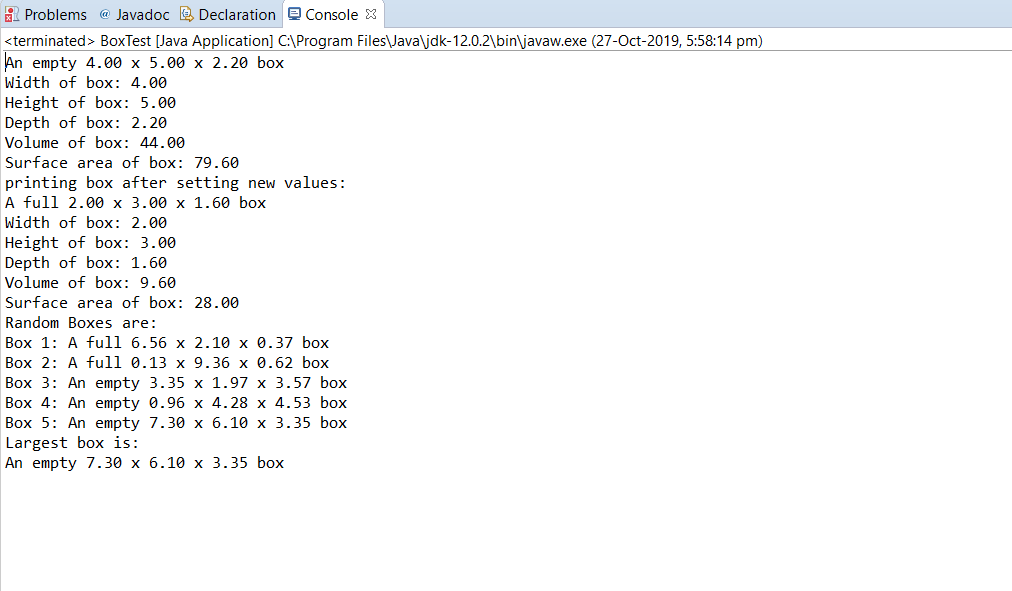
let me know if you have any doubts or problem in the program.
 venereology answered 3 months ago
Related Solutions
in java Design and implement a class called Dog that contains instance data that represents the...
JAVA - Design and implement a class called Flight that represents an airline flight. It should...
Java Write a class called Car that contains instance data that represents the make, model, and...
In java beginner coding language ,Write a class called Sphere that contains instance data that represents...
JAVA Specify, design, and implement a class called PayCalculator. The class should have at least the...
In Java, design and implement a class called Cat. Each Cat class will contain three private...
JAVA PROGRAM Question : Design and implement two classes called InfixToPostfix and PostFixCalculator. The InfixToPrefix class...
Overview For this assignment, implement and use the methods for a class called Seller that represents...
Overview For this assignment, implement and use the methods for a class called Seller that represents...
Based on a Node class; Use Java to implement the OrderedList class which represents an ordered...
- Two 10-cm-diameter charged rings face each other, 15cm apart. The left ring is charged to -29nC...
- Under what conditions would it be possible for an excise tax to have no efficiency cost...
- explain the difference between activities and financial statements of service businesses and merchandising businesses.
- 2. Compare and compare the matrix multiplication algorithm and the Floyd-Warshall algorithm to find all pairs...
- Q: 50.00 ml of 0.5216 M copper(II) nitrate solution is combined with 100.0 ml of 0.5580...
- This is a business law question. Explain how environmental laws regulate the use of toxic substances...
- A sky diver and her parachute system weigh a total of 800 N. She is falling...