Question
In: Computer Science
Using the IDLE development environment, create a Python script named tryme4.py. (Note: an alternative to IDLE...
Using the IDLE development environment, create a Python script named tryme4.py. (Note: an alternative to IDLE is to use a free account on the pythonanywhere website: https://www.pythonanywhere.com/)
IDLE has both an interactive mode and a script mode. You must use the script mode to develop your script. Your script must use meaningful variable names and have comments that describe what is happening in your script. Comments may describe the assignment of a value to a variable, a computation and the assignment of the result to a variable, or the display of the result.
Write a function in this file called nine_lines that uses the function three_lines (provided below) to print a total of nine lines.
Now add a function named clear_screen that uses a combination of the functions nine_lines, three_lines, and new_line (provided below) to print a total of twenty-five lines. The last line of your program should call the function clear_screen.
The function three_lines and new_line are defined below so that you can see nested function calls. Also, to make counting “blank” lines visually easier, the print command inside new_line will print a dot at the beginning of the line:
def new_line():
print('.')
def three_lines():
new_line()
new_line()
new_line()
Submit your Python script file in the posting of your assignment. Your Python script should be either a .txt file or a .py file.
You must execute your script and paste the output produced into a document that you will submit along with your Python script.
It is very helpful if you print a placeholder between the printing of 9 lines and the printing of 25 lines. It will make your output easier to read for your peer assessors. A placeholder can be output such as “Printing nine lines” or “Calling clearScreen()”.
Solutions
Expert Solution
def new_line():
    print('.')

def three_lines():
    new_line()
    new_line()
    new_line()

def nine_lines():
    three_lines()
    three_lines()
    three_lines()

def clearScreen():
    print('Printing nine lines')
    nine_lines()
    print('Printing nine lines')
    nine_lines()
    print('Printing three lines')
    three_lines()
    print('Printing three lines')
    three_lines()
    print('Printing new line')
    new_line()

print('Line from main function')
print('Calling clearScreen function')
clearScreen()
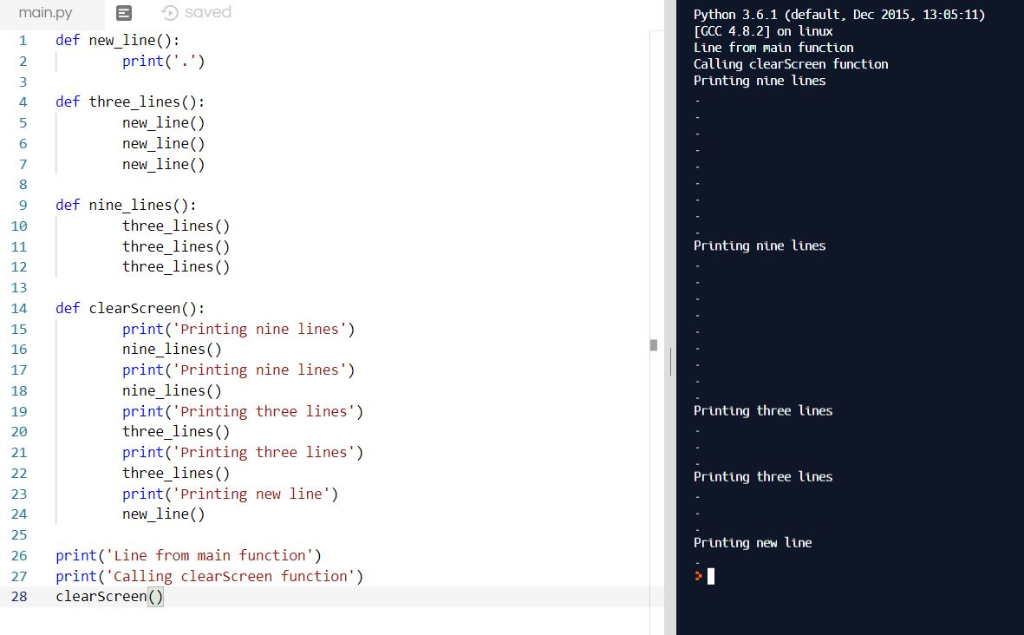 Please upvote, as i have given
the exact answer as asked in question. Still in case of any
concerns in code, let me know in comments. Thanks!
Please upvote, as i have given
the exact answer as asked in question. Still in case of any
concerns in code, let me know in comments. Thanks!
 venereology answered 6 months ago
Related Solutions
Create a Python script in IDLE or Kali Python3 CLI to create the following Python Program:...
Python Create a Python script file called hw3.py. Ex. 1. Write a program that inputs numbers...
Create and Compile a Python Script without using Numpy that Generate an nxn matrix using Python...
Using Python Shell 2.7, create a file called Assignment6_1.py Create an array based on a basic...
Using Python create a script called create_notes_drs.py. In the file, define and call a function called...
Problem: Write a Python module (a text file containing valid Python code) named p5.py. This file...
Write a bash script named q1f.sh that will edit the PATH environment variable to include the...
Create a bash script file named assessment-script-a that: 1. Accepts any number of file names on...
Using a Python environment of your choice – Create the following three dictionaries: Gary, Alice, and...
Using a Python environment of your choice – Create the following three dictionaries: Gary, Alice, and...
- An Auditor may decide to make use of a specialist in obtaining sufficient appropriate audit evidence...
- Dirac's Theorem states that "A simple graph with n vertices (n >= 3) is Hamiltonian if...
- Two 10-cm-diameter charged rings face each other, 15cm apart. The left ring is charged to -29nC...
- Under what conditions would it be possible for an excise tax to have no efficiency cost...
- explain the difference between activities and financial statements of service businesses and merchandising businesses.
- 2. Compare and compare the matrix multiplication algorithm and the Floyd-Warshall algorithm to find all pairs...
- Q: 50.00 ml of 0.5216 M copper(II) nitrate solution is combined with 100.0 ml of 0.5580...