Question
In: Computer Science
Identifying OSI Model Layers from Captured Packets Time Required: 15 minutes Objective: Use Wireshark to capture...
Identifying OSI Model Layers from Captured Packets Time Required: 15 minutes Objective: Use Wireshark to capture the packets generated from an HTTP communication session. Identify the OSI model layers represented by the headers in the captured files. Required Tools and Equipment: Net-XX with Wireshark installed and Internet access
Description: Using Wireshark and an appropriate capture filter, capture the packets involved in an HTTP session that you start by opening a Web page. Select an HTTP packet, and using the headers in the middle pane, perform the following tasks:
- Map the header names in the captured packet to the layers of the OSI model.
- For each header, find two fields you can identify as pertaining to that OSI layer’s function, and explain why.
Solutions
Expert Solution
here i am using vmware workstation with kali linux
here i gave a screen shot of wireshak and i captured packets on eth0 .
i search google.com in browser it is http request to google and captured all packets during that time.
i filter with http and the below screen shot shows only those packets.
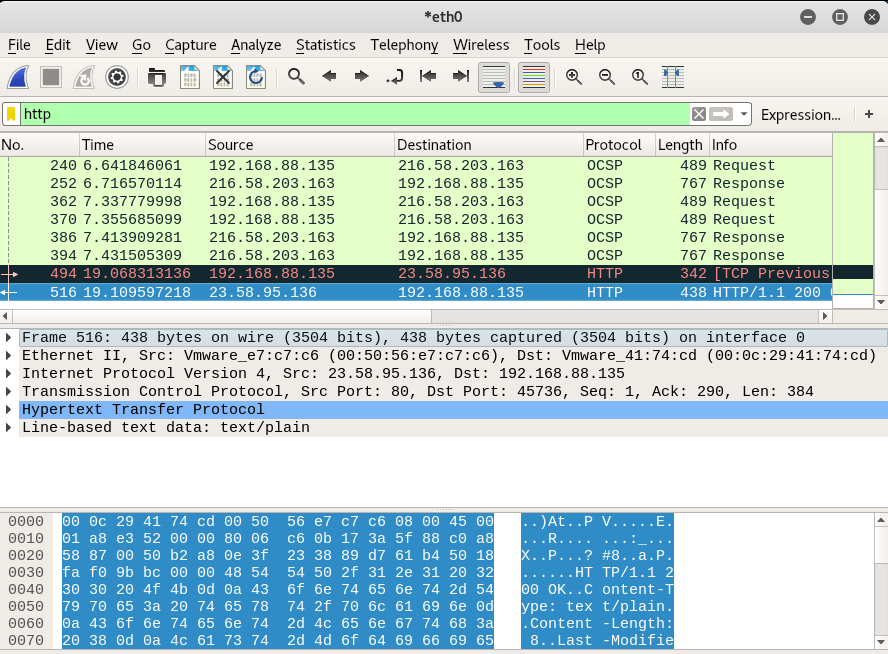
here highlighted text shows Application Layer which is HTTP
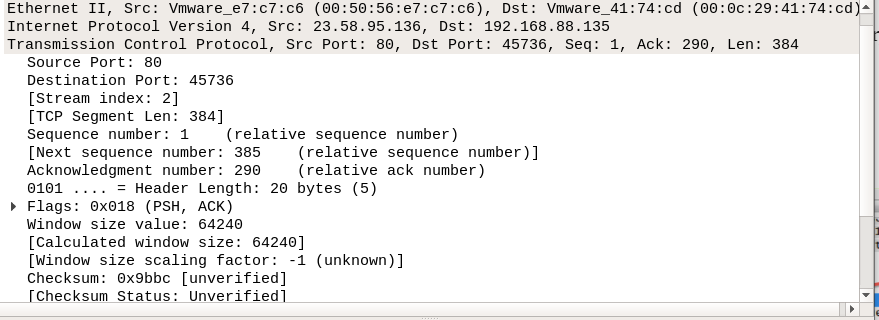
(1) layer 4:the Transport Layer
in this layer we found that the packet transfer through TCP connection and it gives all details about port number and segment length , source and destination port .
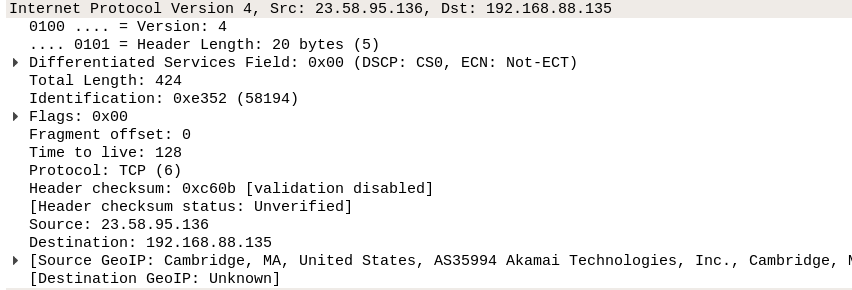
(2) Layer 3: the network layer
in below screen shot the header of packets in that part the version of IP is IPv4 source and destination ip addresses and TTL(time to live field) - after this time packet will be destroyed , and many other things.
(3) layer 2: Data link Layer
it contains source and destination MAC addresses

(4) Layer 1: Physical layer
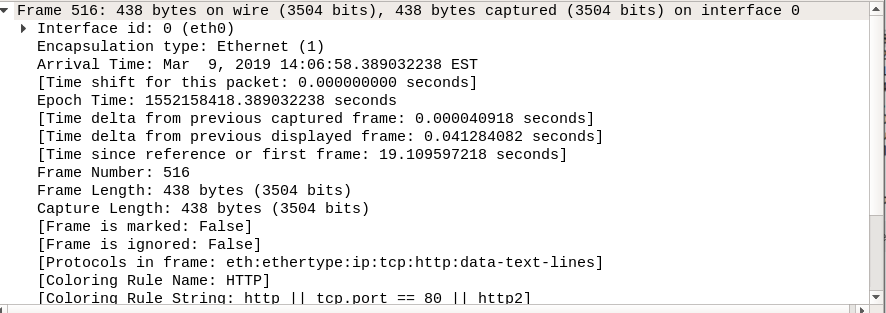
all above given layers are layers of OSI Model
 venereology answered 1 month ago
Related Solutions
Perform a wireshark capture on your machine and use the wireshark filter to examine ARP packets...
- mr. smith completed 9 years of fixed monthly payments of 3,333.28 on a 30 year loan...
- during the experiment, a student did not follow the procedure exactly as directed how will eact...
- Assume all temperatures to be exact, and neglect significant figures for small changes in dimension. When...
- why is Argentina a developing country ?
- Calculate the enthalpy of the reaction 4B(s)+3O2(g)?2B2O3(s) given the following pertinent information: B2O3(s)+3H2O(g)?3O2(g)+B2H6(g), ?H?A=+2035 kJ 2B(s)+3H2(g)?B2H6(g),  
- Do you think that CAFTA will have a major impact on the U.S. economy? Why?
- Assignment 4, Fraction Comparable Instructions For this assignment, you will be updating the Fraction class from...