Questions
**Use C** You will write an encoder and a decoder for a modified "book cipher." A...
**Use C** You will write an encoder and a decoder for a modified "book cipher." A book cipher uses a document or book as the cipher key, and the cipher itself uses numbers that reference the words within the text. For example, one of the Beale ciphers used an edition of The Declaration of Independence as the cipher key. The cipher you will write will use a pair of numbers corresponding to each letter in the text. The first number denotes the position of a word in the key text (starting at 0), and the second number denotes the position of the letter in the word (also starting at 0). For instance, given the following key text (the numbers correspond to the index of the first word in the line)
[0] 'Twas brillig, and the slithy toves Did gyre and gimble in the wabe;
[13] All mimsy were the borogoves, And the mome raths outgrabe.
[23] "Beware the Jabberwock, my son! The jaws that bite, the claws that catch!
[36] Beware the Jubjub bird, and shun The frumious Bandersnatch!"
[45] He took his vorpal sword in hand: Long time the manxome foe he sought—
The word "computer" can be encoded with the following pairs of numbers:
35,0 catch
5,1 toves
42,3 frumious
48,3 vorpal
22,1 outgrabe
34,3 that
23,5 Beware
7,2 gyre
Placing these pairs into a cipher text, we get the following:
35,0,5,1,42,3,48,3,22,1,34,3,23,5,7,2
If you are encoding a phrase, rather than just a single word, spaces in the original english phrase will also appear in the ciphered text. So, the phrase "all done" (using the above Jabberwocky poem) might appear as: 0,3,1,4,13,1 6,0,46,2,44,2,3,2
Only spaces in the key text should be considered delimiters. All other punctuation in the key text are to be considered part of a key word. Thus the first word in the Jabberwocky poem, 'Twas, will have the following characters and positions for key word 0:
Position 0: '
Position 1: T
Position 2: w
Position 3: a
Position 4: s
Developing the Program:
You should approach this assignment in several parts. The first part will be to write a menu driven program that prompts the user for the following actions:
- Read in the name of a text file to use as a cipher key
- Create a cipher using the input text file (and save the result to a file)
- Decode an existing cipher (prompt user for a file to read containing the cipher text)
- Exit the program
For each choice, create a stub function that will be completed in the remaining steps.
After testing your menu, continue to fill in the stub functions with the following specifications:
Choice #1
For this menu choice, you will prompt the user for the name of a cipher text file (such as the Declaration of Independence). You will read this text file line by line, and place each word, in order, in an array of char strings. As you copy each word into the array, you will keep a running count of the number of words in the text file and convert the letters of each word to lower case. You may assume that you will use no more than the first 5,000 words in the text, and no more than the first 15 characters in a word. However, there is no guarantee that the text will have 5000 words or less and any word in the text is 15 characters or less.
Choice #2
If no file has been chosen for Choice #1 (i.e. the user goes directly to Choice #2 without first choosing Choice #1), you will first prompt the user to enter a cipher text and read it into memory (presumably by calling the function that would be called by Choice #1). You will prompt the user to enter a secret message (in plain text - such as "Computer Science is the best major at GMU!") that is terminated by pressing the "Enter" key. You can assume that the length of this message will be less than 1500 characters (including the carriage return and NULL terminator). You will then parse this message, character by character, converting them to lower case as you go, and find corresponding characters in the words found in the key text word array. You can do this by going through each word in the word array, and then each character in each word, until you find a match with the current message character. There are more efficient ways to perform this operation, and you are encouraged to implement them instead of the given method. Once a character match is found, you will write the index of the word and the index of the character to a character string that you will later write out to a text file. Spaces are to be placed into the text as found in the message and will be used to delimit the separate words in the secret message. Once the message has been encoded, prompt the user for the name of a file to save the encoded message to, and save it to that file.
Choice #3
You will prompt the user for the name of a file containing an encoded text (i.e. a file containing number pairs). Your program will read the file and decode the the text using the indexes pairs given for each character in the word and the text file chosen for Choice #1. If no file has been chosen for Choice #1 (i.e. the users goes directly to Choice #3 without first choosing Choice #1), you will prompt the user to enter a cipher text and read it into memory (presumably by calling the function that would be called by Choice #1). Spaces found in the file are to be treated as spaces in the decoded text. You can assume that the number of characters in the encoded text file is 5000 or less, including any carriage returns or NULL terminator characters. Once the text is decoded, print the message to standard output.
Choice #4
Exit the program.
Additional Specifications:
- In order to introduce some "randomness" in the specific
character encoding, you will generate a random number i from 0..9
inclusive (use the last four digits of your G Number as the seed),
and use the ith instance of that character found in the text. (If
fewer than i instances of the character is found in the text, loop
back and continue the search from the beginning of the document.)
- Example: Suppose the letter to encode is a 'c'. Using the
sentences just above, we find that there are the following 'c'
characters:
- In order to introduCe some "randomness" in the speCifiC CharaCter enCoding, you will generate a random number i from 0..9 inClusive (use the last four digits of your G Number as the seed), and use the ith instanCe of that CharaCter found in the text.
- If the random number returns 6, then you will use the 'c' from the word "inclusive." (Start counting from 0). If the random number returns 2, you would the second c found in the word "specific."
- Example: Suppose the letter to encode is a 'c'. Using the
sentences just above, we find that there are the following 'c'
characters:
- If a given character in the secret message is not found in any word of the text, replace that character with the '#' character in the encoded text (a single '#' character replaces a word/position pair).
In: Computer Science
**Use C** You will write an encoder and a decoder for a modified "book cipher." A...
**Use C** You will write an encoder and a decoder for a modified "book cipher." A book cipher uses a document or book as the cipher key, and the cipher itself uses numbers that reference the words within the text. For example, one of the Beale ciphers used an edition of The Declaration of Independence as the cipher key. The cipher you will write will use a pair of numbers corresponding to each letter in the text. The first number denotes the position of a word in the key text (starting at 0), and the second number denotes the position of the letter in the word (also starting at 0). For instance, given the following key text (the numbers correspond to the index of the first word in the line)
[0] 'Twas brillig, and the slithy toves Did gyre and gimble in the wabe;
[13] All mimsy were the borogoves, And the mome raths outgrabe.
[23] "Beware the Jabberwock, my son! The jaws that bite, the claws that catch!
[36] Beware the Jubjub bird, and shun The frumious Bandersnatch!"
[45] He took his vorpal sword in hand: Long time the manxome foe he sought—
The word "computer" can be encoded with the following pairs of numbers:
35,0 catch
5,1 toves
42,3 frumious
48,3 vorpal
22,1 outgrabe
34,3 that
23,5 Beware
7,2 gyre
Placing these pairs into a cipher text, we get the following:
35,0,5,1,42,3,48,3,22,1,34,3,23,5,7,2
If you are encoding a phrase, rather than just a single word, spaces in the original english phrase will also appear in the ciphered text. So, the phrase "all done" (using the above Jabberwocky poem) might appear as: 0,3,1,4,13,1 6,0,46,2,44,2,3,2
Only spaces in the key text should be considered delimiters. All other punctuation in the key text are to be considered part of a key word. Thus the first word in the Jabberwocky poem, 'Twas, will have the following characters and positions for key word 0:
Position 0: '
Position 1: T
Position 2: w
Position 3: a
Position 4: s
Developing the Program:
You should approach this assignment in several parts. The first part will be to write a menu driven program that prompts the user for the following actions:
- Read in the name of a text file to use as a cipher key
- Create a cipher using the input text file (and save the result to a file)
- Decode an existing cipher (prompt user for a file to read containing the cipher text)
- Exit the program
For each choice, create a stub function that will be completed in the remaining steps.
After testing your menu, continue to fill in the stub functions with the following specifications:
Choice #1
For this menu choice, you will prompt the user for the name of a cipher text file (such as the Declaration of Independence). You will read this text file line by line, and place each word, in order, in an array of char strings. As you copy each word into the array, you will keep a running count of the number of words in the text file and convert the letters of each word to lower case. You may assume that you will use no more than the first 5,000 words in the text, and no more than the first 15 characters in a word. However, there is no guarantee that the text will have 5000 words or less and any word in the text is 15 characters or less.
Choice #2
If no file has been chosen for Choice #1 (i.e. the user goes directly to Choice #2 without first choosing Choice #1), you will first prompt the user to enter a cipher text and read it into memory (presumably by calling the function that would be called by Choice #1). You will prompt the user to enter a secret message (in plain text - such as "Computer Science is the best major at GMU!") that is terminated by pressing the "Enter" key. You can assume that the length of this message will be less than 1500 characters (including the carriage return and NULL terminator). You will then parse this message, character by character, converting them to lower case as you go, and find corresponding characters in the words found in the key text word array. You can do this by going through each word in the word array, and then each character in each word, until you find a match with the current message character. There are more efficient ways to perform this operation, and you are encouraged to implement them instead of the given method. Once a character match is found, you will write the index of the word and the index of the character to a character string that you will later write out to a text file. Spaces are to be placed into the text as found in the message and will be used to delimit the separate words in the secret message. Once the message has been encoded, prompt the user for the name of a file to save the encoded message to, and save it to that file.
Choice #3
You will prompt the user for the name of a file containing an encoded text (i.e. a file containing number pairs). Your program will read the file and decode the the text using the indexes pairs given for each character in the word and the text file chosen for Choice #1. If no file has been chosen for Choice #1 (i.e. the users goes directly to Choice #3 without first choosing Choice #1), you will prompt the user to enter a cipher text and read it into memory (presumably by calling the function that would be called by Choice #1). Spaces found in the file are to be treated as spaces in the decoded text. You can assume that the number of characters in the encoded text file is 5000 or less, including any carriage returns or NULL terminator characters. Once the text is decoded, print the message to standard output.
Choice #4
Exit the program.
Additional Specifications:
- In order to introduce some "randomness" in the specific
character encoding, you will generate a random number i from 0..9
inclusive (use the last four digits of your G Number as the seed),
and use the ith instance of that character found in the text. (If
fewer than i instances of the character is found in the text, loop
back and continue the search from the beginning of the document.)
- Example: Suppose the letter to encode is a 'c'. Using the
sentences just above, we find that there are the following 'c'
characters:
- In order to introduCe some "randomness" in the speCifiC CharaCter enCoding, you will generate a random number i from 0..9 inClusive (use the last four digits of your G Number as the seed), and use the ith instanCe of that CharaCter found in the text.
- If the random number returns 6, then you will use the 'c' from the word "inclusive." (Start counting from 0). If the random number returns 2, you would the second c found in the word "specific."
- Example: Suppose the letter to encode is a 'c'. Using the
sentences just above, we find that there are the following 'c'
characters:
- If a given character in the secret message is not found in any word of the text, replace that character with the '#' character in the encoded text (a single '#' character replaces a word/position pair).
In: Computer Science
In this project, you will be expanding on recent In-Class Activity to create a basic Scrabble...
In this project, you will be expanding on recent In-Class Activity to create a basic Scrabble Game. You do not need to worry about the game board, just the logic of the game. You may have up to 3 programmers in your group.
In this version of the game, players indicate how many rounds of play there will be for two players. Then each player will take turns entering words until the number of rounds are complete. In order for a word to be accepted, a letter in the word must correspond to a letter in a previous word. The exception is for the first word entered will be accepted without validating as there is nothing to validate against.
- On the inputRounds() method, validate the number entered is numeric. If it is not, return a default numeric value of 2 instead.
- On the inputWord() method, pass the player number and display in the input message.
- On the inputWord() method, call a validation method called validWord(). This method will check to make sure the current word entered has a letter contained from the previous round with the exception of the first word entered.
- On the validWord() method, the following validations
need to take place:
- Return False when word entered is empty
- Return False when the word entered is the same as the previous word
- Return True when nothing has been entered (ie this is the start of the game and as long as a word is not empty bypass validation)
- Return False when the word entered must has no letters in common with the previous word entered
- In the main program create the following Lists, Dictionaries,
and Tuples
- Create a Variables for player information using the names: rounds, player1, score1, player2, score2
- Utilize the provided function that returns a Dictionary for the points per letter called points
- Utilize the provided function that returns a List for end of game messages called messages
- Optional unit testing available requires methods initMessages(), initPoints() to setup the initial values of the tuples, dictionaries and lists.
Values for messages List
Format Text Replacement will be used for the {} Text. See https://pyformat.info/ for more information on how to use the format() method.
- Player {} Wins with a score of {}!
- Tie Game, no winners.
- Invalid word! Player {} Wins!
- Invalid word! You must enter a valid word to start.
- Player {} Entered the Words:
Point Values Per Letter for points Dictionary
- 1 Point for Letters: a e i l n o r s t u
- 2 Points for Letters: d g
- 3 Points for Letters: b c m p
- 4 Points for Letters: f h v w y
- 5 Points for Letters: k
- 8 Points for Letters: j x
- 10 Points for Letters: q z
To use this call points['a'], where a is any lowercase letter you want to find the point value for.
Data Types for Variables
- rounds:
- currPlayer:
- prevPlayer:
- player1:
- score1:
- player2:
- score2:
Rubric / Grading Scale
- Appropriate Output of Instructions for user input for the number of rounds and words (6pt)
- 2 Functions utilized for initializing default values of points and messages (4pt)
- 4 Functions created as specified for inputRounds(), inputWord(), validWord(), playerScore() (12pt)
- 3 Unit Test cases found on test_main.py pass with OK (9pt)
- Working Scrabble Game per the above rules (19pt)
Total Points: 50
Additional Grading Notes
- Programmers must have attention to detail, as a result up to 2 Points may be taken for not updating the student info (Name, CRN, Semester Year) in the Markdown and Python Comments.
- Customers will not pay for programs that do not work, as a result up to 50 Points may be taken for programs that do not run due to syntax errors.
- Programmers tend to forget how large programs work over time, as a result up to 4 Points may be taken for programs that do not have a reasonable amount of comments that describe key sections of code.
- Minimum of 4 or more commits made to GitHub showing incremental
programming changes towards the final program (4pt)
- 1 Commit may be for updating Student Info in the Markdown and Python File
- 3 Commits must be for programming updates to source code
- If a unit test is available, no changes made to the Unit Test will count towards the required commits (nor should there be any changes made to this file).
- This is a team project, all group members must have at least one commit with code changes. Updating student info does not count.
- All programs must have your Github URL submitted in Canvas via the assignment page. Unsubmitted Github repos will receive 0 Points.
- Programs that have been submitted and received a grade will not be regraded, unless the instructor makes a request for changes.
- If a program is eligible for regrading, it is the responsibility of the student to inform the instructor when the program is ready for regrading.
Here is what i have so far... i need help
# Function 1: Input Player Rounds
def inputRounds():
try:
rounds = int(input("Please enter the number of rounds you would like to play: "))
except:
rounds = 2
print("Invalid response using default value of: ", rounds)
print(rounds)
return None
# Function 2: Input Player Word
def inputWord():
word = str(input("Please enter your word: "))
return(word)
# Function 3: Validate Word
def validWord():
return None
# Function 4: Generate Score
def playerScore():
return None
# Method 5: Initialize List with Messages
def initMessages():
messages = [
'Player {} Wins with a score of {}!',
'Tie Game, no winners.',
'Invalid word! Player {} Wins!',
'Invalid word! You must enter a valid word to start.',
'Player {} Entered the Words:'
]
return messages
# Function 6: Initialize Points Dictionary
def initPoints():
points = {
"a": 1 , "b": 3 , "c": 3 , "d": 2 ,
"e": 1 , "f": 4 , "g": 2 , "h": 4 ,
"i": 1 , "j": 8 , "k": 5 , "l": 1 ,
"m": 3 , "n": 1 , "o": 1 , "p": 3 ,
"q": 10, "r": 1 , "s": 1 , "t": 1 ,
"u": 1 , "v": 4 , "w": 4 , "x": 8 ,
"y": 4 , "z": 10
}
return points
# Main Program
if __name__ == '__main__':
# Initialize Player Variables
# Declare Variables
points = initPoints()
messages = initMessages()
# Start Game Below
inputRounds()
inputWord()
In: Computer Science
question: Bits 0 and 1 are transmitted in the data transmission channel, due to a noise, a...
question:
Bits 0 and 1 are transmitted in the data transmission channel, due to a noise, a single bit is incorrectly received by a probability of 0.3 , Playback For encoding instead of bit 0, the code word 00000 and bit 1 are transmitted as code word 11111,The receiver decodes the codeword received by selecting the most frequently occurring bit , for example 00000 → 0, 01010 →
(a) What is the probability that the received code word is correctly decoded?
(b) When millions of bits are transmitted over the data channel over the above repetition coding, what is the expected value of decoded codewords incorrectly?
In: Statistics and Probability
I need to, Modify my mapper to count the number of occurrences of each character (including punctuation...
I need to, Modify my mapper to count the number of occurrences of each character (including punctuation marks) in the file.
Code below:
#!/usr/bin/env python
#the above just indicates to use python to intepret this file
#This mapper code will input a line of text and output <word, 1> #
import sys
sys.path.append('.')
for line in sys.stdin:
line = line.strip() #trim spaces from beginning and end
keys = line.split() #split line by space
for key in keys:
value = 1
print ("%s\t%d" % (key,value)) #for each word generate 'word TAB 1' line
In: Computer Science
1. A _______ is a long-term debt instrument that promises to pay interest periodically as well...
1. A _______ is a long-term debt instrument that promises to pay interest periodically as well as a principal amount at maturity to the investor. (answer is one word, four letters)
2. The rate used to determine the amount of cash the investor receives is the ______ rate. (answer is one word, six letters)
3. The interest rate bond investors expect for their investment is the ______ i rate of interest. (answer is one word, six letters)
4. A company issues 10% bonds at a time when other bonds of similar risk are paying 12%. These bonds will sell at a ________________. (one word, eight letters)
5. A company issues 10% bonds at a time when other bonds of similar risk are paying 8%. These bonds will sell at a ________________. (one word, seven letters)
6. Payment for the use of money is (one word, 8 letters)
7. A series of equal dollar amounts to be paid or received at evenly spaced time intervals is a (or an)
-discount
-future value
-present value
-annuity
8. For a single payment: what is the present value factor for four periods at a discount rate of 11%?
9. For a single payment: what is the present value factor for sixteen periods at a discount rate of 10%?
10. For a single payment: what is the present value factor for one period at a discount rate of 10%?
11. For an annuity: what is the present value factor for nine periods at a discount rate of 12%?
12.For an annuity: what is the present value factor for twenty periods at a discount rate of 8%?
13. For an annuity: what is the present value factor for five periods at a discount rate of 8%?
In: Accounting
Use python write a function that translates the input string into Pig Latin. The translation should...
Use python write a function that translates the input string into Pig Latin. The translation should be done word by word, where all words will be separated by only one space. You may assume that each word must have at least one vowel (a,e,i,o,u and uppercased counterparts), and there will be no punctuation or other special characters in the input string.
The Pig Latin rules are as follows:
-
For words that begin with consonants, all letters before the initial vowel are placed at the end of the word sequence. Then, “ay” is added.
Example: “pig” -> “igpay”, “banana” -> “ananabay”, “duck” -> “uckday”,
“stupid” -> “upidstay”, “floor” -> “oorflay”, “string” -> “ingstray”.
-
For words that begin with vowels, append “yay” to the end of this word.
Example: “omelet” -> “omeletyay”, “eat” -> “eatyay”, “egg” -> “eggyay”.
-
For whatever reason, we are afraid of 8-letter words. Thus, whenever you encounter a word with 8 letters, you should stop translating immediately and return what we have translated so far.
Example: “A short sentence” -> “Ayay ortshay”
-
Hint: command in might be useful here
-
Hint: either break or continue may be helpful here. Think which one
-
Hint: the method enumerate() can be useful. A brief explanation and examples of its potential use can be found here.
def pig_latin(string):
"""
>>> pig_latin('Hi how are you')
'iHay owhay areyay ouyay'
>>> pig_latin('Absolute')
''
>>> pig_latin('When words begin with consonant clusters')
'enWhay ordsway eginbay ithway onsonantcay'
"""
In: Computer Science
A developmental psychologist believes that word chunking impacts vocabulary development. To investigate, the psychologist assesses a...
A developmental psychologist believes that word chunking impacts
vocabulary development. To investigate, the psychologist assesses a
group of 6-year olds by asking them to recall as many words as they
can starting with the letter "v". The psychologist then asks the
parents to ensure their children practice word chunking for 60
minutes each day for four weeks. At the end of the four weeks, the
psychologist assesses the same children by asking them to recall as
many words starting with the letter "v" again. What can be
concluded with α = 0.10? The word recall data are below.
| 1nd | 2nd |
| 6 8 9 5 9 6 4 7 |
5 |
c) Obtain/compute the appropriate values to
make a decision about H0.
(Hint: Make sure to write down the null and alternative hypotheses
to help solve the problem.)
critical value = ; test statistic =
Decision: ---Select--- Reject H0 Fail to reject H0
d) If appropriate, compute the CI. If not
appropriate, input "na" for both spaces below.
[ , ]
e) Compute the corresponding effect size(s) and
indicate magnitude(s).
If not appropriate, input and/or select "na" below.
d = ______ ; ---Select--- na trivial effect
small effect medium effect large effect
r2 = ______ ; ---Select--- na
trivial effect small effect medium effect large effect
f) Make an interpretation based on the
results.
Word chunking significantly impairs vocabulary development.
Word chunking significantly improves vocabulary development.
Word chunking did not have a significant impact on vocabulary development.
In: Statistics and Probability
Instructions: Type your answer using the Micro soft word, Line spacing should be 1.5 space line...
In: Mechanical Engineering
Refer to Data
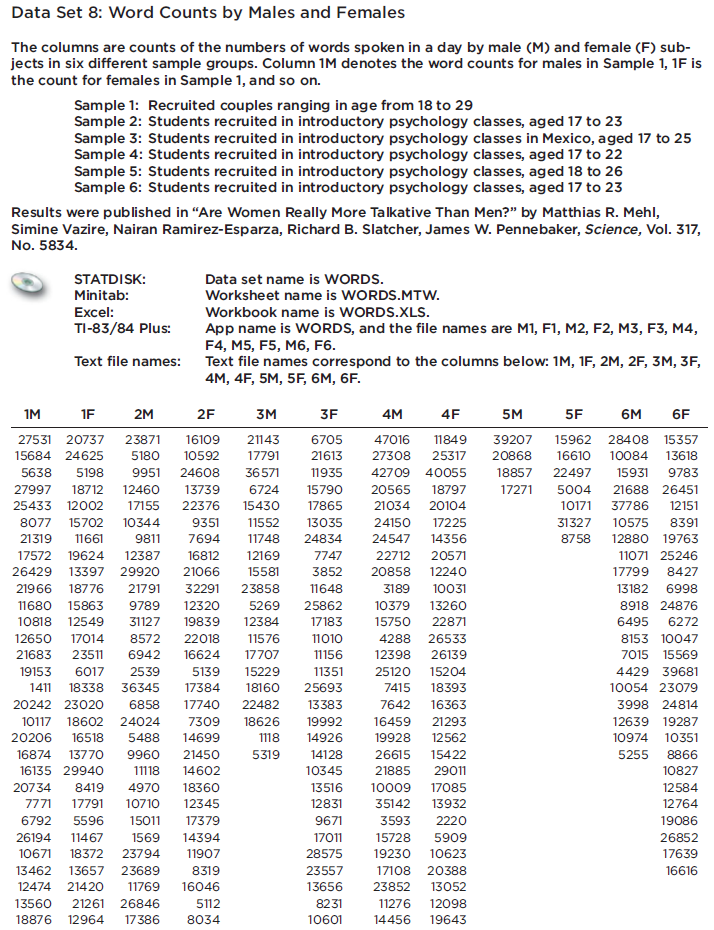
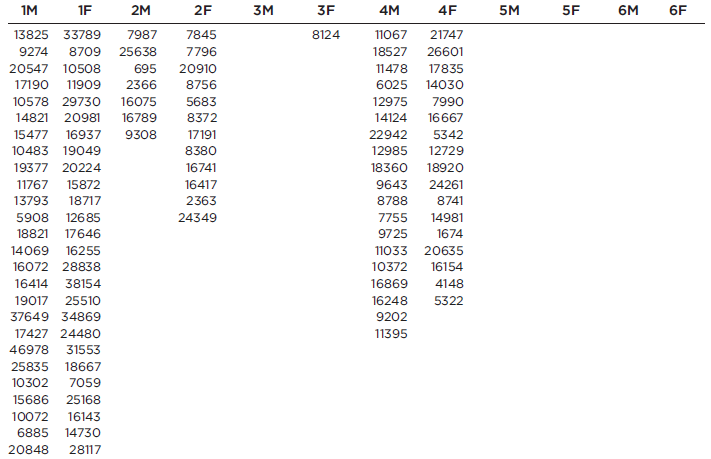
Refer to Data Set 8 in Appendix B and use the word counts measured for men and women from the couples listed in the first two columns of Data Set 8. Find the best predicted word count of a woman given that her male partner speaks 6000 words in a day.
In: Statistics and Probability